

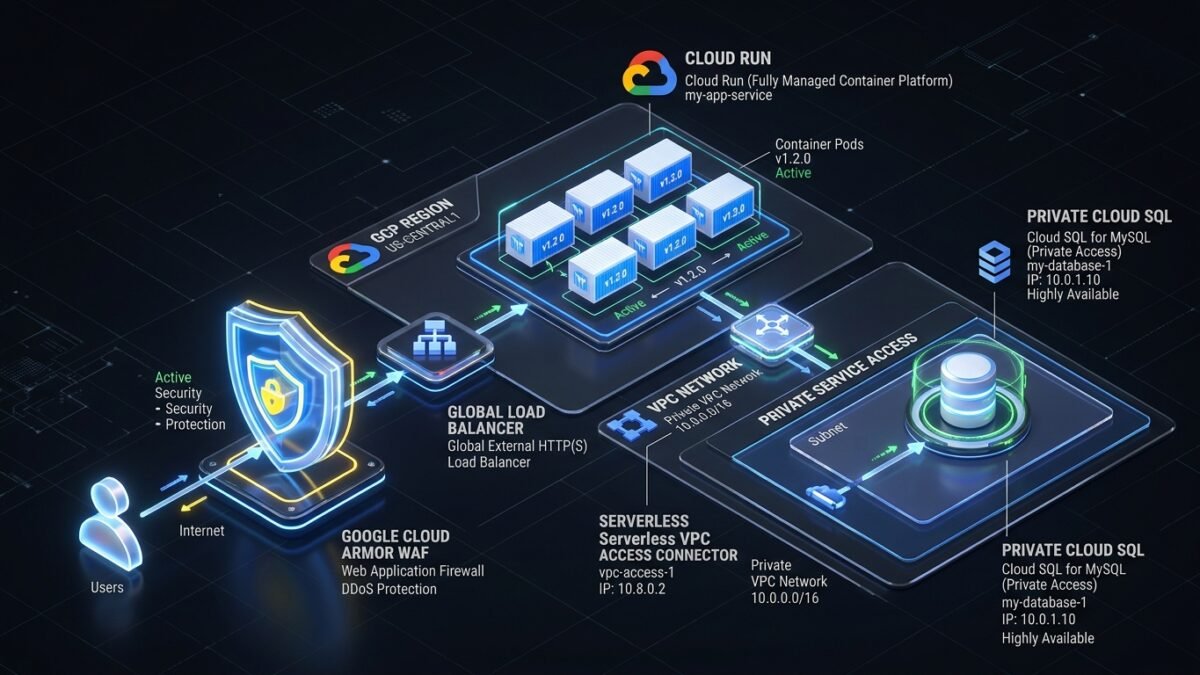
For years, connecting serverless microservices on Google Cloud Run to private backend databases (Cloud SQL, Memorystore) and on-premises subnets required deploying Serverless VPC Access connectors. While functional, these legacy connectors represented a severe architectural compromise: static e2-micro VM instances that could not scale to zero, unpredictable cold-start egress latencies exceeding 800ms, expensive fixed baseline compute billing, and hard limits of 660 Mbps per connector throughput. With the General Availability of Direct VPC Egress, Google Cloud has completely decoupled serverless containers from dedicated connector VMs. Cloud Run instances now receive native internal IP addresses directly from your VPC subnet. In this production architectural guide, we dissect how to design, secure, and deploy enterprise Cloud Run microservices utilizing Direct VPC Egress, Private Service Connect (PSC), and Cloud Armor edge filtering.
1. The Problem: The High Operational Cost of Serverless VPC Access Connectors
Serverless VPC Access connectors forced containerized Cloud Run services to route egress traffic through underlying Compute Engine VM instances. This intermediary hop introduced severe performance, scalability, and cost penalties across enterprise topologies.
In high-throughput enterprise deployments handling thousands of concurrent queries, legacy connectors broke production workloads across three major vectors:
- Throughput Bottlenecks & Connection Dropping: A standard Serverless VPC Access connector defaults to a maximum of 10 e2-micro instances, capping aggregated throughput at roughly 660 Mbps. When microservices exceed this limit during burst traffic, TCP SYN packets drop silently, triggering database connection timeouts.
- Persistent Baseline Billing (No Scale-to-Zero): Unlike Cloud Run which scales to zero when idle, VPC connectors require at least 2 to 3 running VMs 24/7/365 to handle failover, incurring continuous infrastructure charges even for low-traffic internal applications.
- Subnet IP Exhaustion: Each connector demands a dedicated
/28CIDR range. In complex Shared VPC networks spanning multiple development teams, provisioning dozens of non-overlapping/28blocks causes severe IP address fragmentation.
| Architectural Dimension | Legacy Serverless VPC Access Connector | Cloud Run Direct VPC Egress (Modern Standard) |
|---|---|---|
| Infrastructure Model | Managed e2-micro / f1-micro VM instances | Zero VMs; Native VPC interface on container |
| Scaling Characteristics | Slow scale-up (takes 2–3 minutes to add VMs) | Instant scale with Cloud Run instances |
| Throughput Capacity | Capped (~660 Mbps to 1 Gbps max) | Line-rate per-instance VPC bandwidth |
| Idle Cost | ~$20–$50/month minimum per connector | $0.00 (Pure scale-to-zero model) |
| Network Tagging Support | Limited connector-level tagging | Direct revision-level network tags for firewalling |
2. Architectural Blueprint: Direct VPC Egress & Private Service Connect Topology
Direct VPC Egress architecture provisions dynamic Elastic Network Interfaces directly inside the target VPC subnet. Container outbound traffic reaches private VPC subnets, peered networks, and Cloud VPN interconnects without passing through VM proxies.
- Subnet Allocation: When deploying a Cloud Run service with Direct VPC Egress enabled, each running container instance claims an internal IP address dynamically from the specified VPC subnet (e.g.,
10.240.0.0/20). - Private Service Connect (PSC) Interconnect: Outbound calls to Google managed APIs (BigQuery, Cloud Storage) or third-party partner SaaS endpoints route over Private Service Connect endpoints, keeping all traffic private and isolated from the public internet.
- Cloud Armor Edge Ingress: Inbound client requests terminate on an external Global Application Load Balancer (HTTPS). Cloud Armor security policies inspect traffic, blocking SQL injections, DDoS attacks, and geo-restricted IP addresses before forwarding clean requests to the Cloud Run backend via a Serverless Network Endpoint Group (NEG).
3. Production Implementation: Deploying Cloud Run with Direct VPC Egress via gcloud CLI
Step 1: Reserve Subnet & Configure Firewall Rules
# Create a dedicated private subnet for Cloud Run services in Shared VPC
gcloud compute networks subnets create cloudrun-prod-subnet
    --network=production-vpc
    --region=us-central1
    --range=10.240.16.0/20
    --enable-private-ip-google-access

# Allow Cloud Run containers to access private Cloud SQL database on port 5432
gcloud compute firewall-rules create allow-cloudrun-to-cloudsql
    --network=production-vpc
    --action=ALLOW
    --rules=tcp:5432
    --source-ranges=10.240.16.0/20
    --target-tags=cloudsql-db-prod
Step 2: Deploy Cloud Run Service with Direct VPC Egress
# Deploy container revision with Direct VPC Egress and private routing
gcloud run deploy customer-api-service
    --image=us-central1-docker.pkg.dev/prod-project-101/apps/customer-api:v2.4
    --region=us-central1
    --network=production-vpc
    --subnet=cloudrun-prod-subnet
    --vpc-egress=private-ranges-only
    --network-tags=cloudrun-api-client
    --ingress=internal-and-cloud-load-balancing
    --cpu=2
    --memory=2048Mi
    --min-instances=1
    --max-instances=100
    --service-account=cloudrun-runtime-sa@prod-project-101.iam.gserviceaccount.com
4. Production Gotchas: Subnet Sizing, Cloud NAT & Cold Starts
- Subnet Exhaustion During Rapid Scaling: Because each Cloud Run instance consumes an internal IP address from your subnet, configuring a small subnet (like a
/28with only 11 usable IPs) will cause deployment failures during scale-out events. Always provision at least a/22or/20subnet for production microservices scaling to hundreds of instances. - Cloud NAT Egress Latency: If your Cloud Run service uses
--vpc-egress=all-trafficto route public internet traffic through Cloud NAT, ensure your Cloud NAT gateway is configured with dynamic port allocation. Static port exhaustion will trigger TCP connection drops when making concurrent outbound HTTP calls. - Startup Probe Latency: Direct VPC network interface attachment occurs during container startup. Always configure an HTTP startup probe on
/healthzto prevent traffic from hitting the container before internal network routes are fully initialized.
5. Diagnostic & Troubleshooting Matrix
| Error Symptom / Diagnostic Code | Root Cause | Investigation Command | Engineering Resolution |
|---|---|---|---|
Ready condition status: False (IP address allocation failed) |
Target subnet has run out of available private IP addresses. | gcloud compute subnets describe cloudrun-prod-subnet |
Expand subnet primary IP range or deploy service to a larger secondary subnet. |
Connection timeout to Cloud SQL private IP (10.x.x.x:5432) |
VPC firewall rule missing or network tags not applied to Cloud Run revision. | gcloud compute firewall-rules list --filter="network:production-vpc" |
Add firewall rule allowing egress from Cloud Run subnet to Cloud SQL private IP range. |
403 Forbidden (Origin blocked by Cloud Armor) |
Client request matched a Cloud Armor WAF rule or rate-limiting filter. | gcloud compute security-policies describe prod-armor-policy |
Inspect Cloud Logging request headers (jsonPayload.enforcedSecurityPolicy) to tune WAF rule threshold. |
6. Production Checklist & Next Steps
- Decommission all legacy Serverless VPC Access connectors and migrate existing Cloud Run services to Direct VPC Egress to eliminate baseline compute costs.
- Integrate microservices with enterprise network perimeter defense by reviewing our blueprint on GCP Shared VPC Security Architecture with Private Service Connect & Cloud Armor.
- Harden hybrid Active Directory identities accessing Google Cloud via Active Directory Kerberos Armoring (FAST) & Tier-0 DC Hardening.
7. Frequently Asked Questions (FAQ)
Q1: What is the primary difference between Direct VPC Egress and Serverless VPC Access connectors?
Direct VPC Egress provisions network interfaces natively within your target VPC subnet, allowing Cloud Run containers to scale to zero with zero VM maintenance and line-rate network throughput. Serverless VPC Access connectors require running dedicated e2-micro VM instances that incur persistent billing and introduce throughput bottlenecks.
Q2: Can Cloud Run with Direct VPC Egress access on-premises networks via Cloud VPN?
Yes. Because the Cloud Run instance receives a native internal IP within your VPC subnet, all established VPC routes—including Cloud VPN tunnels, Cloud Interconnect attachments, and VPC peering connections—are natively accessible.
Q3: What happens when a Cloud Run service exceeds its subnet IP capacity?
If the subnet runs out of free IP addresses during a scale-up event, Cloud Run fails to provision new container instances and returns HTTP 503 errors. For production workloads, always allocate at least a /22 or /20 CIDR block.
{
“@context”: “https://schema.org”,
“@type”: “FAQPage”,
“mainEntity”: [
{
“@type”: “Question”,
“name”: “What is the primary difference between Direct VPC Egress and Serverless VPC Access connectors?”,
“acceptedAnswer”: {
“@type”: “Answer”,
“text”: “Direct VPC Egress provisions network interfaces natively within your target VPC subnet, allowing Cloud Run containers to scale to zero with zero VM maintenance and line-rate network throughput. Serverless VPC Access connectors require running dedicated e2-micro VM instances that incur persistent billing and introduce throughput bottlenecks.”
}
},
{
“@type”: “Question”,
“name”: “Can Cloud Run with Direct VPC Egress access on-premises networks via Cloud VPN?”,
“acceptedAnswer”: {
“@type”: “Answer”,
“text”: “Yes. Because the Cloud Run instance receives a native internal IP within your VPC subnet, all established VPC routes—including Cloud VPN tunnels, Cloud Interconnect attachments, and VPC peering connections—are natively accessible.”
}
},
{
“@type”: “Question”,
“name”: “What happens when a Cloud Run service exceeds its subnet IP capacity?”,
“acceptedAnswer”: {
“@type”: “Answer”,
“text”: “If the subnet runs out of free IP addresses during a scale-up event, Cloud Run fails to provision new container instances and returns HTTP 503 errors. For production workloads, always allocate at least a /22 or /20 CIDR block.”
}
}
]
}
Recommended Hardware & Reference Architecture Literature
Tested tools and authoritative documentation to implement the architectures covered in this lab: