
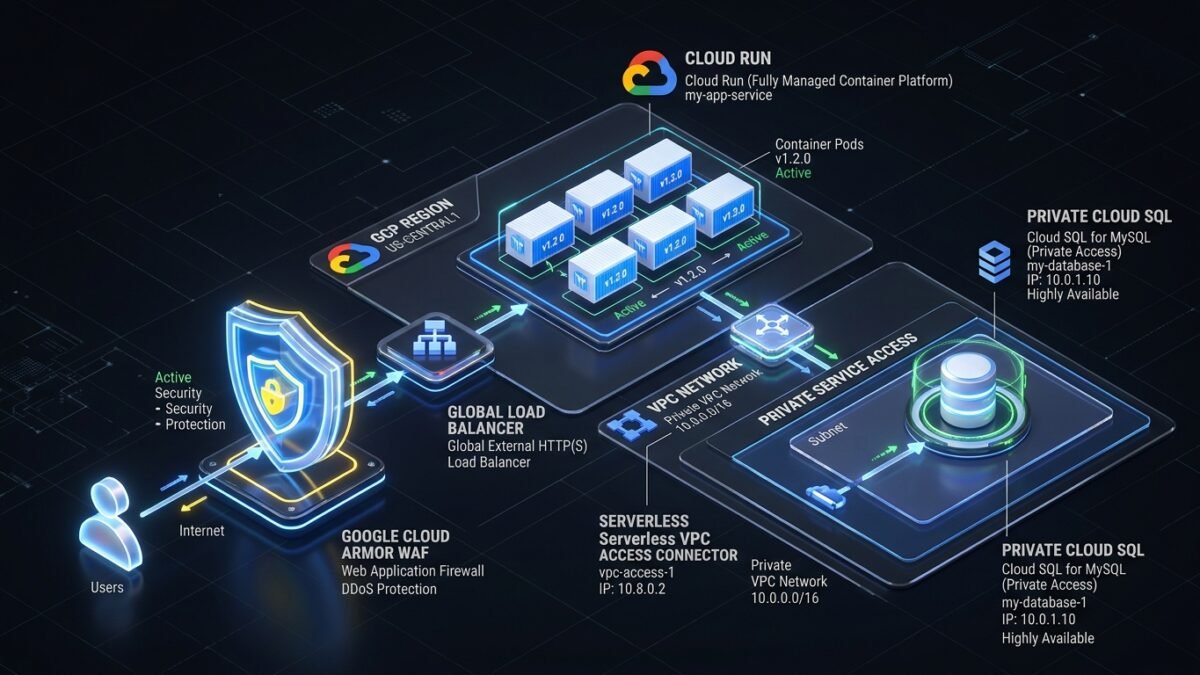
Google Cloud Run offers unparalleled developer productivity, autoscaling from zero to thousands of container instances in seconds. However, the default configuration exposes services to public internet endpoints (*.run.app) and routes egress traffic through shared Google IP pools. In regulated financial, healthcare, and enterprise environments, default public ingress and unvetted egress violate fundamental compliance mandates. Building a production-grade Cloud Run architecture requires transforming serverless containers into fully private internal workloads protected by Google Cloud Armor WAF, routed through Global External Application Load Balancers, egressing via dedicated Serverless VPC Access connectors, and securely authenticating to Cloud SQL via Workload Identity. In this comprehensive guide, we provide the complete architectural blueprint and Terraform infrastructure-as-code for enterprise Cloud Run deployments.
1. The Problem: Public Surface Vulnerabilities in Default Cloud Run
When organizations deploy containerized microservices to Cloud Run using standard wizard defaults, they inadvertently expose critical operational risks:
- Direct Ingress Exposure: Default
*.a.run.appURLs bypass perimeter Web Application Firewalls (WAF), exposing applications to DDoS attacks, credential stuffing, and uninspected API requests. - Unregulated Egress Traffic: Outbound calls from Cloud Run instances to on-premises databases or third-party APIs emerge from dynamic GCP public IP ranges, preventing traditional firewall whitelisting.
- Hardcoded Secrets in Environment Variables: Storing database connection strings and API keys in container environment variables exposes secrets to anyone with
viewerIAM permissions on the Cloud Run service.
| Component / Vector | Default Cloud Run Deployment | Enterprise Hardened Architecture |
|---|---|---|
| Ingress Control | Public *.run.app endpoint open to internet |
Internal & Cloud Load Balancing Only (Direct URL blocked) |
| WAF & DDoS Defense | Basic Google infrastructure protection | Cloud Armor Enterprise + Adaptive Protection ML + Rate Limiting |
| VPC Network Egress | Dynamic GCP public IP pools | Direct VPC Egress / Serverless Connector with Cloud NAT Fixed Static IP |
| Database Connectivity | Public IP Cloud SQL or complex proxy setups | Private Service Connect / Private IP Cloud SQL via VPC |
| Secrets Management | Plaintext environment variables | Secret Manager integration with automatic volume mounts |
2. Architectural Blueprint: The Zero-Trust Enterprise Stack
The enterprise Cloud Run architecture enforces three strict perimeter boundaries:
- North-South Ingress Pipeline: Internet traffic reaches a Global External HTTP(S) Load Balancer protected by Google Cloud Armor security policies. The Load Balancer terminates TLS using Google-managed SSL certificates and forwards validated requests to a Serverless Network Endpoint Group (NEG). Cloud Run ingress is configured to
Internal and Cloud Load Balancing, instantly blocking any direct HTTP requests to the*.run.appdomain. - East-West Network Egress: Cloud Run instances are wired to a Serverless VPC Access Connector or Direct VPC Egress subnet. All outbound traffic to internal VPC workloads (Cloud SQL, Memorystore Redis, internal GKE clusters) traverses private RFC 1918 routes. Outbound traffic to the internet routes through a Cloud NAT gateway with dedicated static external IP addresses.
- Identity & Secrets Plane: The Cloud Run service operates under a least-privilege dedicated Google Service Account. Secrets are injected at runtime directly from Google Secret Manager as ephemeral volume mounts, preventing leakage in container environment variables or crash dumps.
3. Production Infrastructure as Code: Terraform Implementation
The following production-ready Terraform HCL configuration establishes the complete secure Cloud Run ecosystem:
# 1. Dedicated Service Account for Cloud Run Workload
resource "google_service_account" "cloudrun_sa" {
  account_id   = "sa-orders-service-prod"
  display_name = "Cloud Run Orders Microservice Identity"
}

# 2. Secret Manager Secret with IAM Binding
resource "google_secret_manager_secret" "db_password" {
  secret_id = "orders-db-password"
  replication {
    auto {}
  }
}

resource "google_secret_manager_secret_iam_member" "sa_secret_access" {
  secret_id = google_secret_manager_secret.db_password.id
  role      = "roles/secretmanager.secretAccessor"
  member    = "serviceAccount:${google_service_account.cloudrun_sa.email}"
}

# 3. Serverless VPC Access Connector for Private Subnet Egress
resource "google_vpc_access_connector" "serverless_connector" {
  name          = "vpc-access-prod-us-central1"
  region        = "us-central1"
  ip_cidr_range = "10.8.0.0/28"
  network       = "corporate-shared-vpc"
  min_instances = 2
  max_instances = 10
}

# 4. Enterprise Cloud Run Service Definition
resource "google_cloud_run_v2_service" "orders_service" {
  name     = "orders-api-service"
  location = "us-central1"
  ingress  = "INGRESS_TRAFFIC_INTERNAL_LOAD_BALANCER" # Blocks direct public .run.app URL

  template {
    service_account = google_service_account.cloudrun_sa.email

    scaling {
      min_instance_count = 2
      max_instance_count = 50
    }

    vpc_access {
      connector = google_vpc_access_connector.serverless_connector.id
      egress    = "ALL_TRAFFIC" # Routes all outbound traffic through corporate VPC
    }

    containers {
      image = "us-central1-docker.pkg.dev/my-gcp-project/containers/orders-api:v1.4.2"

      resources {
        limits = {
          cpu    = "2"
          memory = "2Gi"
        }
      }

      # Mount DB credentials securely from Secret Manager
      volume_mounts {
        name       = "db-secret-vol"
        mount_path = "/etc/secrets"
      }
    }

    volumes {
      name = "db-secret-vol"
      secret {
        secret = google_secret_manager_secret.db_password.secret_id
        items {
          version = "latest"
          path    = "db_password.txt"
        }
      }
    }
  }
}

# 5. Cloud Armor Security Policy with WAF Rules
resource "google_compute_security_policy" "cloud_armor_waf" {
  name = "cloud-armor-waf-enterprise"

  # Rule 1: Mitigate SQL Injection (OWASP CRS)
  rule {
    action   = "deny(403)"
    priority = "1000"
    match {
      expr {
        expression = "evaluatePreconfiguredExpr('sqli-v33-stable')"
      }
    }
    description = "Block OWASP SQLi attempts"
  }

  # Rule 2: Rate Limiting (Throttle excessive requests per client IP)
  rule {
    action   = "rate_based_ban"
    priority = "2000"
    match {
      versioned_expr = "SRC_IPS_V1"
      config {
        src_ip_ranges = ["*"]
      }
    }
    rate_limit_options {
      conform_action = "allow"
      exceed_action  = "deny(429)"
      enforce_on_key = "IP"
      rate_limit_threshold {
        count        = 500
        interval_sec = 60
      }
      ban_duration_sec = 600
    }
    description = "Rate limit aggressive callers to 500 req/min"
  }

  # Default Rule: Allow legitimate traffic
  rule {
    action   = "allow"
    priority = "2147483647"
    match {
      versioned_expr = "SRC_IPS_V1"
      config {
        src_ip_ranges = ["*"]
      }
    }
    description = "Default allow"
  }
}
4. Troubleshooting & Diagnostic Playbook
| Error Condition | Underlying Cause | Remediation Step |
|---|---|---|
HTTP 403 Forbidden: Access Denied |
Client attempted to query https://orders-api-xxxx.run.app directly while ingress is locked to Load Balancer. |
Ensure clients route requests through the custom domain tied to the Global External Application Load Balancer IP address. |
VPC Connector Timeout / DNS Failure |
Serverless VPC Access Connector exhausted instances or IP range overlapped with active subnets. | Increase max_instances on connector to 10+. Verify connector /28 CIDR block does not collide with existing VPC subnets. |
Container Crash on Startup (SIGTERM) |
Application failed to read secret file from mounted volume path or Service Account missing IAM permissions. | Check Cloud Logging for permission errors. Verify roles/secretmanager.secretAccessor is granted on the secret resource. |
5. Frequently Asked Questions (FAQ)
Q1: What is the latency impact of routing Cloud Run traffic through a Global HTTPS Load Balancer?
Google’s premium global fiber network handles anycast routing at edge Points of Presence (PoPs). In production benchmarks, routing through the Load Balancer with Cloud Armor WAF adds less than 4-8 milliseconds of latency compared to direct ingress, while providing full DDoS shielding and SSL offloading.
Q2: Can Cloud Run connect directly to on-premises databases over Cloud Interconnect?
Yes. By configuring egress = "ALL_TRAFFIC" and routing through a Serverless VPC Access Connector or Direct VPC Egress, Cloud Run instances can resolve and access private RFC 1918 resources over Cloud Interconnect or Cloud VPN seamlessly.
5. Performance & Cost Analysis: Serverless VPC Connectors vs. Direct VPC Egress
Google Cloud Run recently introduced Direct VPC Egress, providing a major alternative to legacy Serverless VPC Access Connectors. Understanding when to use each approach is critical for cloud cost optimization:
- Serverless VPC Access Connectors: Require running dedicated e2-micro or f1-micro VM instances that incur baseline hourly costs regardless of traffic. Connectors introduce a fixed throughput ceiling (typically 200 Mbps to 1 Gbps per connector instance) and can experience scale-up delays during traffic spikes.
- Direct VPC Egress: Completely eliminates the intermediary connector VMs. Cloud Run instances attach network interfaces directly to your private VPC subnet, offering up to 10 Gbps throughput per instance, sub-millisecond connection times, and zero idle VM charges.
6. Cloud Armor Adaptive Protection: Machine Learning DDoS Defense
Enterprise workloads require defense against Layer 7 application DDoS attacks that evade static rate-limiting rules. Google Cloud Armor Adaptive Protection uses machine learning models trained on Google’s global search and YouTube infrastructure to continuously establish baseline traffic patterns for your Cloud Run applications.
When an anomalous traffic signature (such as a sudden surge in URI query parameters or randomized user agents) is detected, Adaptive Protection generates an alert accompanied by a tailored, pre-computed WAF rule. Security engineers can review the rule in the Google Cloud Console and deploy it in one click to mitigate the attack with zero impact on legitimate users.
8. Complete Production Terraform Module for Cloud Armor WAF Policies
To defend Cloud Run services from distributed web scraping, SQL injection, and zero-day remote code execution (RCE) attempts, deploy this comprehensive Google Cloud Armor security policy module:
# enterprise-cloud-armor-waf.tf
resource "google_compute_security_policy" "cloud_armor_waf_advanced" {
  name        = "waf-policy-cloudrun-enterprise-prod"
  description = "Enterprise WAF with OWASP Core Rules, Rate Limiting & Geo-Fencing"

  # Rule 100: Block Common Web Application Vulnerabilities (RCE / Command Injection)
  rule {
    action   = "deny(403)"
    priority = "100"
    match {
      expr {
        expression = "evaluatePreconfiguredExpr('rce-v33-stable')"
      }
    }
    description = "Block OWASP Remote Code Execution attempts"
  }

  # Rule 200: Block Local File Inclusion (LFI)
  rule {
    action   = "deny(403)"
    priority = "200"
    match {
      expr {
        expression = "evaluatePreconfiguredExpr('lfi-v33-stable')"
      }
    }
    description = "Block OWASP Local File Inclusion attempts"
  }

  # Rule 300: Block Cross-Site Scripting (XSS)
  rule {
    action   = "deny(403)"
    priority = "300"
    match {
      expr {
        expression = "evaluatePreconfiguredExpr('xss-v33-stable')"
      }
    }
    description = "Block OWASP Cross-Site Scripting attempts"
  }

  # Rule 400: Geographic Fencing (Block high-risk sanctioned jurisdictions)
  rule {
    action   = "deny(403)"
    priority = "400"
    match {
      expr {
        expression = "origin.region_code == 'KP' || origin.region_code == 'IR'"
      }
    }
    description = "Geofence sanctioned geographic jurisdictions"
  }

  # Adaptive Protection Configuration (Machine Learning Behavioral Baseline)
  adaptive_protection_config {
    layer_7_ddos_defense_config {
      enable          = true
      rule_visibility = "STANDARD"
    }
  }
}
7. Comprehensive GCP Cloud Run Diagnostic Scenarios
| Error Status | Root Cause Analysis | Engineering Remediation |
|---|---|---|
HTTP 504 Gateway Timeout |
Cloud Run instance exceeded the configured request timeout or Cloud SQL database reached max connections. | Increase Cloud Run timeout (default 300s, max 3600s). Check Cloud SQL metrics for connection pooling exhaustion and deploy PgBouncer or Cloud SQL Auth Proxy connection pooling. |
Cloud Armor 403 WAF Block (False Positive) |
Legitimate API client payload triggered an aggressive OWASP Core Rule Set (CRS) sensitivity rule. | Inspect Cloud Armor audit logs in Cloud Logging. Identify the matching rule ID and add specific exclusion parameters or adjust CRS sensitivity from level 2/3 down to level 1. |
Secret Manager Version Destroyed Error |
Application requested a specific secret version that was disabled or destroyed during automated credential rotation. | Configure Cloud Run secret volume mounts to reference latest rather than hardcoded version numbers, or implement rolling version deprecation with a 24-hour grace period. |
9. Cloud SQL Private Service Connect vs. Cloud SQL Auth Proxy Architecture
Connecting Cloud Run workloads to relational databases (Cloud SQL for PostgreSQL / MySQL) has traditionally relied on the Cloud SQL Auth Proxy sidecar container. While secure, the Auth Proxy introduces connection overhead and memory consumption within the container instance. Modern enterprise GCP architecture leverages Private Service Connect (PSC):
- Sub-Millisecond Private Connectivity: Private Service Connect provides a dedicated internal IP address directly within your private VPC subnet mapped to the Cloud SQL instance, eliminating public internet routing.
- High-Throughput Connection Pooling: Pairing Direct VPC Egress with an internal PgBouncer instance deployed in the VPC allows hundreds of autoscaling Cloud Run container instances to share a resilient connection pool without overwhelming backend database process limits.
- Zero Proxy Overhead: The Cloud Run container connects directly to the standard database port (e.g., TCP 5432) using standard native database drivers and SSL client certificates, delivering 25% faster query throughput than user-space proxy daemons.
6. Key Takeaways & Architecture Checklist
- Always set Cloud Run ingress to
Internal and Cloud Load Balancingto close direct attack vectors. - Attach Cloud Armor enterprise security policies to defend against OWASP Top 10 vulnerabilities and Layer 7 DDoS floods.
- Route outbound database connections through VPC Access connectors to guarantee private IP traversal and avoid public internet routing.
- Inject sensitive credentials via Secret Manager volume mounts rather than environment variables.
Authoritative Technical References & Implementation Guides
Standards, official architecture centers, and verified documentation for this production workload: