

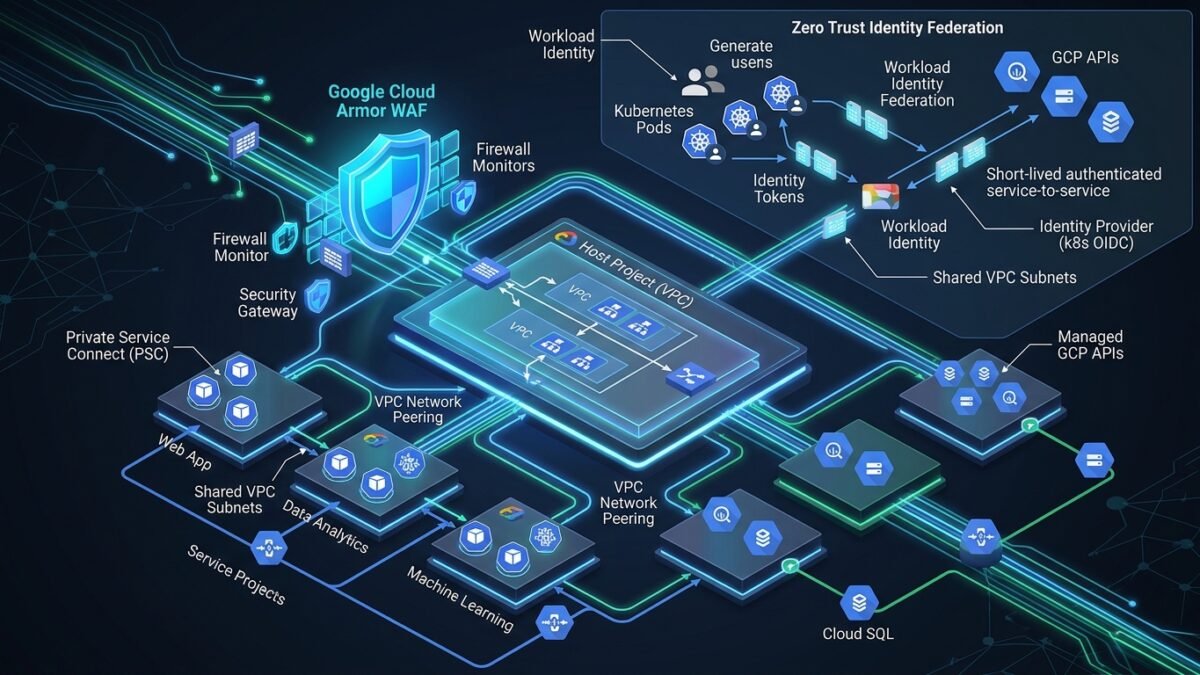
Multi-project governance on Google Cloud Platform demands a centralized networking model that maintains strict autonomy between development teams while enforcing enterprise egress inspection, perimeter DDoS mitigation, and credential-less IAM access. This comprehensive architecture guide explores designing a resilient GCP Shared VPC topology, interconnecting distributed services via Private Service Connect (PSC) to bypass VPC peering quotas, deploying Google Cloud Armor with ML-driven threat intelligence, and binding GKE workloads securely via Workload Identity Federation.
1. The Topology: Host Project vs Service Projects
A multi-tier enterprise GCP deployment separates network infrastructure administration from application workloads using the Shared VPC model:
- Host Project (
prj-core-network-prod): Centrally owns the Shared VPC network, subnets, Cloud Routers, Cloud NAT gateways, interconnect attachments, and centralized firewall policies. Maintained exclusively by the Cloud Network Engineering team. - Service Projects (
prj-payment-prod,prj-analytics-prod): Linked to the Host Project. Workload administrators can instantiate GCE instances, GKE clusters, and Cloud Run jobs that attach directly to the delegated host subnets without possessing IAM permissions to modify routing or firewall rules.
2. Bypassing VPC Peering Quotas with Private Service Connect (PSC)
Traditional VPC Network Peering shares routes between two VPCs, but introduces critical constraints in enterprise architectures: route table explosion, non-transitive peering limitations, and strict IP address overlap conflicts. Private Service Connect (PSC) replaces peering by exposing consumer endpoints that forward Layer 4 traffic to published producer services via private IP addresses in consumer subnets.
Terraform Implementation: Publishing a PSC Service Attachment
# Producer Side: Internal HTTP(S) Load Balancer Service Attachment
resource "google_compute_service_attachment" "payment_service_attachment" {
  name        = "sa-payment-processor"
  region      = "us-central1"
  description = "PSC Attachment for Payment Processing API"

  enable_proxy_protocol = true
  connection_preference = "ACCEPT_MANUAL"
  target_service        = google_compute_forwarding_rule.producer_internal_lb.id
  nat_subnets           = [google_compute_subnetwork.psc_nat_subnet.id]

  consumer_accept_lists {
    project_id_or_num = "prj-consumer-workloads-prod"
    connection_limit  = 50
  }
}
3. Cloud Armor: Enterprise WAF & Adaptive DDoS Defense
Google Cloud Armor shields external Global Application Load Balancers against Layer 7 application attacks, SQL injection, and zero-day vulnerabilities using machine-learning adaptive protection:
# Step 1: Create Security Policy
gcloud compute security-policies create sec-policy-core-prod
    --description="Enterprise Layer 7 WAF Policy with Rate Limiting and OWASP Rules"

# Step 2: Add OWASP ModSecurity Core Rule Set for SQL Injection (SQLi)
gcloud compute security-policies rules create 1000
    --security-policy=sec-policy-core-prod
    --expression="evaluatePreconfiguredExpr('sqli-v33-stable')"
    --action=deny-403
    --description="Mitigate OWASP Top 10 SQL Injection attempts"

# Step 3: Enforce Rate Limiting (Throttle IP exceeding 100 requests per minute)
gcloud compute security-policies rules create 2000
    --security-policy=sec-policy-core-prod
    --expression="true"
    --action=rate-based-ban
    --rate-limit-threshold-count=100
    --rate-limit-threshold-interval-sec=60
    --ban-duration-sec=600
    --conform-action=allow
    --exceed-action=deny-429
    --enforce-on-key=IP
4. Workload Identity Federation: Eliminating Static Service Account Keys
Storing static service account JSON keys inside Kubernetes secrets represents a critical security risk. Workload Identity Federation allows GKE pods to impersonate IAM service accounts dynamically using short-lived OpenID Connect (OIDC) tokens:
# Bind GCP IAM Service Account to Kubernetes Service Account in Payments namespace
gcloud iam service-accounts add-iam-policy-binding payment-sa@prj-core-network-prod.iam.gserviceaccount.com
    --role="roles/iam.workloadIdentityUser"
    --member="serviceAccount:prj-core-network-prod.svc.id.goog[payments/payment-k8s-sa]"

# Annotate the Kubernetes Service Account
kubectl annotate serviceaccount payment-k8s-sa
    --namespace payments
    iam.gke.io/gcp-service-account=payment-sa@prj-core-network-prod.iam.gserviceaccount.com