

Quick Answer
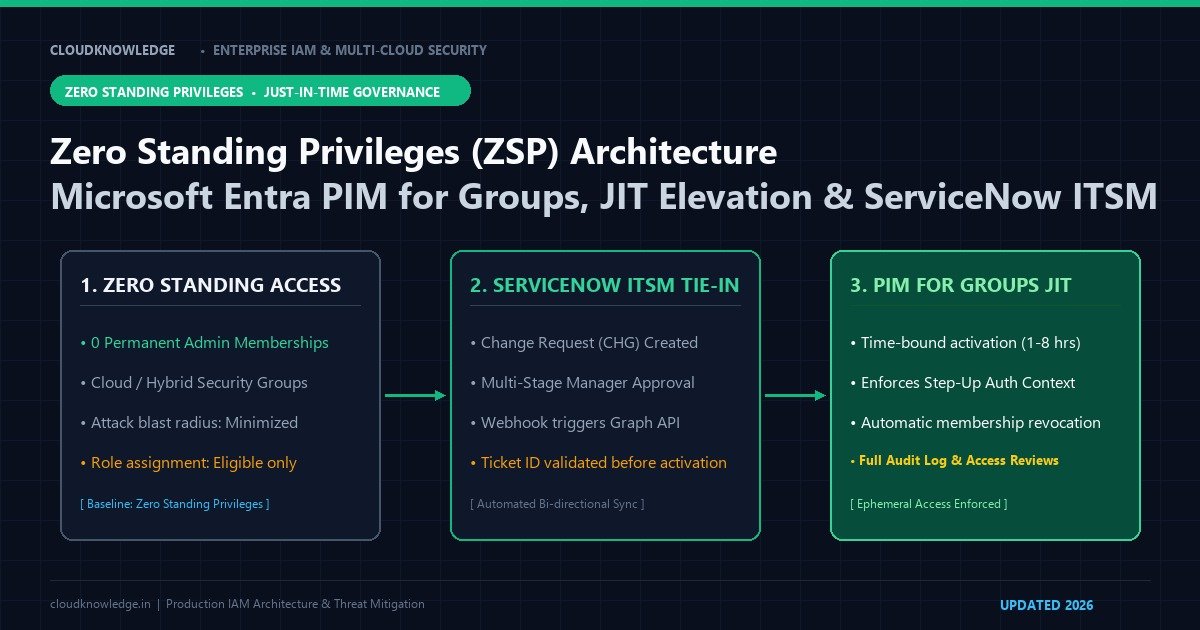
Zero Standing Privileges (ZSP) eliminates permanent administrative assignments by maintaining empty privileged security groups until an engineer is explicitly approved for time-bound, just-in-time (JIT) access. Integrating Microsoft Entra PIM for Groups with ServiceNow change/incident requests via Microsoft Graph API webhooks automates business justification, ticket-backed approvals, and automatic expiration.

This technical guide is part of our comprehensive Privileged Identity Management (PIM) Hub, providing production architecture blueprints, step-by-step implementation standards, and real-world failure troubleshooting for modern enterprise identity teams.
Permanent administrative access is the single most critical liability in enterprise security. When threat actors or ransomware operators breach an identity perimeter, their primary objective is discovering accounts holding 24/7 standing administrative roles (Global Administrator, Security Administrator, or Contributor). Zero Standing Privileges (ZSP) transforms this paradigm: no user, regardless of seniority, retains permanent administrative rights. Instead, access is granted strictly Just-In-Time (JIT), scoped to the minimum required time window, gated by multi-party approvals, and cryptographically tied to active change control tickets via Microsoft Entra Privileged Identity Management (PIM) for Groups and ServiceNow ITSM. In this architectural guide, we construct a production ZSP framework, automate group-based role activations, and integrate ITSM approval webhooks via Microsoft Graph.
1. The Problem: The Attack Surface of 24/7 Permanent Administrators
Zero Standing Privileges (ZSP) is an enterprise access control strategy mandating that administrative accounts possess zero default permissions during standard business operations, acquiring privileged access exclusively through ephemeral, just-in-time elevation requests governed by ticket justification, dual custody, and automated expiration.
Maintaining permanent administrative assignments introduces catastrophic enterprise vulnerabilities:
- Instant Lateral Movement & Ransomware Deployment: If an administrator’s endpoint is compromised while the account holds permanent Global Admin or Domain Admin rights, attackers can immediately deploy tenant-wide ransomware, exfiltrate data, or delete backups without triggering elevation alarms.
- Credential Stuffing of Admin Accounts: Permanent administrative privileges mean any credential leak across any system exposes the entire enterprise infrastructure 24 hours a day, 7 days a week.
- Lack of Auditable Justification: When admins hold continuous rights, audit logs fail to distinguish between routine maintenance, emergency remediation, and unauthorized malicious changes.
| Privilege Model | Default Standing Rights | Elevation Mechanism | Approval Requirement | Audit Traceability |
|---|---|---|---|---|
| Legacy Permanent Admin | 24/7 Permanent Global/Domain Admin | None (Always active) | None | Poor (All actions appear as standard admin) |
| Standard Entra PIM (Role-Based) | Zero standing rights | Manual portal activation per role | Optional (Internal PIM approval) | Moderate (Logged in Entra AuditLogs) |
| Enterprise ZSP (PIM for Groups + ITSM) | Zero standing rights across all systems | JIT Nested Group Membership | Dual-Custody + Valid ServiceNow Ticket | High (Tied to approved change ticket & CAE) |
2. PIM for Directory Roles vs. PIM for Groups: The Architectural Shift
Traditionally, security teams configured PIM directly on individual Microsoft Entra directory roles (e.g., User Administrator, Exchange Administrator). However, modern enterprise architectures span multi-cloud resources (AWS accounts, GCP projects, Azure subscriptions, and SaaS apps like Snowflake or Salesforce). Managing role-based PIM across disparate systems results in severe policy fragmentation.
Microsoft Entra PIM for Groups solves this by turning security groups into the universal elevation control plane:
- Security teams create a cloud security group (e.g.,
SEC-GRP-PROD-DBA-ELEVATED) assigned to Azure RBAC roles, AWS IAM Identity Center permission sets, or Entra directory roles. - Administrators are assigned as Eligible Members (not permanent members) of this group.
- When an admin needs to perform database maintenance, they activate membership in the group via PIM. Upon activation, group membership is granted for 2 hours, automatically inheriting permissions across Azure, AWS, and on-prem systems simultaneously, and automatically revoking membership when the timer expires.
3. Automating PIM for Groups via Microsoft Graph PowerShell SDK v2
The following production script creates an Entra ID role-assignable security group, enables PIM governance, and configures a strict 2-hour maximum elevation policy requiring MFA and ticket justification:
# Connect with Privileged Role Administrator rights
Connect-MgGraph -Scopes "Group.ReadWrite.All", "PrivilegedAccess.ReadWrite.AzureADGroup"

# 1. Create a Role-Assignable Security Group
$GroupParams = @{
    DisplayName = "SEC-GRP-CLOUD-INFRA-ADMINS"
    Description = "ZSP Governed group for infrastructure administrators"
    MailEnabled = $false
    MailNickname = "cloud-infra-admins"
    SecurityEnabled = $true
    IsAssignableToRole = $true # Critical: Enables assignment to Azure/Entra roles
}
$NewGroup = New-MgGroup -BodyParameter $GroupParams
Write-Host "Role-assignable group created: $($NewGroup.Id)" -ForegroundColor Cyan

# 2. Onboard the Group to PIM for Groups Governance
$PimOnboard = @{
    groupId = $NewGroup.Id
}
# Enable Privileged Access on group
Invoke-MgGraphRequest -Method POST -Uri "https://graph.microsoft.com/v1.0/identityGovernance/privilegedAccess/group/eligibilityScheduleRequests" -Body $PimOnboard

# 3. Configure Strict Activation Policy Rules (2 Hours Max, MFA Required)
$PolicyRule = @{
    id = "Expiration_EndUser_Assignment"
    ruleIdentifier = "ExpirationRule"
    settings = @{
        maximumDuration = "PT2H" # 2 Hours Max
    }
}
Write-Host "PIM for Groups successfully initialized with 2-hour maximum lease." -ForegroundColor Green
4. Integrating ServiceNow ITSM with Microsoft Entra PIM
To achieve true Zero Standing Privileges compliance, an administrator should never be allowed to activate an eligible role without an active, approved Change Request or Incident ticket in ServiceNow.
The Automated Integration Workflow
- The administrator opens a Change Request (CR) or Incident (INC) in ServiceNow.
- Once the change advisory board (CAB) or manager approves the ticket, ServiceNow triggers an automated outbound webhook to an Azure Logic App / Azure Function.
- The Azure Function calls the Microsoft Graph API endpoint:
POST https://graph.microsoft.com/v1.0/identityGovernance/privilegedAccess/group/assignmentScheduleRequests - The request payload specifies the target
principalId,groupId, ticket number, and exact duration matching the change window. - Upon task completion or ticket closure in ServiceNow, a secondary webhook terminates the PIM assignment immediately, resetting standing privileges to zero.
5. Break-Glass (Emergency Access) Architecture
Under a strict ZSP model, if Microsoft Entra ID PIM services experience an outage or external federation fails, administrators must retain a reliable method to regain access without compromising security:
- Dedicated Cloud-Only Accounts: Maintain two cloud-only break-glass accounts (e.g.,
bg-admin1@cloudknowledge.onmicrosoft.com) that are never synchronized from on-premises Active Directory. - Exclusion from PIM & Conditional Access: Break-glass accounts must have permanent Global Administrator rights and must be explicitly excluded from standard Conditional Access block policies.
- FIDO2 Hardware Keys in Physical Vaults: Secure the physical FIDO2 security keys and 32-character complex passwords in tamper-evident physical safes across separate geographic data centers.
- Real-Time High-Severity Alerts: Configure a Microsoft Sentinel alert that fires an immediate P1 alert to senior management and the SOC anytime a break-glass account initiates a sign-in.
6. Production Governance Checklist
- [ ] Inventory all active Global Administrator and Subscription Owner assignments; convert 100% to Eligible status.
- [ ] Migrate from direct role assignments to PIM for Groups governance.
- [ ] Mandate Phishing-Resistant MFA and ticket numbers for all PIM elevation requests.
- [ ] Configure Continuous Access Evaluation (CAE) to revoke access immediately upon group membership termination.
- [ ] Schedule automated quarterly Entra ID Access Reviews to recertify eligible role members.
Frequently Asked Questions
What is the fundamental difference between role-based PIM and PIM for Groups?
Role-based PIM elevates users directly into specific Entra directory roles or Azure resource RBAC roles. PIM for Groups manages just-in-time membership or ownership of role-assignable Microsoft Entra security groups, allowing organizations to manage SaaS application permissions, Intune roles, and on-premises synchronized groups under a single governance model.
What licenses are required to implement Microsoft Entra PIM for Groups?
Microsoft Entra PIM requires Microsoft Entra ID P2 licenses or Microsoft 365 E5 licenses for users who activate or approve eligible group assignments. Advanced lifecycle workflows and automated provisioning require Microsoft Entra ID Governance licenses.
How does ServiceNow trigger JIT elevation in Entra ID via Graph API?
When a change request or emergency incident ticket is approved in ServiceNow, a ServiceNow IntegrationHub spoke sends an authenticated POST request to Microsoft Graph API (privilegedAccess/group/assignmentScheduleRequests) to grant the engineer time-bound active membership.
What prevents an engineer from maintaining elevated access once a maintenance window closes?
PIM automatically schedules membership expiration upon reaching the configured maximum activation window (e.g., 2 to 8 hours). When the timer expires, Entra ID removes the user from the security group and revokes downstream group claims.
How do recurring access reviews enforce continuous governance over PIM eligible assignments?
Entra ID Governance access reviews periodically prompt group owners or resource managers to recertify that users still require eligible standing. Any unconfirmed memberships are automatically revoked to prevent privilege creep.
Official Architecture & Vendor References
Recommended Hardware & Reference Architecture Literature
Tested tools and authoritative documentation to implement the architectures covered in this lab: