

PowerShell, a robust scripting language, offers developers powerful tools to automate tasks. At its core are variables and scopes, essential components that every scripter must understand to create efficient scripts. This guide explores these concepts with practical examples to get you started.
What Are PowerShell Variables?
A variable in PowerShell is a named storage location in memory used to store a value that can change during script execution. Variables are prefixed with a $ sign.
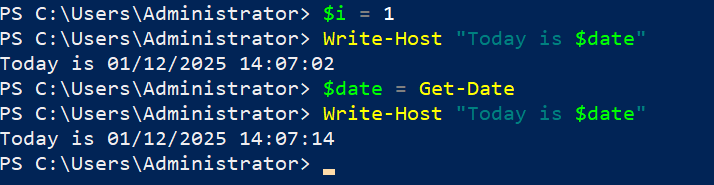
$i = 1
$string = “Hello World!”
$date = Get-Date
Write-Host “Today is $date”
Variables can store strings, integers, command outputs, and more.
Understanding Data Types
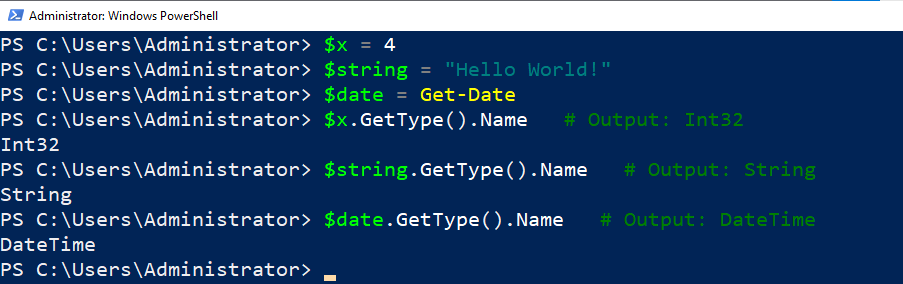
PowerShell automatically assigns a data type to variables based on the content. To check a variable’s data type, use .GetType().Name.
$x = 4
$string = “Hello World!”
$date = Get-Date
$x.GetType().Name # Output: Int32
$string.GetType().Name # Output: String
$date.GetType().Name # Output: DateTime
Common Data Types in PowerShell:
[string]– Text strings.[int]– 32-bit integers.[double]– Floating-point numbers.[datetime]– Date and time values.[hashtable]– Key-value pairs.[regex]– Regular expressions.
Variables can also be cast to a specific type:
$number = “4”
[int]$number # Converts string to integer

Automatic Variables
PowerShell includes built-in variables, dynamically managed by the system.

Get-ChildItem -Path C: -Directory | ForEach-Object { Write-Host $_.FullName }

Environment Variables
Environment variables store system and session information. Access them using $env:.
Write-Host $env:PSModulePath
List all environment variables with:
dir env: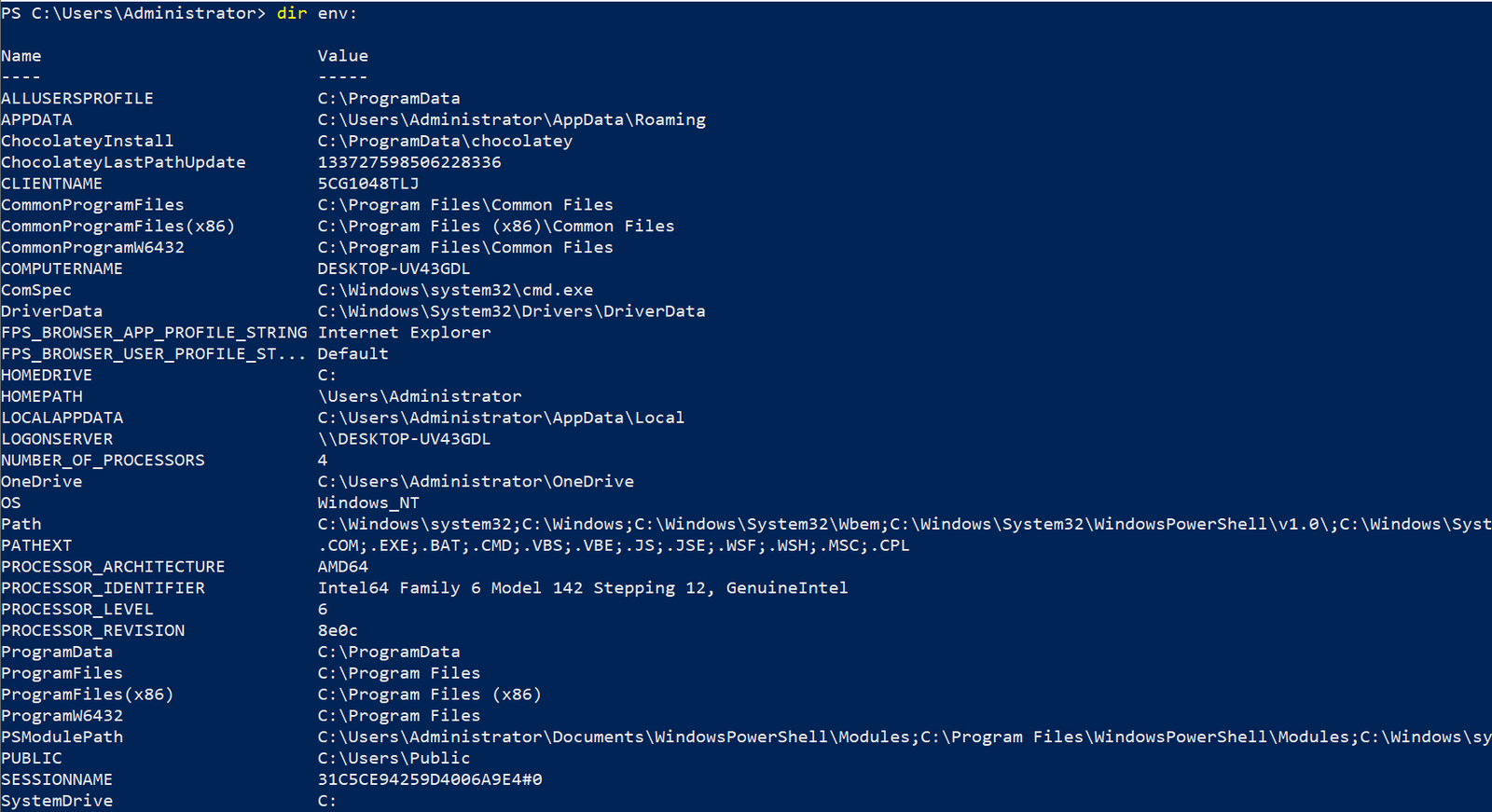
Variable Scopes
Scope determines where a variable is accessible. PowerShell supports the following scopes:
- Local: Default scope, accessible only in the current function or script.
- Script: Variables defined within a script but accessible throughout it.
- Global: Variables accessible throughout the entire session.
function Set-Variables { $local_variable = “Local scope” $script:script_variable = “Script scope” $global:global_variable = “Global scope”}
Set-VariablesWrite-Host $local_variable # Not accessibleWrite-Host $script:script_variable # AccessibleWrite-Host $global:global_variable # Accessible

Operators in PowerShell
Arithmetic Operators
Perform mathematical operations:
$a = 5; $b = 3
$result = $a + $b # Addition
$result = $a – $b # Subtraction

Comparison Operators
Evaluate values and return Boolean results:
$a -eq $b # Equal $a -ne $b # Not equal $a -lt $b # Less than $a -gt $b # Greater than

Logical Operators
Combine multiple conditions:Tips for PowerShell Best Practices
- Use meaningful variable names to make your scripts easier to understand.
- Declare scope explicitly for variables shared across scripts or functions (
$script:,$global:).- Test scripts thoroughly before deploying in production environments.
Architect's Toolkit Recommendation Verified Production Tools • AdSense CompliantRecommended Hardware & Reference Architecture Literature
Tested tools and authoritative documentation to implement the architectures covered in this lab:
★ 4.8 • HARDWARE SECURITYYubiKey 5 NFC Security KeyFIDO2 / Passwordless Step-Up AuthView on Amazon (₹5,499) ↗★ 4.9 • DISTRIBUTED SYSTEMSDesigning Data-Intensive AppsBy Martin Kleppmann (O'Reilly)View on Amazon (₹1,250) ↗Explore high-IOPS lab SSDs, cloud cert guides, and developer mice. Browse Full Architecture Toolkit →TAGS: #how to create and use powershell global variable #learn powershell #powershell #powershell basics #powershell commands #powershell for beginners #powershell hashtable #powershell scripting #powershell scripting variables #powershell tutorial #powershell variable #powershell variables #powershell variables and arrays #powershell variables explained #variable scope #variable types powershell #variables #variables in powershell #windows powershell← Previous LabKnowledgeable and Latest way to Azure AD Identity Protection
4 responses to “PowerShell Variables and Scopes the Knowledgeable and Latest way”

[…] If / ElseIf / Else […]
PowerShell Variables and Scopes the Knowledgeable and Latest way – Cloud Knowledge
[url=http://www.grqivm6j24h7s974f2ik2139w6dp78z4s.org/]urpjcwxsgr[/url]
arpjcwxsgr
rpjcwxsgr http://www.grqivm6j24h7s974f2ik2139w6dp78z4s.org/
Thanks for sharing. I read many of your blog posts, cool, your blog is very good.
Top Best Friction Powered Cars Manufacturer & Factories
jslcd.co.kr
OEM/ODM Parking Garage Play Sets Manufacturer & Factory
China Best Pull Back Car Toys Supplier & Exporter
Top Best Mini Car Toy Sets Supplier & Exporters
OEM/ODM City Vehicle Toy Sets Manufacturers & Exporter