

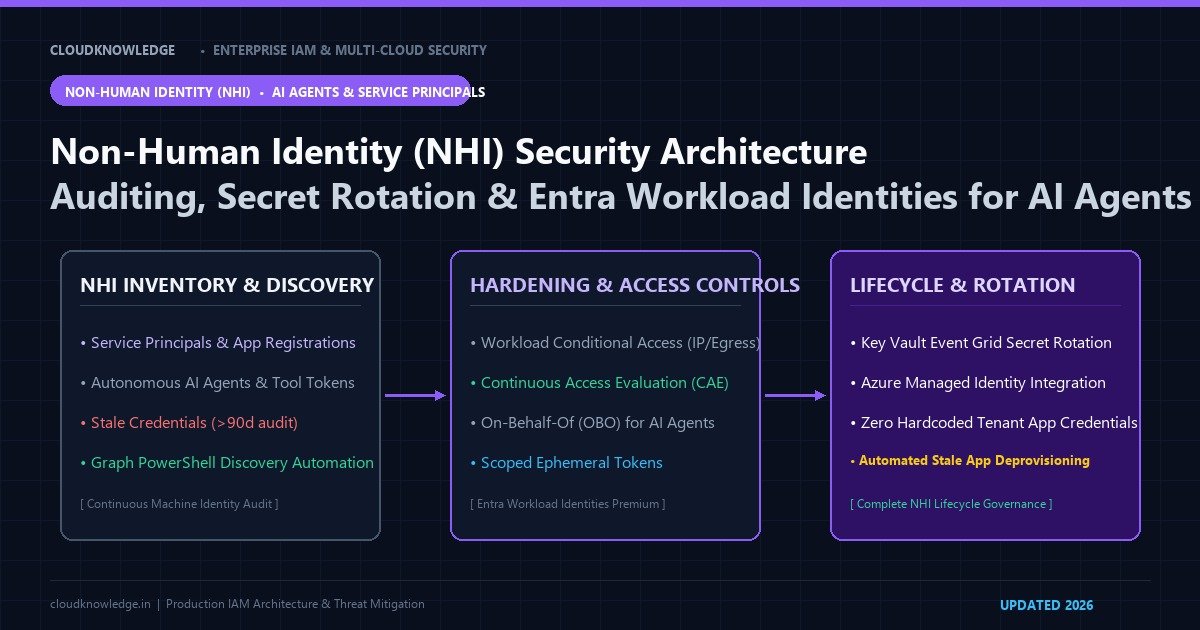
Quick Answer: What Is Non-Human Identity (NHI) Security?
Non-Human Identities (NHIs) are programmatic credentials—including service principals, managed identities, API keys, and autonomous AI agents—used by automated workloads to access cloud APIs without human interaction. Unlike human identities protected by MFA, NHIs require specialized lifecycle governance: continuous discovery auditing, least-privilege scoping, automated secret rotation via Key Vault, and Entra Workload Identities Conditional Access.
Last reviewed: 19 November 2026
Non-Human Identities (NHIs)—including enterprise service principals, application registrations, automated CI/CD runners, scheduled background daemons, and autonomous AI agents—now outnumber human user accounts by more than 45 to 1 in modern enterprise architectures. Governed under modern identity governance frameworks, machine identities represent an enormous attack surface because they rarely undergo interactive MFA challenges, frequently possess sweeping tenant-wide API permissions (such as Directory.ReadWrite.All), and rely on unrotated static client secrets. When adversaries compromise an over-privileged service principal or manipulate tool-calling LLMs via prompt injection, they achieve silent, unmonitored persistence. In this guide, we audit machine identities using Microsoft Graph PowerShell SDK v2, establish automated secret rotation pipelines, and enforce Microsoft Entra Workload Identities Premium controls.
1. The Non-Human Identity Attack Surface: Why Machine Accounts Fail Silently
A Non-Human Identity (NHI) is any software credential—such as an OAuth application registration, enterprise service principal, cloud managed identity, or AI agent tool token—that authenticates a programmatic workload to access cloud resources without human intervention.
Enterprise identity teams confront four systemic vulnerabilities when managing NHIs:
- Application Permission Creep: Developers frequently request high-impact tenant-wide application permissions during testing (e.g.,
Mail.ReadWriteorRoleManagement.ReadWrite.Directory) and deploy the app to production without narrowing scopes down to specific mailboxes or resource groups. - Orphaned and Forgotten App Registrations: When projects terminate or third-party contractors leave, their enterprise applications and active client secrets remain active in the tenant indefinitely, serving as covert backdoors.
- AI Agent Token Hijacking: Autonomous AI agents equipped with OAuth tool-calling capabilities often hold privileged access tokens. If the agent’s LLM suffers prompt injection, an adversary can compel the agent to execute privileged API calls (such as exfiltrating directory lists or altering security policies).
- Absence of User-Style Conditional Access: Traditional Conditional Access policies target interactive human logins. Standard service principals bypass user MFA, device compliance checks, and risk-based sign-in evaluations unless covered by specialized workload policies.
| Identity Dimension | Human User Account | Service Principal / App Registration | Managed Identity (Azure / AWS IAM) |
|---|---|---|---|
| Primary Credential | Password, FIDO2 Passkey, Biometrics | Static Client Secret or X.509 Certificate | Zero Secret (Platform-managed token) |
| MFA & Interactivity | FIDO2 / Push / Number Matching | None (Direct API token minting) | Not Applicable (Local IMDS binding) |
| Credential Rotation | User-driven or forced reset | Manual or pipeline-driven | Automatic (Cloud fabric managed) |
| Primary Threat Vector | AiTM Phishing, Social Engineering | Secret exfiltration, Illicit consent grants | Instance metadata service (SSRF) |
To eliminate static secret exfiltration entirely, organizations should migrate automated runners and multi-cloud systems to secretless multi-cloud workload identity federation across AWS, GCP, and Azure rather than issuing static passwords to service principals.
2. Auditing Stale & Over-Privileged Service Principals with Graph PowerShell
The foundation of machine identity hygiene is continuous automated discovery. The following PowerShell script uses the Microsoft Graph PowerShell SDK v2 to audit all service principals, inspect password credential expiration dates, flag unrotated secrets older than 90 days, and list high-risk application role assignments:
# Connect to Microsoft Graph with Application and Audit privileges
Connect-MgGraph -Scopes "Application.Read.All", "AuditLog.Read.All", "Directory.Read.All" -NoWelcome

# Define high-risk Microsoft Graph application permissions
$HighRiskPermissions = @(
    "Directory.ReadWrite.All",
    "RoleManagement.ReadWrite.Directory",
    "AppRoleAssignment.ReadWrite.All",
    "Mail.ReadWrite",
    "User.ReadWrite.All",
    "AuditLog.Read.All"
)

# Fetch all application service principals
$ServicePrincipals = Get-MgServicePrincipal -All -Property Id, AppId, DisplayName, PasswordCredentials, KeyCredentials, ServicePrincipalType |
    Where-Object { $_.ServicePrincipalType -eq "Application" }

$NHIReport = foreach ($SP in $ServicePrincipals) {
    # Evaluate credential health: secrets expiring soon or already expired
    $Now = Get-Date
    $StaleSecrets = $SP.PasswordCredentials | Where-Object { $_.EndDateTime -lt $Now.AddDays(30) }
    $UnrotatedSecrets = $SP.PasswordCredentials | Where-Object { $_.StartDateTime -lt $Now.AddDays(-90) }

    # Fetch app role assignments (application permissions granted to this service principal)
    $AppRoles = Get-MgServicePrincipalAppRoleAssignment -ServicePrincipalId $SP.Id -All
    $HighRiskAssigned = $AppRoles | Where-Object { $HighRiskPermissions -contains $_.ResourceDisplayName }

    [PSCustomObject]@{
        DisplayName         = $SP.DisplayName
        AppId               = $SP.AppId
        ObjectId            = $SP.Id
        TotalSecrets        = $SP.PasswordCredentials.Count
        ExpiringSecrets30d  = $StaleSecrets.Count
        UnrotatedSecrets90d = $UnrotatedSecrets.Count
        TotalCertificates   = $SP.KeyCredentials.Count
        HighRiskRolesCount  = $HighRiskAssigned.Count
        HasHighRiskRoles    = ($HighRiskAssigned.Count -gt 0)
    }
}

# Output high-risk service principals requiring immediate review
$HighRiskNHIs = $NHIReport | Where-Object { $_.HasHighRiskRoles -eq $true -or $_.UnrotatedSecrets90d -gt 0 }
$HighRiskNHIs | Format-Table -AutoSize DisplayName, AppId, TotalSecrets, UnrotatedSecrets90d, HighRiskRolesCount

# Export complete inventory for compliance audit
$NHIReport | Export-Csv -Path "./EntraID_NHI_Governance_Audit.csv" -NoTypeInformation
Write-Host "NHI inventory audit completed: $($NHIReport.Count) machine identities analyzed." -ForegroundColor Green
When an unauthorized or anomalous service principal is discovered during the audit, administrators should follow the protocol detailed in our guide to auditing and revoking high-risk OAuth app consents in Entra ID to immediately invalidate grants and sever access tokens.
3. Enforcing Microsoft Entra Workload Identities Premium
Standard Entra ID Free and P1 tiers provide basic app registration inventory, but managing enterprise-grade machine risk requires Microsoft Entra Workload Identities Premium. This license enables advanced policy enforcement tailored to programmatic identities:
1. Conditional Access for Workload Identities
Just as Conditional Access blocks human users based on geographic risk, Workload Conditional Access restricts service principal token minting to dedicated corporate egress IPs, trusted VPN endpoints, or secure CI/CD runner subnets:
# Deploy Conditional Access Policy for High-Privilege Workload Identities
$WorkloadCAParams = @{
    DisplayName = "CA-WORKLOAD: Enforce Dedicated Corporate Egress for CI/CD Runners"
    State = "enabled"
    Conditions = @{
        ClientAppTypes = @("all")
        ServicePrincipals = @{
            IncludeServicePrincipals = @("a1b2c3d4-e5f6-7890-abcd-serviceprincipal1")
        }
        Locations = @{
            IncludeLocations = @("All")
            ExcludeLocations = @("Corp-Egress-IP-NamedLocation")
        }
    }
    GrantControls = @{
        Operator = "OR"
        BuiltInControls = @("block")
    }
}

New-MgIdentityConditionalAccessPolicy -BodyParameter $WorkloadCAParams
Write-Host "Workload Conditional Access policy enforced successfully." -ForegroundColor Cyan
2. Continuous Access Evaluation (CAE) for Service Principals
In traditional OAuth flows, issued access tokens remain valid until expiration (typically 60 to 90 minutes). With Continuous Access Evaluation enabled for workload identities, security events—such as client secret revocation or identity risk elevation flagged by Entra ID Protection—trigger real-time token invalidation within seconds.
3. Access Reviews for Service Principals & Groups
To prevent permanent standing access for service principals, organizations should enforce Zero Standing Privileges (ZSP) and Entra PIM for Groups. By placing service principals into security groups governed by quarterly access reviews, resource owners must justify why an automated identity still requires administrative role membership.
4. Securing Autonomous AI Agents & LLM Tool Calls
As enterprises deploy autonomous AI agents powered by OpenAI GPT, Anthropic Claude, or Google Gemini to orchestrate business workflows, these agents receive API credentials to query corporate systems. To safeguard against prompt injection and tool hijacking, apply these architectural rules:
- Enforce Delegated Permissions via On-Behalf-Of (OBO) Flow: Never grant an AI agent tenant-wide application permissions (e.g.,
User.ReadWrite.Allwithout user context). Instead, authenticate the agent using the OAuth 2.0 On-Behalf-Of (OBO) flow so the LLM executes actions strictly within the caller’s authorized boundaries. - Implement Ephemeral Scope-Down Token Exchange: When an AI agent executes a tool (such as querying an inventory API), exchange the agent’s broad user context token for an ephemeral token scoped solely to that specific resource with a 5-minute lifespan.
- Require Out-of-Band Human Approval for High-Impact Tools: Prohibit autonomous execution of state-altering actions (such as deleting databases, modifying security groups, or executing financial transactions). Integrate an out-of-band approval step that alerts a human supervisor via Slack or Microsoft Teams before execution proceeds.
- Protect Human Supervisors with Phishing-Resistant MFA: Ensure administrators approving AI actions or managing machine identity policies are secured using enterprise FIDO2 passkeys and WebAuthn hardware keys, which prevents credential interception via Adversary-in-the-Middle (AiTM) reverse proxy attacks.
5. Automated Secret Rotation Architecture with Azure Key Vault
Eliminate human error and credential leakage by establishing automated 90-day secret rotation pipelines using Azure Key Vault, Event Grid, and Azure Automation:
- Centralized Credential Store: Store all service principal client secrets exclusively inside Azure Key Vault with an enforced expiration date of 90 days.
- Event Grid Expiration Notification: Configure Azure Event Grid to monitor the Key Vault event
Microsoft.KeyVault.SecretNearExpiry, configured to fire 30 days prior to secret expiration. - Automated Graph API Runbook: Event Grid triggers an Azure Automation PowerShell runbook. The runbook generates a cryptographically secure client secret, connects to Microsoft Graph via Managed Identity, and adds the new password credential to the target application registration.
- 7-Day Overlap Grace Period: The runbook leaves the expiring secret active for a 7-day grace period, allowing consuming applications to pull the new version without downtime.
- Automated Deprecation: After the grace period elapses, a second scheduled runbook removes the deprecated secret from the app registration.
Frequently Asked Questions (FAQ)
What is the difference between a service principal and a managed identity?
A service principal is a local directory representation of an application registration in a specific Entra ID tenant, typically authenticating via a static password secret or X.509 certificate. A managed identity is a specialized service principal whose credential lifecycle is entirely managed by the Azure cloud fabric, eliminating static secrets from application code.
What licensing is required for Microsoft Entra Workload Identities?
Basic service principal inventory and password expiration audits are supported under Microsoft Entra ID Free and P1 tiers. Advanced security features—including Conditional Access for Workload Identities, Continuous Access Evaluation (CAE), and Identity Protection risk detection for service principals—require Microsoft Entra Workload Identities Premium licenses.
Why are static client secrets considered a major security risk for NHIs?
Static client secrets are frequently checked into code repositories, stored in cleartext configuration files, or shared across team members. Unlike human credentials, static secrets bypass interactive MFA and biometric validation, allowing an attacker who exfiltrates a secret to authenticate from any location globally.
How can security teams mitigate prompt injection risks in autonomous AI agents?
Mitigate prompt injection by enforcing least-privilege delegated scopes (OBO flow), issuing short-lived ephemeral tokens scoped strictly to invoked tools, establishing out-of-band human confirmation for destructive actions, and logging all tool calls in Microsoft Sentinel.
How does Continuous Access Evaluation (CAE) function for workload identities?
CAE for workload identities establishes real-time synchronization between identity providers and resource APIs. When a high-risk event occurs (such as credential disablement, IP address anomaly, or administrative revocation), CAE terminates the service principal’s active access token immediately rather than waiting for token expiration.
Official Architecture & Vendor References
- Microsoft Learn: Microsoft Entra Workload Identities Overview
- Microsoft Learn: Application and Service Principal Objects in Microsoft Entra ID
- Microsoft Learn: Conditional Access for Workload Identities
- Microsoft Learn: Get-MgServicePrincipal Cmdlet Reference
- Microsoft Learn: Automate Key Vault Secret Rotation for Two Sets of Credentials
Recommended Hardware & Reference Architecture Literature
Tested tools and authoritative documentation to implement the architectures covered in this lab: