

As businesses scale and prioritize secure, seamless user experiences, identity management becomes central. Microsoft Entra ID (formerly Azure AD B2C) provides powerful identity and access management (IAM) tailored for customer-facing apps. This blog walks you through everything you need to know about setting up and managing Azure AD B2C custom attributes, app registration, enabling SSO, planning cost-efficient deployments, and migrating users with minimal friction.
🔐 Understanding Azure AD B2C Custom
Attributes
When integrating Azure AD B2C into your application, extending
user profiles with custom attributes
allows you to store business-specific data — like whether users have accepted
terms or subscribed to newsletters.
What Do Custom Attributes Look Like?
Here’s an example of
a custom attribute returned in a Microsoft Graph API call:

- extension_ prefix: Identifies this as a custom attribute.
- e5988430254…: Refers to the Application (Client) ID of the app used to create the attribute — typically the B2C_1A_Extensions app.
- If this app is deleted, all
associated custom attributes will be lost, so it’s crucial to protect it.
🔑Azure AD B2C custom attributes, Graph API, extension attributes, B2C_1A_Extensions
📱 App Registration in Azure AD B2C
All applications using Azure AD B2C authentication must be registered individually.
Key App Registration Details:
- Up to 250 apps per B2C tenant.
- Each app must:
- Provide its own Application ID.
- Include Reply URLs (multiple allowed within the same domain).
- Specify the user flow or custom policy to initiate.
Why It Matters:
- Enables secure, consistent OAuth2/OpenID Connect flows.
- Important for implementing multi-tenant apps.
- Allows precise redirect URI control during sign-ins.
🔑 Azure AD B2C app registration, reply URLs, Application ID, policy-based authentication
🔁 Enabling Single Sign-On (SSO)
Single Sign-On (SSO) allows users to authenticate once and access multiple apps without re-logging in — a key aspect of modern, frictionless UX.
Azure AD B2C SSO Options:
- Tenant-wide SSO
- Policy-based SSO
- App-specific SSO
- Disabled SSO
🧠 Pro Tip: All apps using the same policy and sharing a domain can benefit from session tokens for SSO.
🔑 Keywords: Azure AD B2C SSO, seamless login, policy-based SSO, single sign-on configuration.
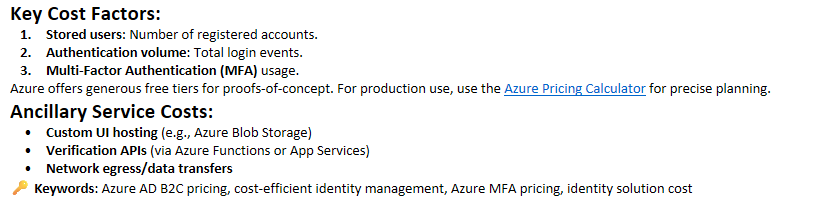
💰 Azure AD B2C Pricing and Cost Planning
🔄 Azure AD B2C User Migration Strategies
A successful
migration ensures existing users continue accessing your services without
disruption.
Pre-Migration Checklist:
- Clean junk
data (spam email
addresses, invalid accounts) - Deduplicate based on emails, phone
numbers - Review
old/unused accounts
for pruning
Migration Strategy Comparison
|
Strategy |
Best For |
Requirements |
|
Authentication Middleware |
Staged app |
Legacy system |
|
Bulk Migration |
Few apps & |
Full database |
|
Just-In-Time (JIT) Migration |
Preserving |
API to validate |
|
Dual Repositories |
Gradual migration |
Sync strategy and |
🔑
Keywords: Azure AD B2C user migration, bulk migration, JIT
migration, dual identity repository
⚙️ How Just-In-Time (JIT) Migration Works
This is the most user-friendly migration approach when
users’ passwords are stored securely (e.g., hashed).
Flow:
- User logs in via Azure AD
B2C. - B2C calls your JIT web
service with
credentials. - Service validates credentials
with the legacy identity provider. - If valid:
- User is created in B2C using
Graph
API. - Login session (JWT) is
returned to the app.
📂 Example implementation: GitHub JIT Migration Sample
🔑
Keywords: Azure AD B2C JIT migration, seamless user
migration, authenticate legacy users
🛠 Maintaining Two User Repositories
In some scenarios,
businesses must maintain both B2C and a legacy
identity system.
Key Decisions:
- Define the authoritative
source. - Implement sync
mechanisms
(e.g., via JIT service). - Ensure profile updates and
password resets are replicated.
Password Management Considerations:
- Reset on
login: Easy,
secure, and enforces new complexity. - Migrate
as-is: Requires
clear-text passwords. - Flag weak
passwords: Force
reset on next change attempt.
🔑
Keywords: Azure AD B2C password migration, syncing user
repositories, dual identity store
📊 Example User Workflow Table
|
Workflow |
Azure AD B2C as Primary |
Legacy IDP as Primary |
|
Sign-In |
B2C authenticates |
B2C federates or |
|
Sign-Up |
Handled by B2C, |
Handled by legacy, |
|
Profile Edit |
B2C updates both |
Updates via |
|
Password Reset |
B2C with optional |
Handled by legacy, |
🧠 Final Thoughts
Migrating to Azure AD B2C is more than just a tech upgrade —
it’s a transformation of how you handle identity,
security, and customer experience. Whether you need custom attribute management, SSO, or a hybrid
identity model, Azure AD B2C can handle it — but planning is everything.
Key Takeaways:
- Protect your B2C_Extensions app and custom attributes.
- Leverage flexible app
registration and reply URL policies. - Enable SSO to create seamless user
journeys. - Carefully plan for pricing and
ancillary costs. - Use JIT, bulk, or dual-repo
migration strategies based on your business case.
💬 Got questions or need help with your Azure AD B2C
migration? Drop them in the comments or contact us
for a free consultation.
Recommended Hardware & Reference Architecture Literature
Tested tools and authoritative documentation to implement the architectures covered in this lab:
Wow, that’s what I was exploring youtube downloader for windows, what a material!
present here at this webpage, thanks admin of this site.