

Quick Answer
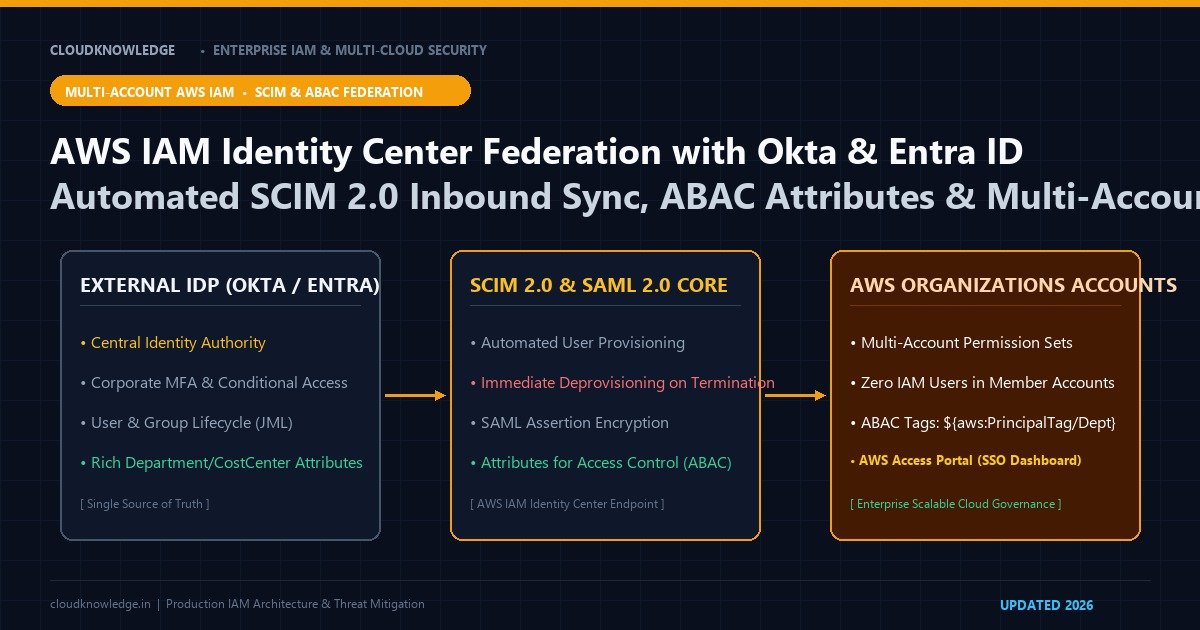
Federating AWS IAM Identity Center (formerly AWS SSO) with Microsoft Entra ID or Okta centralizes identity across multi-account AWS Organizations. Using SAML 2.0 for single sign-on and SCIM 2.0 for automated user provisioning, enterprises eliminate individual IAM users and enforce attribute-based access control (ABAC) permission sets dynamically mapped to directory attributes.

This technical guide is part of our comprehensive AWS IAM & Cloud Security Hub, providing production architecture blueprints, step-by-step implementation standards, and real-world failure troubleshooting for modern enterprise identity teams.
Managing static IAM users, long-lived access keys, and fragmented cross-account assume-role chains across a multi-account AWS Organizations landing zone introduces severe security and operational vulnerabilities. When an employee leaves the company, manually auditing hundreds of AWS accounts to revoke local credentials invites compliance failure and credential leakage. AWS IAM Identity Center (the evolution of AWS Single Sign-On) resolves this by serving as the central authentication and authorization hub across your entire AWS Organization. By combining SAML 2.0 federation for identity authentication, automated SCIM (System for Cross-domain Identity Management) v2.0 for real-time user lifecycle provisioning, and Attribute-Based Access Control (ABAC) for scalable permission sets, enterprise security teams achieve zero-static-credential compliance. In this architectural guide, we dissect how to build, test, and automate an enterprise federation pipeline linking Okta and Microsoft Entra ID to AWS IAM Identity Center.
1. The Problem: The Peril of Static IAM Users and Cross-Account Sprawl
AWS IAM Identity Center SCIM federation is the automated synchronization protocol that continuously mirrors identity objects, group memberships, and user lifecycle states from an external Identity Provider (Okta, Entra ID) directly into AWS without manual provisioning.
Enterprises managing hundreds of AWS accounts without centralized federation face three systemic security risks:
- Static Long-Lived Access Key Exposure: Local IAM users provisioned with programmatic access keys (
AKIA...) are frequently committed to Git repositories or leaked via developer laptops, representing the leading cause of unauthorized cloud resource crypto-mining and data breach incidents. - Manual Offboarding Gaps: When an engineer departs, HR triggers an account disablement in Okta or Entra ID. If AWS relies on local IAM accounts or un-synced IAM roles, the employee retains unauthorized access to production infrastructure until an admin manually deletes their account from each separate AWS account.
- Permission Set Explosion (RBAC Bloat): Traditional Role-Based Access Control (RBAC) mandates creating separate IAM roles for every combination of team, environment, and tier (e.g.,
App1-Dev,App1-Prod,App2-Dev). This results in thousands of unmaintainable IAM policies that violate AWS account quotas.
| Architectural Dimension | Legacy Local IAM Users | Basic SAML Role Federation | AWS IAM Identity Center + SCIM & ABAC |
|---|---|---|---|
| Identity Source | Decentralized local IAM DB per account | External IdP (Okta / Entra ID) | External IdP synchronized via SCIM 2.0 |
| Provisioning Automation | Manual / Terraform scripts per account | Manual Just-In-Time (JIT) on login | Automated continuous push via SCIM endpoint |
| Access Key Lifespan | Permanent (Static AKIA... keys) |
Temporary STS sessions (1 to 12 hours) | Temporary STS sessions via short-lived tokens |
| Permission Model | Static IAM Policies attached to users/groups | Static AssumeRole IAM policies | Dynamic ABAC Permission Sets via Session Tags |
| Offboarding Enforcement | Delayed; requires script across all accounts | Immediate SAML login block, but un-synced state | Instant global revocation; SCIM disables user everywhere |
2. Architectural Blueprint: SAML 2.0 Auth + SCIM 2.0 Synchronization Pipeline
Enterprise federation separates authentication from identity provisioning into two distinct protocols:
Core Protocol Handshake Mechanics
- SCIM Synchronization (Background REST API): The external IdP (Okta/Entra) continuously communicates with the AWS Identity Center SCIM endpoint over HTTPS (
https://scim.identity-center.us-east-1.amazonaws.com/...). When a user is added to theAWS-Engineersgroup in Okta, the IdP sends an HTTP POST request to AWS SCIM, pre-provisioning the user and group metadata before the user ever attempts to log in. - SAML 2.0 Authentication (Interactive User Flow): The user accesses the AWS access portal (
https://d-xxxxxxxxxx.awsapps.com/start). AWS redirects the browser to Okta/Entra. Upon successful multi-factor authentication (MFA), the IdP returns a signed SAML assertion. AWS validates the signature against the pre-provisioned SCIM identity, issues temporary AWS STS credentials, and renders the AWS account list.
3. Scaling Permissions with Attribute-Based Access Control (ABAC)
Instead of creating hundreds of discrete IAM roles for each project team, Attribute-Based Access Control (ABAC) allows a single Permission Set to dynamically evaluate who can access which resources based on tags passed during the session.
Configuring Identity Center Session Tags
Configure your external IdP to pass the user’s CostCenter and Department as SAML attributes. AWS IAM Identity Center maps these attributes into AWS STS Session Tags (aws:PrincipalTag/Department).
{
  "Version": "2012-10-17",
  "Statement": [
    {
      "Sid": "AllowResourceAccessIfTagsMatch",
      "Effect": "Allow",
      "Action": [
        "ec2:StartInstances",
        "ec2:StopInstances",
        "ec2:DescribeInstances",
        "s3:GetObject",
        "s3:PutObject"
      ],
      "Resource": "*",
      "Condition": {
        "StringEquals": {
          "aws:ResourceTag/Department": "${aws:PrincipalTag/Department}"
        }
      }
    }
  ]
}
Engineering Rationale: If a user belongs to the Finance department, their session can only start, stop, or read EC2 and S3 resources that carry the tag Department: Finance. When a new project is created, engineers simply tag the resource—zero IAM policy edits are required.
4. Production Implementation: Deploying Permission Sets via AWS CLI & CloudFormation
Automate the provisioning of multi-account Permission Sets across your AWS Organizations management plane:
# Step 1: Retrieve IAM Identity Center Instance ARN
INSTANCE_ARN=$(aws sso-admin list-instances --query "Instances[0].InstanceArn" --output text)
echo "Identity Center Instance ARN: $INSTANCE_ARN"

# Step 2: Create a Baseline ReadOnly Permission Set with 8-Hour Session Duration
PERMISSION_SET_ARN=$(aws sso-admin create-permission-set \
  --instance-arn "$INSTANCE_ARN" \
  --name "SecOps-Audit-ReadOnly-Access" \
  --description "Read-only security auditing permission set for SecOps team" \
  --session-duration "PT8H" \
  --query "PermissionSet.PermissionSetArn" --output text)

echo "Provisioned Permission Set ARN: $PERMISSION_SET_ARN"

# Step 3: Attach AWS Managed Policy 'SecurityAudit' to the Permission Set
aws sso-admin attach-managed-policy-to-permission-set \
  --instance-arn "$INSTANCE_ARN" \
  --permission-set-arn "$PERMISSION_SET_ARN" \
  --managed-policy-arn "arn:aws:iam::aws:policy/SecurityAudit"

# Step 4: Provision Permission Set across target Production Account
aws sso-admin provision-permission-set \
  --instance-arn "$INSTANCE_ARN" \
  --permission-set-arn "$PERMISSION_SET_ARN" \
  --target-type "ALL_PROVISIONED_ACCOUNTS"
5. Troubleshooting & Operational Failure Scenarios
| Operational Symptom | Root Cause Analysis | Engineering Remediation Playbook |
|---|---|---|
SCIM Error: HTTP 401 Unauthorized |
SCIM Access Token in external Identity Provider expired (AWS SCIM tokens have a maximum validity of 1 year). | Generate a new SCIM token in AWS IAM Identity Center settings. Update the API Token field in Okta / Entra provisioning settings without recreating the app. |
SAML User Not Found in Identity Store |
SAML NameID or Subject attribute sent by IdP does not match the SCIM userName or emails[primary=true] value. |
Ensure Okta/Entra is configured to send the exact user attribute mapped to AWS userName (typically userPrincipalName or email). |
ABAC Permission Denied (Implicit Deny) |
Session Tag was dropped during SAML assertion or resource lacks the matching tag key/value. | Check CloudTrail event AssumeRoleWithSAML to confirm PrincipalTags are present. Verify exact case sensitivity on resource tags (e.g., Department vs department). |
Access Denied upon AWS CLI sso login |
Developer cached stale SSO token locally or AWS CLI profile references retired Permission Set ARN. | Purge local credentials cache: rm -rf ~/.aws/sso/cache/. Run aws sso login --profile <profile-name> to refresh OAuth tokens. |
Frequently Asked Questions
What is the primary benefit of AWS IAM Identity Center over IAM users with cross-account assume-role?
IAM Identity Center centralizes multi-account user management and assignment through enterprise IdPs. Employees sign in once through Entra ID or Okta and access AWS accounts and applications with temporary, audited STS credentials instead of managing individual IAM user credentials in each account.
How does SCIM 2.0 synchronize users and groups from Entra ID/Okta to AWS?
SCIM 2.0 uses secure HTTPS REST APIs to push user creation, updates, and deprovisioning in real-time from the IdP into AWS IAM Identity Center, ensuring that organizational hierarchy and group memberships stay perfectly synchronized without manual intervention.
How do ABAC permission sets simplify permissions management in multi-account AWS Organizations?
ABAC uses incoming session tags (such as Department or CostCenter) passed during SAML assertion to dynamically evaluate access against resource tags. This replaces thousands of static permission sets with a few reusable policy definitions.
What happens in AWS when an employee is disabled or deleted in Okta or Entra ID?
The IdP immediately fires a SCIM deprovisioning call to AWS IAM Identity Center, which suspends the user. Any new sign-in attempts are rejected immediately, and active CLI sessions expire upon their temporary STS credential lifetime.
Which Entra ID or Okta license levels are required for SAML and SCIM federation with AWS?
Microsoft Entra ID Free or P1 includes SAML SSO and SCIM enterprise app provisioning. Okta Workforce Identity Cloud supports AWS IAM Identity Center via standard Single Sign-On and Lifecycle Management packages.
Official Architecture & Vendor References
- AWS Documentation: What Is IAM Identity Center
- Microsoft Learn: Tutorial – Microsoft Entra SSO with AWS IAM Identity Center
- AWS Documentation: Supported SCIM Attributes in IAM Identity Center
- Okta Documentation: Configure SAML 2.0 and SCIM for AWS Identity Center
- AWS Documentation: Attribute-Based Access Control (ABAC) in Identity Center
Recommended Hardware & Reference Architecture Literature
Tested tools and authoritative documentation to implement the architectures covered in this lab: