

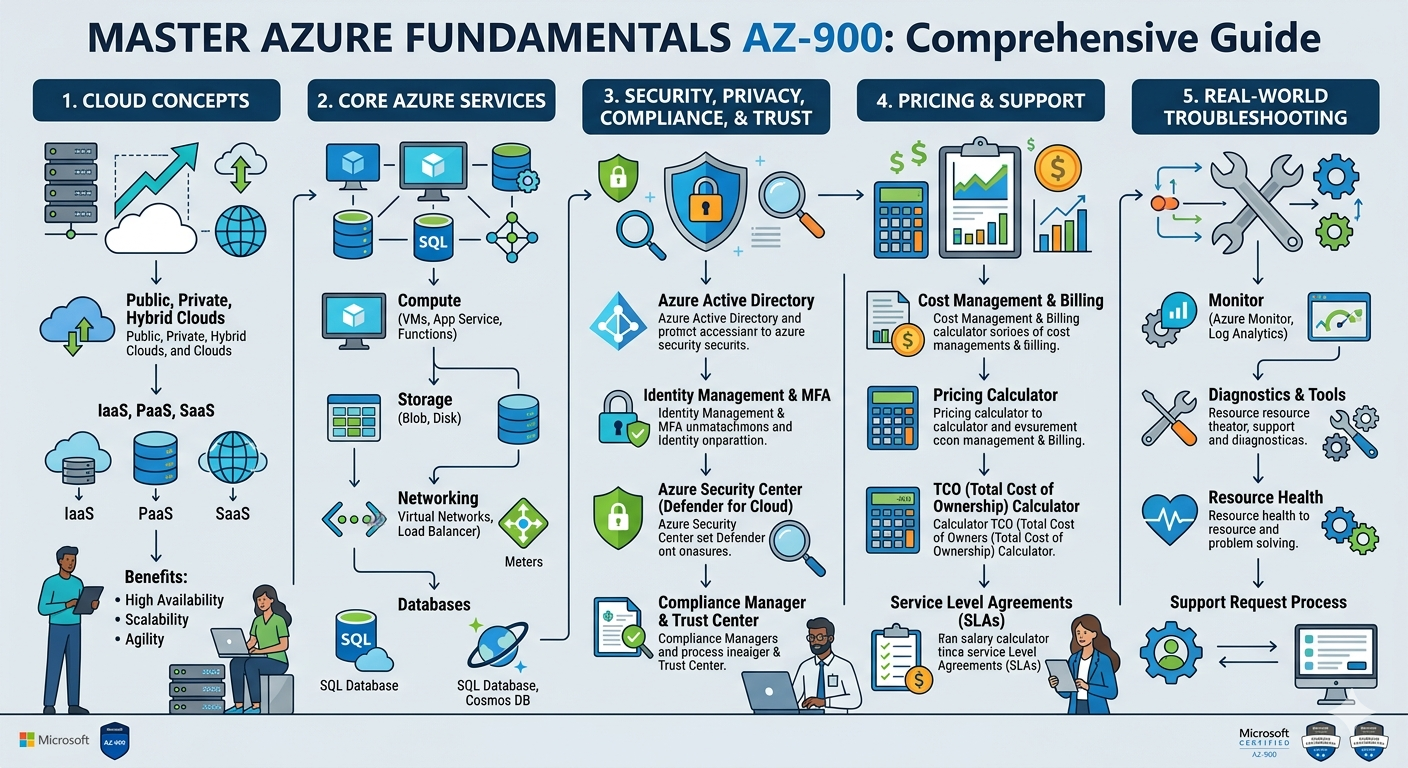
Azure Fundamentals AZ-900 Guide: Complete Cloud Mastery in 2026
Learn Cloud Concepts, Azure Services, Security & Real-World Troubleshooting

Azure Fundamentals AZ-900 Guide is your complete roadmap to understanding cloud computing, Azure architecture, pricing, and security. This guide is designed for beginners and professionals preparing for Azure certification or real-world implementation.
☁️ Cloud Computing Concepts
Cloud computing allows organizations to rent computing resources such as storage, networking, and processing power instead of owning infrastructure.
🔑 Key Benefits
- Cost-effective (Pay-as-you-go)
- Scalable infrastructure
- Global availability
- High reliability
Q: What is cloud computing?
A: Delivery of IT resources over the internet.
🚀 Benefits of Cloud Computing
No upfront investment required.
Increase or decrease resources anytime.
Auto-adjust resources based on demand.
Deploy apps worldwide in minutes.
💸 CapEx vs OpEx
| CapEx | OpEx |
|---|---|
| Upfront cost | Pay-as-you-go |
| Hardware ownership | No ownership |
| Fixed cost | Flexible cost |
🏗️ Cloud Deployment Models
- Public Cloud – Managed by Azure
- Private Cloud – Managed by organization
- Hybrid Cloud – Combination of both
🧩 Service Models (IaaS, PaaS, SaaS)
- IaaS – Full control (VMs)
- PaaS – App development platform
- SaaS – Ready-to-use apps
☁️ Introduction to Microsoft Azure
Microsoft Azure provides 100+ services including compute, networking, storage, AI, and DevOps tools.
- Global infrastructure
- Enterprise-grade security
- Highly scalable
💻 Azure CLI Commands
az group create --name MyResourceGroup --location eastus
az vm create --name myVM --resource-group MyResourceGroup --image Win2019Datacenter
🔗 Useful Links
🎯 Conclusion
This Azure Fundamentals AZ-900 Guide gives you a strong foundation in cloud computing and Azure services.
Azure Fundamentals AZ-900 Guide (Part 2): Compute, Networking & Architecture Deep Dive
Master Azure Core Services with Real-World Scenarios & Troubleshooting

💻 Azure Compute Services
Azure Compute provides on-demand processing power for applications, virtual machines, containers, and serverless workloads.
🔑 Key Compute Services
- Azure Virtual Machines – Full control over OS
- Azure App Service – Web app hosting
- Azure Kubernetes Service (AKS) – Container orchestration
- Azure Functions – Serverless computing
⚙️ Troubleshooting VM Issues
az vm get-instance-view --name myVM --resource-group MyRG
- Check VM power state
- Verify network security group (NSG)
- Check boot diagnostics logs
FAQ
Q: When to use VM vs App Service?
A: VM = full control, App Service = managed platform.
🌐 Azure Networking
Azure networking connects cloud resources securely and efficiently.
Core Networking Services
- Virtual Network (VNet)
- Azure Load Balancer
- Application Gateway
- VPN Gateway
- Azure DNS
🔧 Troubleshooting Network Issues
az network nsg rule list --resource-group MyRG
- Check NSG rules
- Verify subnet configuration
- Validate public IP
FAQ
Q: What is VNet?
A: Logical network in Azure.
💾 Azure Storage Services
Azure Storage provides scalable, durable, and secure storage solutions.
Storage Types
- Blob Storage – Unstructured data
- File Storage – Shared file system
- Queue Storage – Messaging
- Table Storage – NoSQL data
🔧 Troubleshooting Storage
az storage account show --name mystorageaccount
- Check access keys
- Verify firewall settings
- Check storage permissions
FAQ
Q: Which storage is cheapest?
A: Blob storage (cool/archive tier).
🏗️ Azure Architecture & Availability
🌍 Regions
Geographical locations of Azure datacenters.
⚡ Availability Zones
Physically separate datacenters within a region.
🔁 Region Pairs
Two regions paired for disaster recovery.
📊 SLA (Service Level Agreement)
| Service | SLA |
|---|---|
| Single VM | 99.9% |
| Availability Set | 99.95% |
| Availability Zone | 99.99% |
FAQ
Q: What improves SLA?
A: Using Availability Zones.
🔗 Azure Graph API & PowerShell
📌 Get Users (Graph API)
GET https://graph.microsoft.com/v1.0/users
📌 PowerShell Example
Get-AzVM -ResourceGroupName "MyRG"
🔗 Useful Links
🎯 Conclusion
In this section you explored Azure Compute, Networking, Storage, and Architecture with real-world troubleshooting.
Next: Security, IAM, Pricing & Advanced Azure Troubleshooting
Azure Fundamentals AZ-900 Guide (Part 3): Security, Entra ID & IAM Deep Dive
Master Identity, Access Control, Compliance & Real-World Troubleshooting

🔐 Shared Responsibility Model
Azure security follows a shared responsibility model where both Microsoft and customers are responsible for securing resources.
| Cloud Provider | Customer |
|---|---|
| Physical Datacenter | User Access |
| Hardware & Network | Data & Applications |
| Infrastructure | Identity & Permissions |
👤 Microsoft Entra ID (Azure AD)
Microsoft Entra ID is the identity and access management service in Azure used for authentication and authorization.
Core Features
- Single Sign-On (SSO)
- Multi-Factor Authentication (MFA)
- Conditional Access
- Identity Protection
🔧 PowerShell Example
Connect-AzureAD
Get-AzureADUser
FAQ
Q: What is Entra ID?
A: Identity provider for Azure and Microsoft services.
🔑 Authentication vs Authorization
- Authentication – Verifying identity
- Authorization – Granting access
🛡️ Role-Based Access Control (RBAC)
RBAC allows you to assign permissions based on roles.
Common Roles
- Owner
- Contributor
- Reader
🔧 Assign Role (CLI)
az role assignment create --assignee user@domain.com --role Contributor --scope /subscriptions/{id}
FAQ
Q: What is RBAC?
A: Access control based on roles.
🔐 Conditional Access Policies
Conditional Access enforces access decisions based on conditions like location, device, and risk.
Examples
- Require MFA outside office network
- Block legacy authentication
- Allow only compliant devices
🔧 Troubleshooting Steps
- Check Sign-in logs
- Review applied policies
- Validate exclusions
🔒 Azure Encryption & Security
- Data at Rest Encryption
- Data in Transit Encryption
- Azure Key Vault
🌐 Network Security
- Azure Firewall
- NSG (Network Security Group)
- DDoS Protection
🔧 Troubleshooting
- Check NSG inbound rules
- Validate firewall logs
- Test connectivity
📊 Monitoring & Logging
- Azure Monitor
- Log Analytics
- Service Health
🔗 Graph API Example
GET https://graph.microsoft.com/v1.0/users?$filter=accountEnabled eq true
🎯 Conclusion
In this section, you mastered Azure Security, Entra ID, RBAC, Conditional Access, and real-world IAM troubleshooting.
Next: Pricing, Cost Optimization & Advanced Azure Governance
Azure Fundamentals AZ-900 Guide (Part 4): Pricing, Cost Optimization & Governance
Master Azure Cost Management, Policies, Compliance & Enterprise Best Practices

💰 Azure Pricing Models
Azure follows a consumption-based pricing model where you pay only for the resources you use.
Pricing Options
- Pay-As-You-Go
- Reserved Instances
- Spot Pricing
- Free Tier
Factors Affecting Cost
- Resource Type
- Region
- Usage Duration
- Bandwidth
FAQ
Q: What increases Azure cost?
A: Always-on resources and high outbound traffic.
📊 Azure Cost Management Tools
- Azure Pricing Calculator
- Total Cost of Ownership (TCO)
- Azure Cost Management
- Azure Advisor
🔧 Cost Analysis (CLI)
az consumption usage list
📉 Cost Optimization Strategies
- Right-size virtual machines
- Stop unused resources
- Use reserved instances
- Leverage auto-scaling
- Use Dev/Test subscriptions
🔧 Auto Shutdown Script
az vm auto-shutdown --resource-group MyRG --name myVM --time 1900
🏛️ Azure Governance
Governance Tools
- Azure Policy
- Azure Blueprints
- Resource Locks
- Tags
🔧 Create Policy (CLI)
az policy assignment create --name "LimitLocations"
📜 Compliance & Trust
- GDPR
- ISO Standards
- NIST
- Microsoft Trust Center
📡 Azure Monitoring & Service Health
- Azure Monitor
- Service Health Dashboard
- Alerts & Metrics
🏢 Real-World Enterprise Scenario
A company migrated from on-premises infrastructure to Azure and reduced costs by:
- Using Reserved Instances
- Implementing auto-scaling
- Applying cost governance policies
🎯 Final Conclusion
You have now completed the Azure Fundamentals AZ-900 Guide covering:
- Cloud Concepts
- Azure Services
- Security & IAM
- Pricing & Governance
This guide prepares you for AZ-900 certification and real-world Azure implementation.

hi!,I really like your writing very much! proportion we keep
up a correspondence extra approximately your article on AOL?
I need a specialist on this area to unravel my problem.
May be that is you! Looking forward to look you.
My web-site go88