
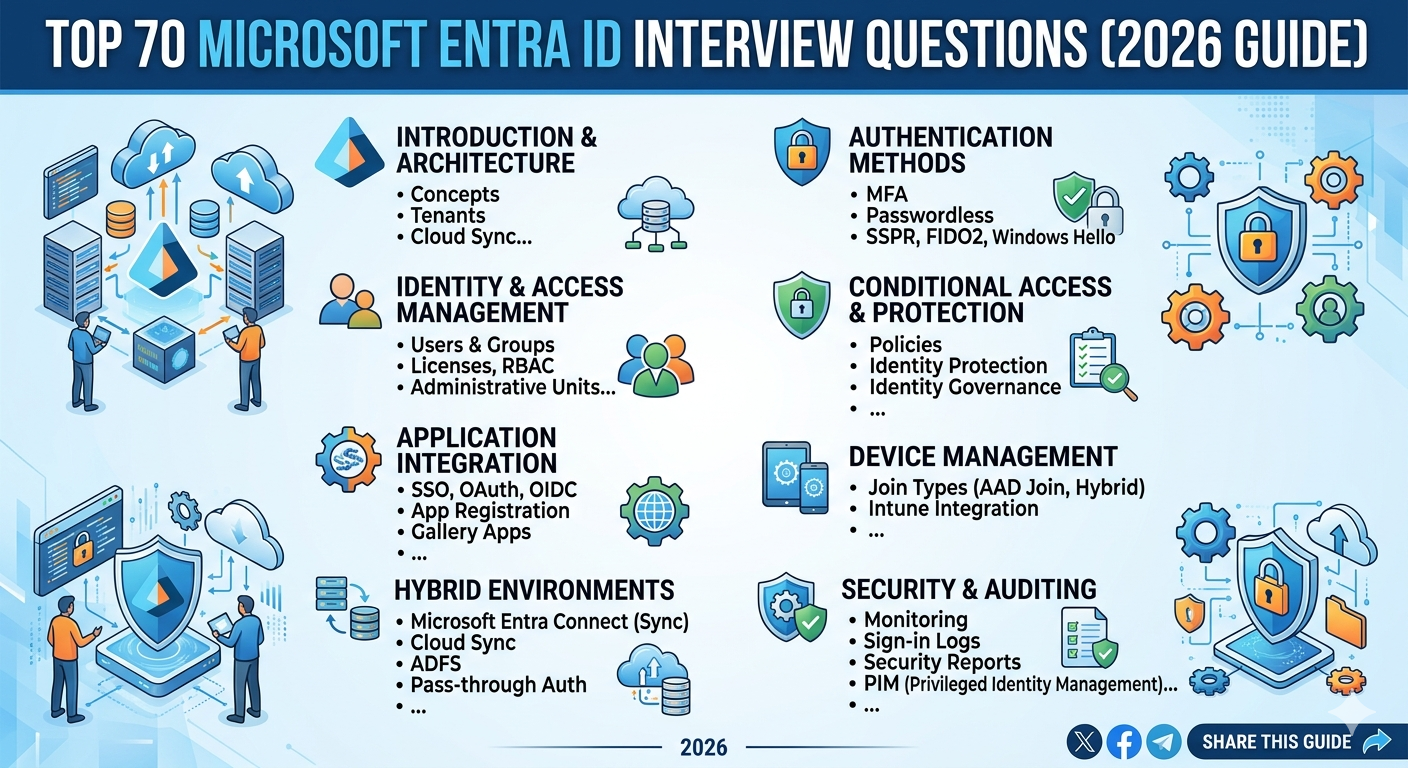
Top 70 Microsoft Entra ID Interview Questions (2026 Guide)
Microsoft Entra ID Interview Questions are essential for IAM professionals preparing for modern cloud identity roles. This guide includes real-world troubleshooting, PowerShell scripts, and Graph API insights.
What is Microsoft Entra ID?
Microsoft Entra ID is a cloud-based Identity and Access Management (IAM) platform that enables secure access to applications, APIs, and enterprise resources.
✨ Key Features
- Single Sign-On (SSO)
- Multi-Factor Authentication (MFA)
- Conditional Access Policies
- Identity Governance
Connect-MgGraph -Scopes "User.Read.All" Get-MgUser -Top 10
💡 FAQs
Q: Is Entra ID same as Active Directory?
A: No, it is cloud-based and uses modern authentication protocols.
Entra ID vs On-Prem AD
| Feature | On-Prem AD | Entra ID |
|---|---|---|
| Protocols | Kerberos, NTLM | SAML, OAuth |
| Access | Network | Internet |
| Management | LDAP | Graph API |
Authentication Methods
Get-MgUserAuthenticationMethod -UserId user@domain.com
Conditional Access
Conditional Access acts as the policy engine enforcing Zero Trust security.
- User / Group
- Device Compliance
- Location
- Risk Level
Get-MgIdentityConditionalAccessPolicy
Troubleshooting Entra ID
- SSO failures
- MFA issues
- Token errors
Get-MgAuditLogSignIn -Top 10
Conclusion
This Microsoft Entra ID Interview Questions guide provides deep IAM insights, troubleshooting techniques, and automation strategies.
Explore More IAM Guides →Advanced Microsoft Entra ID Interview Questions (PIM, Hybrid, Security, Governance)
This section deep dives into advanced Microsoft Entra ID Interview Questions including real-world IAM scenarios, governance, and troubleshooting.
Privileged Identity Management (PIM)
PIM enables Just-In-Time (JIT) access to privileged roles, reducing security risks.
✨ Key Concepts
- Eligible vs Active roles
- Approval workflows
- Time-bound access
Get-MgRoleManagementDirectoryRoleEligibilitySchedule
💡 FAQs
Q: Why use PIM?
A: To minimize permanent admin access and enforce least privilege.
Identity Protection
Detects and responds to identity risks using Microsoft threat intelligence.
Risk Types
- Sign-in Risk
- User Risk
Get-MgRiskyUser
💡 FAQs
Q: How to mitigate risk?
A: Enforce MFA or password reset via policies.
Device Management
Devices can be Registered, Joined, or Hybrid Joined.
Device Types
- Entra Registered (BYOD)
- Entra Joined (Corporate)
- Hybrid Joined
Get-MgDevice -Top 10
💡 Key Points
- Used with Intune compliance
- Supports Conditional Access
- Critical for Zero Trust
Application Proxy & SaaS Integration
Securely publish on-prem apps using Entra Application Proxy.
Integration Steps
- Add Enterprise App
- Configure SSO (SAML/OIDC)
- Assign users/groups
Get-MgServicePrincipal
External Identity (B2B & B2C)
Manage guest users and customer identities securely.
Key Differences
- B2B → Partner collaboration
- B2C → Customer identity platform
New-MgInvitation -InvitedUserEmailAddress user@gmail.com
💡 FAQs
Q: Can guest users be controlled?
A: Yes, using Conditional Access & Access Reviews.
Hybrid Identity (Entra Connect)
Synchronizes on-prem AD with Entra ID.
Authentication Methods
- Password Hash Sync (PHS)
- Pass-through Authentication (PTA)
- ADFS
Start-ADSyncSyncCycle -PolicyType Delta
💡 Key Points
- Supports hybrid environments
- Enables seamless SSO
- Password writeback supported
Identity Governance
Ensures correct access using Access Reviews & Entitlement Management.
Features
- Access Packages
- Access Reviews
- Lifecycle automation
Get-MgIdentityGovernanceAccessReview
Logs & Monitoring
- Sign-in Logs
- Audit Logs
- Provisioning Logs
Get-MgAuditLogDirectoryAudit
💡 FAQs
Q: How long logs are stored?
A: 7–30 days depending on license.
Final Thoughts
This advanced section of Microsoft Entra ID Interview Questions prepares you for real enterprise IAM challenges.
Master IAM with Cloud Knowledge →Deep Troubleshooting & SSO Scenarios (Microsoft Entra ID Interview Questions)
This section focuses on real-world troubleshooting scenarios frequently asked in Microsoft Entra ID Interview Questions, especially around SSO, tokens, federation, and access failures.
Single Sign-On (SSO) Deep Dive
SSO allows users to authenticate once and access multiple applications without repeated logins.
SSO Protocols
- SAML 2.0
- OAuth 2.0
- OpenID Connect (OIDC)
- WS-Federation
Get-MgServicePrincipal -Filter "displayName eq 'AppName'"
💡 FAQs
Q: Why SSO fails?
A: Incorrect configuration, certificate expiry, or claim mismatch.
SAML Authentication Troubleshooting
- Invalid Assertion
- Certificate Expired
- Incorrect Entity ID
- Clock Skew issues
Steps to Troubleshoot
- Check SAML response using browser dev tools
- Validate certificate expiry
- Verify reply URL
- Compare NameID format
Get-MgApplication -Filter "displayName eq 'AppName'"
💡 Key Points
- SAML is XML-based
- Time sync is critical
- Certificates must be rotated
OAuth & OIDC Troubleshooting
OAuth and OIDC are token-based authentication protocols used for modern applications.
Common Errors
- Invalid Client Secret
- Redirect URI mismatch
- Consent issues
- Token expiration
Graph API Debug
GET https://graph.microsoft.com/v1.0/oauth2PermissionGrants
💡 FAQs
Q: What is ID Token?
A: Used for authentication in OIDC.
Token Troubleshooting (JWT Analysis)
Tokens are issued after authentication and contain user claims.
Steps to Analyze Token
- Decode JWT using jwt.ms
- Check issuer (iss)
- Check audience (aud)
- Verify expiration (exp)
Common Issues
- Invalid audience
- Missing claims
- Expired tokens
Conditional Access Troubleshooting
Conditional Access policies often cause access failures if misconfigured.
Troubleshooting Steps
- Use "What If" tool
- Check Sign-in logs
- Verify policy conditions
- Validate exclusions
Get-MgAuditLogSignIn -Filter "userDisplayName eq 'username'"
💡 Key Points
- Block overrides allow
- Multiple policies combine
- Always test policies
Real Interview Scenarios
These scenarios are commonly asked in interviews for IAM engineers.
Scenario 1: User unable to access application
- Check assignment in Enterprise App
- Verify Conditional Access
- Analyze sign-in logs
- Validate SSO configuration
Scenario 2: MFA not prompting
- Check CA policy
- Verify exclusions
- Check trusted location
Scenario 3: SSO working for some users only
- Check group membership
- Validate attribute mapping
- Review provisioning logs
Graph API Troubleshooting
Microsoft Graph API is essential for automation and debugging.
Common Issues
- 403 Forbidden → Missing permissions
- 401 Unauthorized → Invalid token
- 404 Not Found → Wrong endpoint
PowerShell Debug
Connect-MgGraph -Scopes "User.Read.All","AuditLog.Read.All"
Best Practices for Troubleshooting
- Always check logs first
- Validate policies step-by-step
- Use Graph API for automation
- Test with pilot users
Conclusion
Mastering these Microsoft Entra ID Interview Questions and troubleshooting scenarios will help you crack IAM interviews and handle real-world production issues.
Learn Advanced IAM →Enterprise Case Studies & Advanced IAM Design (Microsoft Entra ID Interview Questions)
This section focuses on real enterprise scenarios, IAM architecture design, and advanced interview questions that test practical experience in Microsoft Entra ID.
Case Study 1: Global SSO Failure
Investigation Steps
- Check Azure Service Health
- Validate certificate expiration
- Analyze sign-in logs
- Verify federation metadata
Root Cause
Expired SAML signing certificate.
Solution
- Renew certificate
- Update in both IdP & SP
- Test SSO
Get-MgServicePrincipal | Select DisplayName, KeyCredentials
Case Study 2: MFA Not Triggering
Root Cause
- Trusted location configured
- User excluded from policy
Fix
- Review Conditional Access
- Remove unnecessary exclusions
Case Study 3: User Provisioning Failure
Troubleshooting
- Check provisioning logs
- Validate SCIM endpoint
- Verify attribute mappings
Graph API
GET https://graph.microsoft.com/v1.0/servicePrincipals/{id}/synchronization
IAM Architecture Design
Designing a secure IAM architecture is a key enterprise skill.
Core Components
- Identity Provider (Entra ID)
- Applications (SaaS / On-prem)
- Conditional Access
- Identity Governance
Reference Architecture Flow
- User → Entra ID → Authentication
- Policy Evaluation (CA)
- Token Issuance
- Access Granted
Zero Trust Architecture
Zero Trust assumes no implicit trust and continuously verifies access.
Principles
- Verify explicitly
- Use least privilege
- Assume breach
Implementation in Entra ID
- Conditional Access
- Identity Protection
- Device compliance
Advanced IAM Design Questions
These are high-level questions asked in senior IAM roles.
Question 1
How would you design IAM for a multi-cloud environment?
Answer:
- Use Entra ID as central IdP
- Enable federation with AWS/GCP
- Implement Conditional Access
- Use RBAC across platforms
Question 2
How do you secure privileged accounts?
- Use PIM
- Require MFA
- Enable logging
- Use break-glass accounts
Question 3
How do you design external collaboration securely?
- Use B2B
- Apply Conditional Access
- Enable Access Reviews
Advanced PowerShell for IAM
# Export users Get-MgUser -All | Export-Csv users.csv # Get risky users Get-MgRiskyUser # Get conditional access policies Get-MgIdentityConditionalAccessPolicy
Enterprise Best Practices
- Implement Zero Trust
- Use least privilege
- Automate provisioning
- Monitor logs continuously
Conclusion
These enterprise scenarios and Microsoft Entra ID Interview Questions will help you demonstrate real-world IAM expertise in interviews.
Become IAM Expert →HR Questions + IAM Cheat Sheet + Final SEO Boost (Microsoft Entra ID Interview Guide)
This final section prepares you for behavioral IAM interviews, quick revision, and SEO optimization to maximize your success.
HR & Behavioral Interview Questions
These questions evaluate communication, ownership, and real-world IAM experience.
Question 1: Tell me about a challenging IAM issue you resolved
Sample Answer:
- Explain problem (SSO failure, MFA issue)
- Steps taken (logs, CA analysis)
- Resolution (policy fix, certificate update)
- Outcome (restored access, improved security)
Question 2: How do you handle production incidents?
- Follow incident response plan
- Analyze logs (Sign-in, Audit)
- Communicate with stakeholders
- Apply fix with minimal downtime
Question 3: How do you stay updated?
- Microsoft Learn
- IAM blogs
- Hands-on labs
Scenario-Based Questions
Scenario 1
User cannot access app after password reset
- Check token expiration
- Verify session policies
- Re-authenticate user
Scenario 2
Multiple login prompts
- Check SSO configuration
- Verify domain federation
Scenario 3
Access denied despite correct permissions
- Check Conditional Access
- Review RBAC assignments
Quick Revision Cheat Sheet
| Topic | Key Point |
|---|---|
| SSO | Single login for multiple apps |
| MFA | Multiple authentication factors |
| Conditional Access | Policy-based access control |
| PIM | Just-In-Time admin access |
| Graph API | Automation & management |
Architecture & IAM Flow Visuals
Reference IAM architecture showing authentication, token issuance, and access flow.
Final Conclusion
You now have a complete Microsoft Entra ID Interview Questions master guide covering fundamentals, advanced IAM concepts, troubleshooting, enterprise scenarios, and real interview questions.
🚀 Ready to Crack Your IAM Interview?
Master Entra ID, practice scenarios, and implement real-world solutions.
Explore Full IAM Learning →


Leave a Reply
