


Azure SQL Database for Modern Apps — 10 Proven Reasons to Choose It
Short 120-character summary (for Google Discover / Edge News): Azure SQL Database for Modern Apps — fully managed PaaS, auto-scaling, enterprise security, and built-in intelligence with troubleshooting scripts.

Overview — What makes Azure SQL Database for Modern Apps stand out?
Azure SQL Database for Modern Apps is a fully managed cloud-native relational database service optimized for modern web applications, APIs, and enterprise workloads. It removes infrastructure friction and provides built-in intelligence, security, and scalability so development teams can focus on delivering features, not ops.
- Fully managed PaaS reduces operational overhead.
- Multiple deployment models for variable workloads (serverless, provisioned, elastic pools).
- Enterprise features such as TDE, Always Encrypted, and geo-replication built-in.
Q: Is Azure SQL Database suitable for both web and enterprise apps?
A: Yes — it offers tiers and features that fit lightweight web apps to mission-critical enterprise systems.
1. Fully Managed PaaS Database
Managed services are the backbone of cloud productivity. Azure SQL Database for Modern Apps is delivered as a Platform-as-a-Service (PaaS) that automates patching, backups, OS maintenance, and highly available storage layers. This eliminates infrastructure overhead for organizations and moves responsibility for routine maintenance to Microsoft.
- Patching and updates applied automatically with minimal disruption.
- Managed backups and point-in-time restore out of the box.
- Scale without provisioning VM or storage resources manually.
Q: What operational tasks does Azure SQL Database manage?
A: Patching, backups, storage management, failover handling, and routine maintenance tasks are managed by the service.
2. High Availability Built-In
Azure SQL Database for Modern Apps provides built-in high availability with a financially backed SLA (commonly 99.99% depending on configuration). Features such as zone redundancy, Active Geo-Replication, and Failover Groups ensure minimal downtime for critical enterprise applications.
- Zone-redundant deployments protect against datacenter-level failures.
- Failover Groups automate failover for geo-distributed applications.
- Read-only replicas can be used for load distribution and reporting.
Q: How does geo-replication work?
A: Create readable secondary replicas in other regions; failover is supported to promote a secondary to primary in the event of a region outage.
3. Automatic Scaling for Modern Apps
Workloads for web apps often have unpredictable traffic. Azure SQL Database for Modern Apps supports a serverless compute tier, elastic pools, and provisioned compute so you can adapt cost and performance to traffic patterns. Serverless and auto-pause help save costs for infrequently used databases.
- Serverless: auto-scaling compute and auto-pause to reduce cost.
- Elastic pools: share resources across multiple databases for cost efficiency.
- Manual scaling with minimal downtime for provisioned tiers.
Q: When should I use serverless vs vCore?
A: Use serverless for unpredictable or intermittent workloads; use vCore for predictable, high-performance workloads that need consistent CPU/memory.
4. Predictable Performance with DTU & vCore Models
Azure SQL Database offers two primary purchasing models: DTU (Database Transaction Unit) and vCore (virtual core). DTU is a bundled model combining compute, memory, and I/O into a single unit. vCore provides more granularity — you select compute, memory, and storage separately for more transparent pricing and performance tuning.
- DTU: simple, pre-bundled resource packages.
- vCore: flexible, transparent compute & storage sizing; supports Azure Hybrid Benefit and reserved capacity.
- Choose based on predictability and cost control needs.
Q: Can I change from DTU to vCore later?
A: Yes, you can reconfigure the purchase model to vCore for more granular control; plan for brief downtime during migration depending on configuration.
5. Intelligent Performance Optimization
Built-in AI and telemetry features such as Query Performance Insights, Automatic Tuning, and Intelligent Indexing continuously analyze workload patterns and suggest or apply optimizations. This helps maintain performance without constant manual tuning.
- Automatic tuning can create/drop indexes and force query plans.
- Query Performance Insights shows top resource consumers and waits.
- Automatic indexing reduces manual DBA work for repetitive patterns.
Q: Is automatic tuning safe for production?
A: Yes — tuning can be monitored and rolled back. Use test environments to validate major changes when possible.
6. Enterprise-Grade Security
Security is essential for modern applications. Azure SQL Database for Modern Apps offers Transparent Data Encryption (TDE), Always Encrypted for client-side encryption, Advanced Threat Protection, auditing, firewall rules, and integration with Microsoft Entra ID for identity-based authentication and RBAC.
- TDE encrypts data at rest automatically.
- Always Encrypted secures sensitive columns — keys handled client-side.
- Support for Microsoft Entra ID integrates with enterprise identity and RBAC.
Q: How do I integrate Azure SQL Database with Microsoft Entra ID?
A: Configure Azure AD authentication for AAD principals and use RBAC policies through the Azure portal or PowerShell.
7. Global Scalability & Advanced Geo-Replication
Deploy databases across Azure regions for low latency and resilience. Advanced geo-replication lets you create up to four readable secondary replicas and use Failover Groups for orchestrated multi-region failover.
- Up to 4 readable secondaries for global read scale.
- Failover Groups provide automated failover across paired regions.
- Choose region placement for regulatory and latency requirements.
Q: Can I use read replicas for reporting?
A: Yes — readable secondaries are ideal for offloading analytic and reporting workloads.
8. Seamless Integration with Azure Services
Azure SQL Database for Modern Apps integrates with App Service, Azure Functions, AKS, Logic Apps, and Azure Monitor to build modern microservices and serverless architectures. This makes it straightforward to connect backend services and observability pipelines.
- Direct integration with Azure App Service and Functions for serverless backends.
- Works with AKS for containerized applications.
- Built-in telemetry integrates with Azure Monitor and Log Analytics.
Internal resource link: CloudKnowledge
Official docs: Microsoft Azure SQL Docs
Q: How does Azure SQL integrate with serverless compute?
A: Use Managed Identity and connection strings to securely connect App Service/Functions to your database; serverless tiers allow scaling of compute independently.
9. Simplified Monitoring & Diagnostics
Azure provides SQL Insights, Azure Monitor Metrics, diagnostic settings to send telemetry to Log Analytics, and built-in alerts. These tools give teams the observability they need for performance analysis and troubleshooting.
- Collect metrics and query logs via diagnostic settings.
- Use Log Analytics and Workbooks for custom dashboards.
- Set alerts for DTU/vCore thresholds, blocking, long-running queries.
Q: What tools help diagnose slow queries?
A: Query Performance Insights, Extended Events, and Query Store provide visibility to identify slow queries and regression points.
10. Automatic Backups & Point-in-Time Restore
Azure SQL Database performs automated full, differential, and transaction log backups. Default point-in-time restore (PITR) ranges from 7 to 35 days depending on tier; Long-Term Retention (LTR) extends backups to years for compliance requirements.
- Automated backups with configurable retention.
- PITR enables database restore to a specific time.
- LTR supports compliance and long-term retention policies.
Q: Can I restore to another region?
A: Yes — restore to a different region for disaster recovery or testing scenarios using backups or geo-replicated copies.
11. Built for DevOps & CI/CD
Automation is essential. Use Azure DevOps, GitHub Actions, ARM/Bicep, and Terraform for repeatable deployments. Database migrations can be scripted and integrated into pipelines for continuous delivery.
- Provision databases via ARM templates, Bicep, or Terraform.
- Automate schema changes with migrations in CI/CD pipelines.
- Integrate testing and blue/green or canary deployments.
Q: How to include Azure SQL in CI/CD?
A: Use DACPAC deployment via Azure Pipelines or `sqlpackage`, or migrate schema changes with transactional deployment scripts in GitHub Actions.
12. Cost Optimization Options
Cost control features include serverless auto-pause, Azure Hybrid Benefit to use existing licenses, reserved capacity, and elastic pools. Proper instance sizing and leveraging autoscaling patterns can materially reduce costs for modern apps.
- Serverless auto-pause reduces costs for idle databases.
- Azure Hybrid Benefit and Reserved Instances provide discounts.
- Elastic pools enable cost-effective multi-DB hosting.
Q: How do I estimate costs?
A: Use the Azure Pricing Calculator and review telemetry for actual usage; then choose serverless, vCore, or elastic pool based on workload characteristics.
13. Ideal for Microservices Architectures
Microservices favor small, focused databases per service. Azure SQL Database for Modern Apps supports lightweight instances and elastic pools, enabling teams to give each microservice its own secure, scalable data store.
- Lightweight DB instances to isolate service data.
- Use elastic pools to keep costs predictable across many small DBs.
- Integrate with service meshes and AKS for enterprise-grade microservices.
Q: Is it better to share a single DB or separate DBs per microservice?
A: Separate DBs improve isolation and team autonomy, but shared DBs can be simpler for small teams; balance trade-offs based on scale and compliance.
14. Zero Downtime Maintenance
Azure performs many patching and platform upgrades without noticeable downtime by leveraging live migrations and failover technology. For high-availability tiers, failovers are orchestrated to avoid application impact.
- Planned platform maintenance leverages failover and replicas.
- Design for connection retry logic in apps to be resilient to short failovers.
- Use connection retry libraries and transient fault handling.
Q: Will maintenance cause downtime?
A: Usually no — but always design clients to retry transient failures and use robust connection handling patterns.
15. Multi-Model Data Support
Azure SQL supports relational data plus JSON document storage and in-memory OLTP to accelerate transaction processing. This makes it flexible for modern application patterns that mix document and relational needs.
- Native JSON support for semi-structured data.
- In-memory OLTP for high throughput, low-latency transactions.
- Columnstore indexes for analytics workloads.
Q: Can I store JSON in Azure SQL like a NoSQL DB?
A: Yes — JSON functions allow storing and querying JSON documents within relational tables for hybrid models.
16. Easy Migration via Azure Tools
Azure Migrate, Data Migration Assistant (DMA), and Azure Database Migration Service (DMS) simplify migrations from on-premise SQL Server and other database engines. These tools assess compatibility, automate schema & data migration, and minimize downtime.
- Use DMA for assessment and compatibility checks.
- DMS helps you perform online or offline migrations.
- Plan for pre-migration testing and post-migration tuning.
Q: Can I migrate with minimal downtime?
A: Yes — DMS supports near-zero downtime migrations via continuous sync until cutover.
17. Compliance & Certifications
Azure SQL Database meets a broad set of industry and regional compliance standards like ISO, HIPAA, SOC, PCI-DSS, and FedRAMP, important for regulated enterprise customers.
- Pick region and features to meet data residency and compliance needs.
- Use auditing and LTR to support compliance reporting.
- Leverage Azure Policy and Blueprints for governance at scale.
Q: Where can I check compliance documentation?
A: Use the Azure Trust Center and compliance pages to review certifications and regional compliance status.
18. Designed for High Throughput Applications
For analytics and high-throughput transaction systems, Azure SQL Database supports columnstore indexes, in-memory OLTP, and high-performance storage options that boost throughput and lower latency.
- Columnstore for analytical workloads and large scans.
- In-memory OLTP for sub-millisecond transaction latency.
- Appropriate tier selection is critical for throughput-sensitive apps.
Q: How to optimize for very high throughput?
A: Use in-memory OLTP for hot tables, columnstore for analytics, and tune indexing plus hardware via the vCore model.
19. Supports Modern Development Frameworks
Azure SQL works smoothly with .NET, Java, Python, Node.js, PHP and more. SDKs, drivers, and ORMs (Entity Framework, Hibernate, etc.) are supported, making it easy to integrate into any modern stack.
- Drivers available for major languages and frameworks.
- ORM support speeds development while retaining performance tuning options.
- Managed identities allow secure, password-less connections from Azure services.
Q: Are there managed libraries for secure connections?
A: Yes — use Managed Identity and supported SDKs to avoid secrets in code and improve security posture.
20. Troubleshooting — PowerShell & Graph API (Practical Scripts)
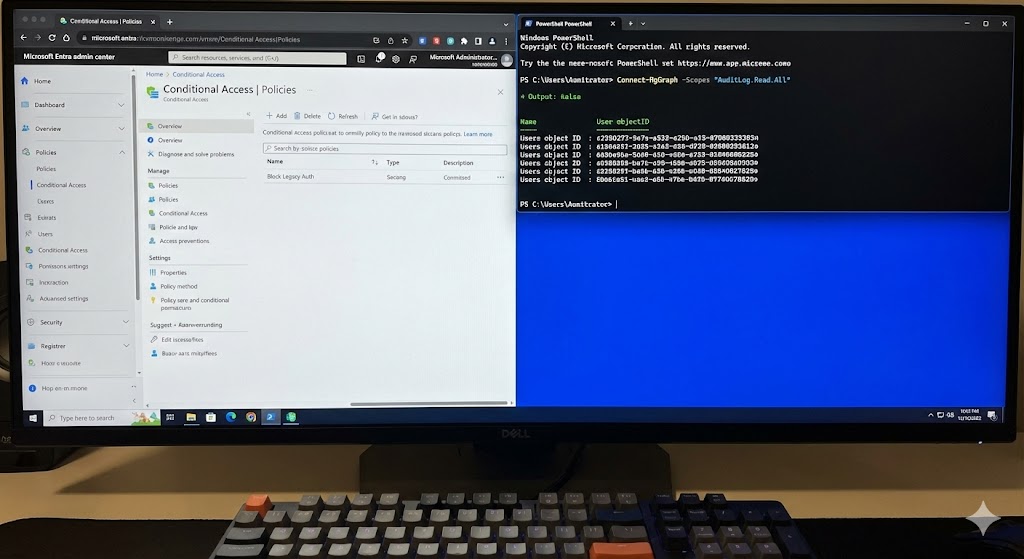
This section provides actionable PowerShell and Microsoft Graph techniques to troubleshoot connectivity, performance, and configuration for Azure SQL Database for Modern Apps. Save these as runbooks or pipeline steps for on-call diagnostics.
20.1 PowerShell — Check Database Connectivity & Status
Use the Az PowerShell module to query database status, firewall rules, and current DTU/vCore usage.
# Login to Azure


Connect-AzAccount

Select subscription

Select-AzSubscription -SubscriptionId "YOUR-SUBSCRIPTION-ID"

List SQL servers and databases

Get-AzSqlServer | ForEach-Object {
$server = $_
Get-AzSqlDatabase -ResourceGroupName $server.ResourceGroupName -ServerName $server.ServerName | Select-Object DatabaseName, Edition, Status, MaxSizeBytes
}

Check firewall rules for a given server

Get-AzSqlServerFirewallRule -ResourceGroupName "RG-Name" -ServerName "sqlserver-name"

Get DTU/vCore metrics via Azure Monitor

StartTime = (Get-Date).AddHours(-1)
$metrics = Get-AzMetric -ResourceId "/subscriptions/YOUR-SUBSCRIPTION-ID/resourceGroups/RG-Name/providers/Microsoft.Sql/servers/sqlserver-name/databases/db-name" -TimeGrain 00:01:00 -StartTime $StartTime -MetricName "cpu_percent","dtu_consumption_percent"
$metrics | Format-Table- Use `Get-AzSqlDatabase` to inspect DB edition and status.
- Query metrics with `Get-AzMetric` to identify CPU/DTU spikes.
- Automate diagnostics to save outputs to storage for postmortem analysis.
20.2 PowerShell — Triggering Failover & Managing Replicas
# Initiate a failover for Failover Group


Switch-AzSqlDatabaseFailoverGroup -ResourceGroupName "RG-Name" -ServerName "primary-server" -FailoverGroupName "failovergroup-name"Q: Can I script routine diagnostics and send to Teams/Slack?
A: Yes — capture outputs and use webhook connectors to notify on-call teams automatically.
20.3 Microsoft Graph & REST — Auditing and Diagnostic Settings
Some diagnostics and policy settings can be queried via REST and Microsoft Graph (for resource management scenarios) or via the ARM API. Use Az CLI or REST for automation where PowerShell isn't available.
# Example: Use Azure CLI to show diagnostic settings for a SQL resource


az monitor diagnostic-settings list --resource "/subscriptions/YOUR-SUBSCRIPTION/resourceGroups/RG-Name/providers/Microsoft.Sql/servers/sqlserver-name/databases/db-name"

Example REST: Get diagnostic settings (replace placeholders)

GET https://management.azure.com/subscriptions/{subId}/resourceGroups/{rg}/providers/Microsoft.Sql/servers/{serverName}/databases/{dbName}/providers/microsoft.insights/diagnosticSettings?api-version=2017-05-01-preview

Authorization: Bearer - Use ARM/REST APIs for non-PowerShell automation (e.g., cross-cloud pipelines).
- Diagnostic settings can route logs to Log Analytics, Event Hubs, or Storage for analysis.
20.4 Practical Troubleshooting Steps (Checklist)
- Confirm service health and Azure region status.
- Validate firewall rules, VNet rules, and managed identity permissions.
- Check connection string, TLS requirements, and client driver versions.
- Collect query performance metrics (Top CPU, long-running queries) via Query Store.
- Review automatic tuning recommendations and recent changes.
- Scale up temporarily if CPU/IO saturation is causing timeouts during investigation.
Q: What if my app can't connect after a configuration change?
A: Check connection strings, firewall/VNet rules, TLS versions, and identity permissions; consult diagnostic logs for errors and times of failure.

Conclusion — Why choose Azure SQL Database for Modern Apps?
In summary, Azure SQL Database for Modern Apps combines the operational efficiency of a fully managed PaaS with enterprise-grade features: high availability, built-in intelligence, global scalability, and deep Azure integration. Whether you’re building a modern web app, a set of microservices, or large-scale enterprise systems, Azure SQL gives you the flexibility, security, and tools to operate at scale.
- It reduces operational burden while providing enterprise features.
- Flexible pricing and scaling models fit varied application needs.
- Built-in intelligence and automation improve performance and reduce manual tuning.
Final FAQ — General
Q: How do I start with Azure SQL Database for Modern Apps?
A: Create an Azure SQL server in the Azure portal, choose the appropriate tier (serverless, provisioned, or elastic pool), configure networking and authentication (Azure AD recommended), and deploy your schema.
Q: Where can I learn more and get hands-on guides?
A: Visit the official Microsoft docs at Microsoft Azure SQL Docs, and refer to tailored articles on CloudKnowledge.






gpbvfhtmtj
10 Proven Reasons Azure SQL Database for Modern Apps Is the Best Choice in 2025
[url=http://www.gmq970dq0s74f3p79b6cqvnt3a1407k5s.org/]ugpbvfhtmtj[/url]
gpbvfhtmtj http://www.gmq970dq0s74f3p79b6cqvnt3a1407k5s.org/
agpbvfhtmtj