



Amazon S3 Glacier — Ultimate Guide to Archival Storage, Retrieval, Cost, Security & Troubleshooting
WordPress-ready, SEO optimized long-form guide. Links to key terms are pointed to cloudknowledge.in per request.
Overview — What is Amazon S3 Glacier?
Amazon S3 Glacier (commonly called Amazon S3 Glacier) is AWS’s low-cost archival offering designed for long-term data retention and compliance. It is now part of the S3 storage class family, offering different retrieval options and price points to balance cost against retrieval latency.
- Designed for long-term archival and regulatory retention.
- Part of S3 storage classes — easy transitions with lifecycle policies.
- Multiple tiers: Instant Retrieval, Flexible Retrieval, Deep Archive.
- Durability: 11 nines (99.999999999%) for objects.
Why choose Glacier? Because many organizations must keep data for years while minimizing monthly cost. Glacier is purpose-built for those use cases where data is rarely accessed but must be preserved — e.g., legal records, research datasets, and media archives.
S3 Glacier Storage Classes — Compare & Choose
S3 Glacier now appears as S3 storage classes. Main classes you’ll use:
- S3 Glacier Instant Retrieval — millisecond access for infrequently accessed but occasionally needed archives. (S3 Glacier Instant Retrieval)
- S3 Glacier Flexible Retrieval — formerly "Glacier"; flexible retrieval with options (expedited, standard, bulk). (S3 Glacier Flexible Retrieval)
- S3 Glacier Deep Archive — lowest cost, retrieval hours (12–48h typical). (S3 Glacier Deep Archive)
- Choose Instant Retrieval when sub-second access is required occasionally.
- Choose Flexible Retrieval for balance between cost and lower retrieval times (minutes to hours).
- Choose Deep Archive for rarely accessed data where cost is the top priority.
Data Durability & Redundancy
S3 Glacier inherits S3’s durability model: 11-nines of durability by redundantly storing objects across multiple Availability Zones. This is critical for long-term archives.
- 11 nines durability minimizes risk of data loss across years.
- Use Cross-Region Replication (CRR) if you need geographically separate copies for disaster recovery.
Security & Compliance
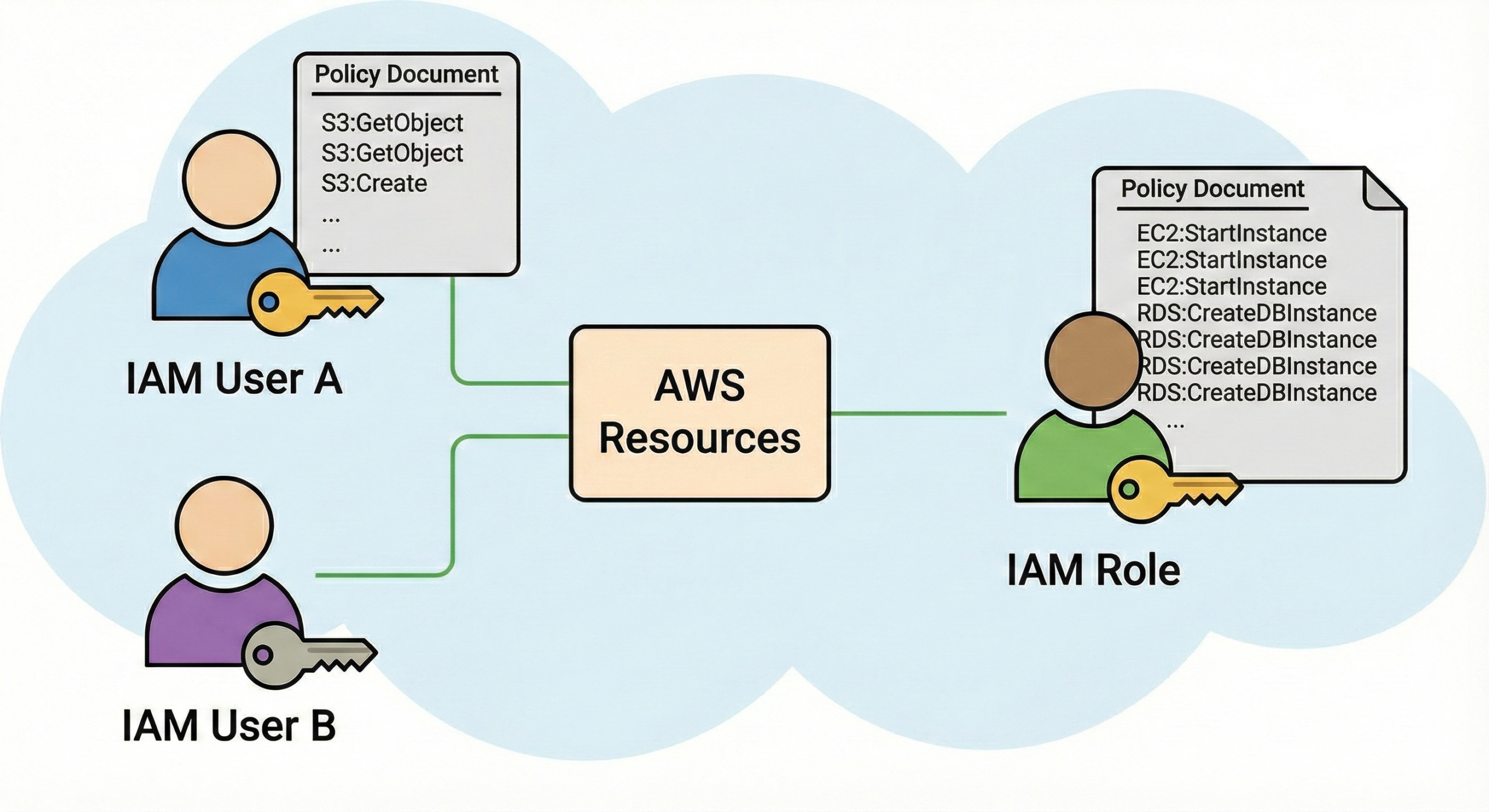
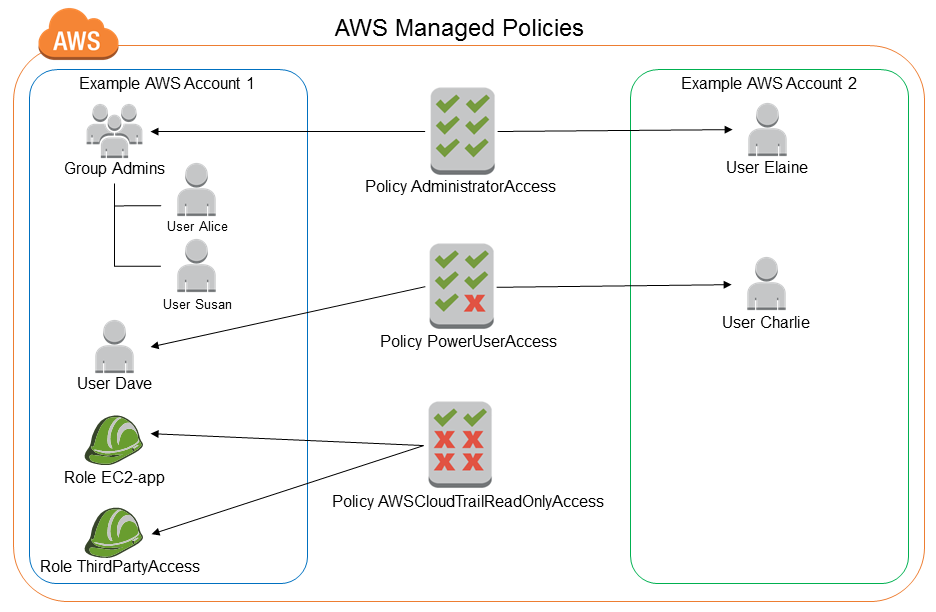
Glacier supports encryption at rest via AES-256 and AWS KMS for customer-managed keys. Access control is integrated with AWS IAM policies, S3 bucket policies, and VPC endpoints for private traffic. Audit trails are available via AWS CloudTrail and S3 Access Logs.
- Encrypt with KMS to control rotation and key policies.
- Use Bucket Policies + IAM roles for least privilege.
- Enable CloudTrail logging for all bucket and lifecycle events for compliance auditing.
- Vault Lock (legacy Glacier vaults) enforces WORM; use S3 Object Lock for WORM pattern in S3 storage classes.
Lifecycle Management — Automate transitions to Glacier
Use S3 Lifecycle Policies to transition objects from S3 Standard → Standard-IA → Glacier or Glacier Deep Archive after a specified number of days. This automates cost optimization.
{
  "Rules": [
    {
      "ID": "Move-to-Deep-Archive-after-365-days",
      "Status": "Enabled",
      "Filter": { "Prefix": "" },
      "Transitions": [
        {
          "Days": 365,
          "StorageClass": "DEEP_ARCHIVE"
        }
      ],
      "NoncurrentVersionTransitions": [],
      "AbortIncompleteMultipartUpload": { "DaysAfterInitiation": 7 }
    }
  ]
}
Apply with AWS CLI:
aws s3api put-bucket-lifecycle-configuration \
  --bucket my-archive-bucket \
--lifecycle-configuration file://lifecycle.json- Lifecycle transitions are free; charges apply after object moves to target storage class.
- Consider early deletion fees for Glacier classes (minimum storage duration applies: 90 days for Glacier Flexible, 180 days for Deep Archive).
- Test your lifecycle rule on a small bucket before global rollout.
Retrieval Options & Costs — Balancing speed vs cost
Retrieval types differ by storage class:
- Instant Retrieval: milliseconds, highest among Glacier classes but still far cheaper than Standard.
- Flexible Retrieval: Expedited (minutes), Standard (hours), Bulk (hours to 12+ hours) — cost scales with speed.
- Deep Archive: typically 12–48 hours; bulk retrievals optimize cost.
- Design retrieval lifecycle: only restore when you need to query or deliver archived data.
- Use S3 Select/Glacier Select to query archived data in-place when possible — avoids full restores and saves cost.
- Monitor retrieval job costs, and use SNS notifications for job completion.
APIs, SDKs, AWS CLI & PowerShell — Programmatic management
Glacier S3 storage classes are managed via the same S3 APIs, SDKs, and AWS CLI that you use for other S3 classes. Below are troubleshooting and operational snippets for AWS CLI and PowerShell (using CLI inside PowerShell for compatibility).
AWS CLI snippets
aws s3api list-objects-v2 \
  --bucket my-archive-bucket \
  --query "Contents[].[Key, StorageClass]" \
--output tableaws s3api restore-object \
--bucket my-archive-bucket \
--key path/to/object.tar.gz \
--restore-request '{"Days":3,"GlacierJobParameters":{"Tier":"Standard"}}'aws s3api head-object \
--bucket my-archive-bucket \
--key path/to/object.tar.gz \
--query "[Restore, StorageClass]"PowerShell (using AWS CLI in PowerShell sessions)
If you prefer PowerShell, invoking the AWS CLI inside PowerShell is reliable across environments. Example below:
# List objects and storage class in PowerShell using AWS CLI
aws s3api list-objects-v2 --bucket my-archive-bucket --query "Contents[].[Key,StorageClass]" --output table

# Initiate restore (Standard tier) from PowerShell
aws s3api restore-object --bucket my-archive-bucket --key "archive/2024/logs.zip" --restore-request '{"Days":7,"GlacierJobParameters":{"Tier":"Standard"}}'
Note: AWS also provides AWS Tools for PowerShell modules (AWS.Tools.S3, AWS.Tools.KMS). If you use those modules, commands such as Get-S3Object and Write-S3Object work for normal operations; however, lifecycle and restore operations are often easiest to script via AWS CLI or SDKs.
- Use CLI or SDKs to script lifecycle, audits, and restores.
- PowerShell users can use AWS Tools for PowerShell or call aws CLI commands directly.
- Always validate credentials and region context with
aws sts get-caller-identityor PowerShell equivalent.
Query-in-Place — S3 Select & Glacier Select
Before restoring entire large objects from Glacier, consider using S3 Select or Glacier Select (where supported) to query compressed data and return only the needed slices.
- Query-in-place saves time and money by avoiding full object retrieval.
- Supported formats: CSV, JSON, Parquet (check the exact support matrix for Glacier Select).
Integration with AWS Backup, Storage Gateway & Tape Gateway
Glacier integrates with AWS Backup and AWS Storage Gateway. Tape Gateway allows virtual tape backups to be stored in Glacier classes, supporting traditional backup workflows in a cloud-native way.
- Use Tape Gateway if migrating VTL workflows to the cloud.
- AWS Backup centralizes policies and simplifies cross-account backup management.
Monitoring & Alerting
Use these services for observability:
- CloudWatch Metrics — track storage usage, retrieval metrics, API errors.
- CloudTrail — audit access, lifecycle changes, restore requests.
- S3 Server Access Logs — detailed per-object access logs (can be expensive; use sparingly).
- AWS Config — validate bucket policies and encryption settings over time.
aws cloudwatch get-metric-statistics \
  --namespace "AWS/S3" \
  --metric-name "BucketSizeBytes" \
  --dimensions Name=BucketName,Value=my-archive-bucket Name=StorageType,Value=DeepArchiveStorage \
--start-time 2025-10-01T00:00:00Z --end-time 2025-11-01T00:00:00Z --period 86400 --statistics Average- Set CloudWatch alarms for abnormal retrieval patterns (spikes in restore jobs can cause high cost).
- Enable CloudTrail for full audit trails; send logs to a secure S3 bucket and analyze with Athena.
Cost Model & Optimization Tips
Glacier’s cost model has several components: storage per GB/month, retrieval request charges, data transfer, and early deletion (minimum storage duration). Optimization strategies:
- Define retention lifecycle intelligently (avoid moving data to Deep Archive if it’s likely to be accessed shortly).
- Use object tagging to create lifecycle rules per tag (e.g., tag
retention:7years). - Consolidate small objects to reduce per-request overhead (many small objects cost more to manage).
- Query-in-place to avoid unnecessary restores.
- Test retrieval costs with representative sample objects before mass retrievals.
- Monitor early deletion fees (90/180 day minimums for Glacier classes).
Common Use Cases
Typical use cases where Glacier shines:
- Regulatory archives (FINRA, SEC, HIPAA records).
- Media & entertainment archives (raw footage, masters).
- Research datasets (genomics, climate data) requiring long retention.
- Financial & legal documents requiring WORM or long-term retention.
- Match retrieval SLA to business needs — do not over-optimize cost at the expense of required retrieval latency for critical records.
Hybrid Scenarios — Storage Gateway and Virtual Tape Library
AWS Storage Gateway (Tape Gateway) enables customers to keep existing backup workflows while storing deduplicated/virtual tape archives in S3 Glacier classes. This is particularly useful for enterprises migrating from on-prem backup appliances to cloud.
- Tape Gateway helps lift-and-shift backup workflows without changing backup software.
- Design retention and retrieval windows according to restore-time objectives for tapes.
Cross-Region Replication & Disaster Recovery
If your compliance or DR policy requires geographically separate archives, use S3 Cross-Region Replication (CRR). Keep in mind that CRR for Glacier classes will replicate object metadata and transitions appropriately.
- CRR increases storage costs but reduces risk from region-wide events.
- Test restore procedures in the target region before implementing CRR broadly.
Data Deletion & Retention Policies
Understand minimum retention times and deletion penalties. Objects moved to Glacier classes have a minimum chargeable period (e.g., 90 or 180 days). Deleting earlier results in a prorated early deletion charge.
- Plan retention windows carefully to avoid unexpected early deletion costs.
- Use object tags and lifecycle rules to automatically expire objects after required retention.
Troubleshooting Guide — Step-by-step with scripts
Below are common issues and runbook-style steps with commands you can paste into PowerShell or a terminal (AWS CLI). Each problem includes diagnostic commands and remediation suggestions.
Issue: “I can’t find objects I moved to Glacier”
Diagnostics:
# List objects with storage class filter
aws s3api list-objects-v2 --bucket my-archive-bucket --query "Contents[?StorageClass=='DEEP_ARCHIVE'].[Key,LastModified]" --output tableRemediation:
- Confirm lifecycle policy was applied:
aws s3api get-bucket-lifecycle-configuration --bucket my-archive-bucket - Check IAM permissions — the calling user must have
s3:GetObjectands3:ListBucket. - Verify if objects were replaced or removed by other jobs — check CloudTrail for
DeleteObjectevents.
Issue: “Restore request stuck or not completing”
Diagnostics:
aws s3api head-object --bucket my-archive-bucket --key "archive/2023/bigdata.tar.gz" --query "Restore"Remediation:
- Check restore tier: expedited may fail if capacity is limited — switch to standard/bulk for large restores.
- Check CloudWatch and CloudTrail for API errors.
- Ensure the object is not encrypted with a KMS key lacking permissions to the requester (KMS key policy must allow decrypt).
Issue: “Unexpected high cost due to restores”
Diagnostics:
# List restore events using CloudTrail (stored in an S3 bucket) or use AWS Cost Explorer to find spikes by service
aws ce get-cost-and-usage --time-period Start=2025-10-01,End=2025-11-01 --metrics "UnblendedCost" --filter '{ "Dimensions": { "Key": "SERVICE", "Values": ["Amazon Simple Storage Service"]}}' --granularity MONTHLYRemediation:
- Educate consumers about retrieval tiers & costs; consider creating guardrails with budgets and Service Quotas.
- Implement CloudWatch alarms for number of restore requests or data retrieval volume.
- Use lifecycle rules to keep frequently accessed data in cheaper, faster classes instead of Glacier Deep Archive.
Troubleshooting Script: Find objects moved to Glacier and recent restores
# PowerShell script using AWS CLI to list Glacier objects and recent restores
$bucket="my-archive-bucket"
# List DEEP_ARCHIVE objects
aws s3api list-objects-v2 --bucket $bucket --query "Contents[?StorageClass=='DEEP_ARCHIVE'].[Key,LastModified]" --output table

# Show recent restore events by searching CloudTrail logs (if pushed to S3 and indexed)
# Example: use Athena or download CloudTrail files and grep for RestoreObject
- Always check CloudTrail for API-level diagnostics when things behave unexpectedly.
- Verify KMS and IAM permissions when restores fail due to access/permission errors.
Automation & Sample Runbooks
Automate your archival lifecycle and monitoring with Lambda and CloudWatch Events (EventBridge). Example automation patterns:
- Lambda triggered monthly to verify objects older than N days have lifecycle tags and create tickets for exceptions.
- EventBridge rule to notify via SNS whenever a restore job finishes or fails.
1. Create EventBridge rule filtering for S3 Restore events.
2. Rule target: SNS topic or Lambda function.
3. Lambda inspects event, writes details to monitoring channel (Slack/email), and optionally (if permissioned) triggers additional processes.
4. Use DynamoDB to store restore job metadata and track durations/costs.
- Automation reduces human error and improves auditability for restores and retention enforcement.
Migration Strategies — From On-Prem & Other Clouds
Common approaches:
- Use AWS DataSync for file share migration to S3, then apply lifecycle to Glacier classes.
- Use Storage Gateway (File Gateway or Tape Gateway) for seamless integration with backup systems.
- For large cold datasets, use Snowball to ship and import data into S3 then transition to Glacier.
- Choose migration tool based on dataset size, network bandwidth, and transfer time tolerance.
- Include checksum validation in migration pipelines to ensure data integrity.
Practical Examples & Templates (Lifecycle, Restore, Monitoring)
Lifecycle rule template (tag based):
{
  "Rules": [
    {
      "ID": "Retain-7-years-by-tag",
      "Status": "Enabled",
      "Filter": {
        "Tag": { "Key": "retention", "Value": "7years" }
      },
      "Transitions":[
        {"Days":30,"StorageClass":"STANDARD_IA"},
        {"Days":365,"StorageClass":"DEEP_ARCHIVE"}
      ],
      "Expiration": { "Days": 365*7 }
    }
  ]
}
Restore example (check & automation):
# Trigger restore and poll status in PowerShell
$bucket="my-archive-bucket"
$key="archive/2020/financials.q1.zip"
# initiate
aws s3api restore-object --bucket $bucket --key $key --restore-request '{"Days":5,"GlacierJobParameters":{"Tier":"Standard"}}'
# poll
while($true){
  $r = aws s3api head-object --bucket $bucket --key $key --query "Restore"
  if($r -match "ongoing-request=\"false\""){ break }
  Start-Sleep -Seconds 60
}
Write-Host "Restore complete. You can GET the object now.";- Always poll
head-objectto confirm restore completion. - Use SNS to receive notifications rather than polling at scale.
Sample Audit Checklist Before Decommissioning On-Prem Backup
- Validate checksum integrity between source and S3 destination.
- Confirm lifecycle rules and retention tags are applied.
- Enable encryption (KMS) and validate KMS key policies for all consumers.
- Set up monitoring & billing alerts for data egress and retrieval spikes.
- Test restores from Glacier Flexible and Deep Archive tiers.
Frequently Asked Questions (FQUs)
A: Flexible Retrieval offers multiple retrieval tiers including expedited (minutes), standard (hours), and bulk (hours), while Deep Archive is the lowest cost with retrievals typically taking 12–48 hours.
A: Glacier Flexible Retrieval has a typical minimum billing duration (e.g., 90 days). Deep Archive typically has longer minimums (e.g., 180 days). Check the exact numbers for your region and class — early deletions will incur pro-rata charges.
A: Use S3 Select or Glacier Select (where available) to query objects in place, returning only the required data and avoiding full restores.
A: Implement IAM policies that restrict s3:RestoreObject to specific roles, use approval workflows, and deploy CloudWatch billing alarms for retrieval charges.
A: Use S3 Object Lock for WORM semantics with S3 storage classes (including Glacier classes) and the legacy Glacier Vault Lock for older Glacier vaults.
- Always double-check region, encryption, and IAM permissions before restoring.
- Use tags and lifecycle automation to reduce human error and cost drift.
SEO & WordPress Guidance (small checklist for publication)
- Title tag — keep under 70 characters and include "Amazon S3 Glacier".
- Meta description — summarize within 155–160 chars (we provided a 120-char summary above that can be adapted).
- Use H1 once (above), H2 for main sections, H3 for subtopics — this document follows that hierarchy.
- Internal linking: we linked important keywords back to cloudknowledge.in per request.
- Feature a featured image (royalty-free) — not embedded in this HTML as requested, but include alt text like "Amazon S3 Glacier archival storage".
- Avoid noindex/noarchive meta tags (per request) — do not add any robots
noindexor similar tags.
Checklist Before Publishing
- Replace
my-archive-bucketand object keys with your real bucket names. - Test all CLI/PowerShell commands in a development AWS account before running in production.
- Add any organizational-specific compliance text (HIPAA, FINRA, etc.) if needed.
Conclusion
Amazon S3 Glacier is a powerful, cost-effective archival platform when used with planning: lifecycle policies, proper encryption and IAM controls, monitoring, and thoughtful retrieval design. The tools and runbooks provided here offer a practical starting point for operations teams and architects to design GDPR-, HIPAA-, and other compliance-friendly archival systems that keep long-term storage costs predictable and manageable.
- Choose the Glacier tier based on access SLA and cost tradeoffs.
- Automate lifecycle transitions and use tags for policy granularity.
- Monitor restore activity and guard against unexpected retrieval costs.
- Script restores and audits with AWS CLI/PowerShell; prefer SNS for notifications.




Fallon
Actually no matter if someone doesn’t be aware of then its up to other people that they
will help, so here it occurs.
My webpage; Our website (http://www.newyork-chronicle.com/)