


Core AWS Services (The "Big Three"): Amazon EC2, Amazon S3 & AWS Lambda — Deep Dive, Best Practices, and Architecture Patterns

Overview: Why EC2, S3 & Lambda matter
When people talk about the "big three" AWS services they frequently mean the core building blocks for most cloud applications:
- Amazon EC2 — virtual machines for full control of compute resources
- Amazon S3 — highly durable object storage used for static assets, backups, and data lakes
- AWS Lambda — serverless compute that executes code in response to events
Together they provide a flexible and cost-effective foundation: EC2 for long-running, customizable compute; S3 for persistent object storage and event-driven integrations; Lambda for lightweight, autoscaling compute without server management. Understanding when and how to use each — and how they interoperate — is critical for cloud architects, developers, and operators.
Amazon EC2 — Deep Dive
Amazon EC2 (Elastic Compute Cloud) provides resizable compute capacity in the cloud — virtual machines (instances) that you can run, stop, resize, or replace. EC2 is the most flexible compute option in AWS and remains the default choice for workloads that require low-level OS control, specialized hardware, or custom networking.
Key concepts
- Instance types — CPU, memory, storage and networking combinations (general purpose M, compute-optimized C, memory-optimized R, storage-optimized I/O-centric types).
- AMIs — Amazon Machine Images used to create instance images (OS + preinstalled software).
- Placement groups — cluster, spread, and partition strategies for reducing latency and increasing availability.
- Elastic Block Store (EBS) — persistent block storage attached to EC2 instances.
- Auto Scaling Groups (ASG) — automatically scale instance counts based on metrics or schedules.
When to choose EC2
Choose EC2 when you need:
- Full OS control, custom kernel, or specific driver support.
- Special hardware: GPU (for ML), FPGA, or high-performance networking.
- Stateful applications requiring attached block storage (EBS) or local NVMe devices.
- Long-running services where constant runtime is cheaper than rapid ephemeral tasks.
Hands-on example: Auto Scaling + Launch Template
// Example architecture at a glance
```

1. Create AMI with app + dependencies.
2. Create Launch Template referencing the AMI, instance type, EBS volumes, and IAM instance profile.
3. Create Auto Scaling Group with min/desired/max instance counts.
4. Attach to ALB (Application Load Balancer) with health checks.
5. Configure CloudWatch alarms to scale in/out based on CPU or custom metrics. Performance & new instance families (notes)
AWS regularly releases new instance families for higher compute density, better efficiency, or specialized workloads (e.g., M8a, C8i families). When planning capacity, monitor release notes for improved price/perf and testing on representative workloads before migrating production.

Best practices for EC2
- Use Launch Templates for repeatability and version control.
- Prefer managed services where applicable — EKS / ECS for container orchestration rather than raw EC2 where possible.
- Rightsize regularly — use Trusted Advisor, Cost Explorer & Compute Optimizer to match instance types to workloads.
- Use Spot instances for fault-tolerant, interruptible workloads to cut compute costs dramatically.
- Automate AMI creation (Packer + EC2 Image Builder) for consistent deployments and security patching.
- Encrypt EBS volumes by default and use IAM roles for instance permissions.
Common pitfalls
Incorrect AMI management, lack of patching, improper IAM roles on instances, and unmanaged EBS snapshots can create security and cost problems. Automated backup policies, tag-based lifecycle rules, and infrastructure as code (IaC) help mitigate these issues.
```Amazon S3 — Deep Dive
Amazon S3 (Simple Storage Service) is AWS's object storage — massively scalable, highly durable (11 9's for multi-region replication use cases), and low cost for many storage access patterns. S3 is used for static website hosting, backups, data lakes, archives, and as event sources for serverless pipelines.
```Key concepts
- Buckets — top-level containers for objects with global unique names.
- Objects — key + value + metadata; S3 treats data as objects.
- Storage classes — Standard, Intelligent-Tiering, Standard-IA, One Zone-IA, Glacier Flexible Retrieval, Glacier Deep Archive.
- Versioning — keep object versions to prevent accidental deletes.
- Object Lock — WORM (Write Once Read Many) capabilities for compliance.
- Lifecycle policies — automatically transition or expire objects.
When to choose S3
S3 is the right choice for:
- Static asset hosting (images, JS/CSS), large binary storage, backup/restore, and data lakes.
- Event-driven workflows using S3 Event Notifications to trigger Lambda or SQS.
- Storing large volumes of infrequently accessed data with lifecycle policies to Glacier.
Hands-on example: S3-backed data pipeline
// Typical flow
   ```
6. Clients upload files to S3 (pre-signed URLs or direct uploads).
7. S3 sends event to SQS or AWS Lambda on object create.
8. Lambda validates/processes file and writes metadata to DynamoDB or RDS.
9. Processed artifacts stored back in S3 on a different prefix/bucket.
10. Lifecycle rules transition originals to Glacier after 30/90/365 days. 
Best practices for S3
- Enable encryption at rest and in transit: use SSE-S3, SSE-KMS, or SSE-C and always encrypt with TLS.
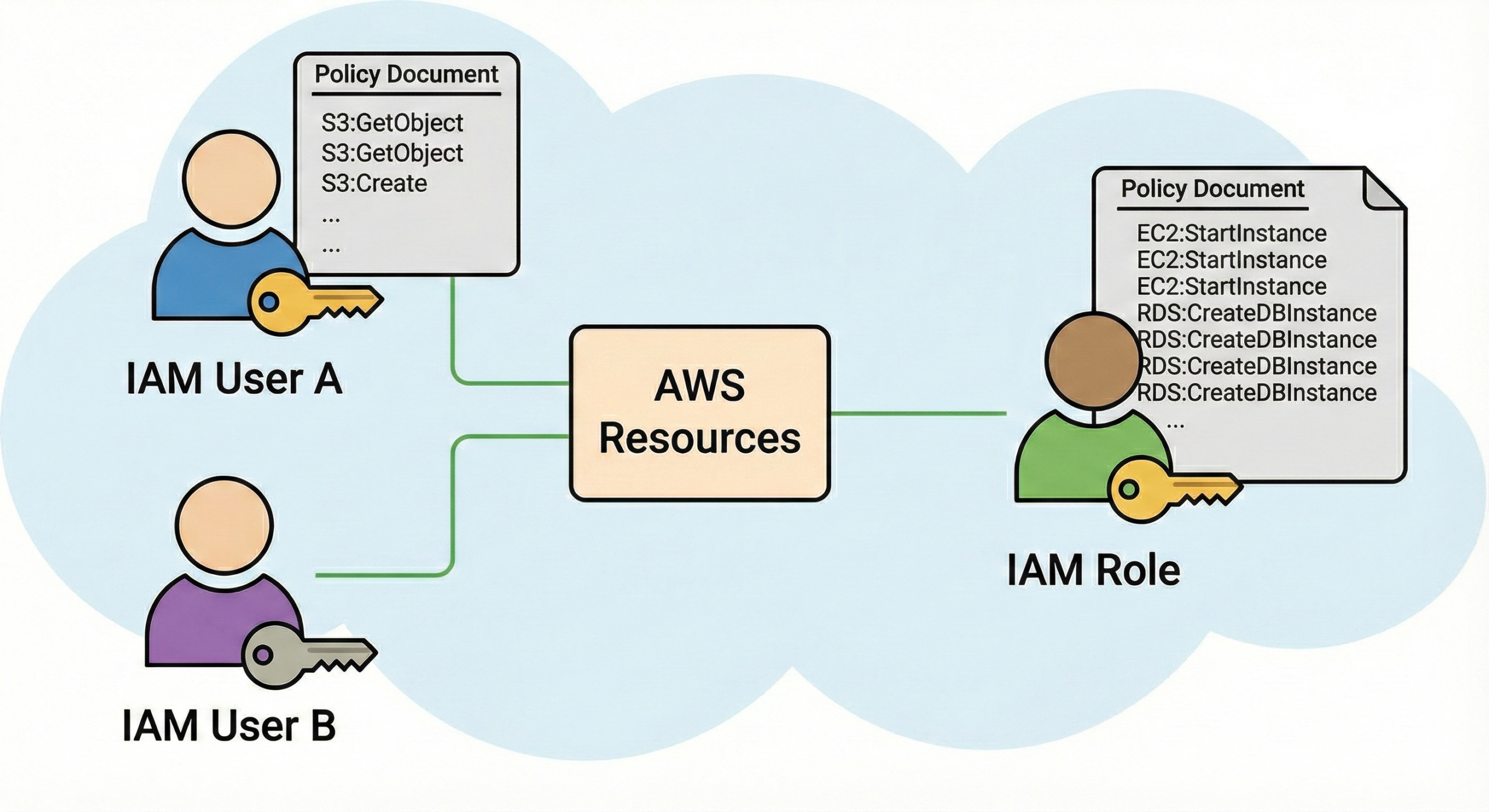
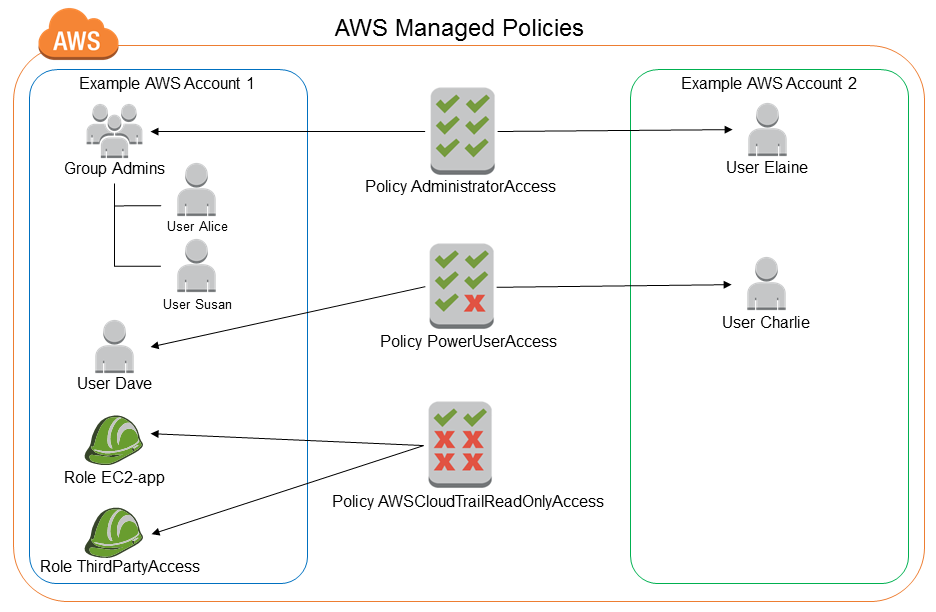
- Apply least-privilege IAM policies and prefer bucket policies with resource-level restrictions.
- Enable versioning and replication for critical data and cross-region DR where required.
- Use lifecycle policies to move cold data to Glacier and reduce storage costs.
- Enable S3 Access Logging / AWS CloudTrail to record access patterns and for audits.
- Use presigned URLs for secure time-limited uploads and downloads.
S3 performance tips
S3 supports extremely high request rates. To optimize performance:
- Design your key prefixes to avoid hotspots; distribute object keys.
- Use multipart upload for large objects (recommended >100 MB).
- Leverage CloudFront for CDN and to reduce latency for global customers.
Common pitfalls
Publicly exposed buckets are one of the most common security mistakes. Always verify bucket ACLs, policies, and Block Public Access settings. Also watch for unexpectedly expensive GET/PUT activity (e.g., crawlers or misconfigured clients) that can drive costs up.
```AWS Lambda — Deep Dive
AWS Lambda is the serverless compute platform that runs code in response to events without requiring provisioning or managing servers. You pay for what you run — billed by GB-seconds and number of requests — making it ideal for event-driven microservices, lightweight APIs, and glue code.
```Key concepts
- Functions — the unit of deployment (code + configuration).
- Runtime — supported languages (Node.js, Python, Java, Go, .NET, Ruby) and custom runtimes via AWS Lambda Runtime API.
- Event sources — S3, DynamoDB Streams, Kinesis, API Gateway, SQS, CloudWatch Events, and more.
- Concurrency — reserved concurrency and account limits; Lambda scales horizontally based on incoming events.
- Cold start — initial invocation latency when a new execution environment is created.
When to choose Lambda
Choose Lambda for:
- Event-driven processes (file processing, webhook handling, data transformations).
- Short-running, stateless workloads where provisioning servers is unnecessary.
- Glue logic between managed services (e.g., S3 to DynamoDB to notifications).
Hands-on example: S3 -> Lambda image processing
// Flow
    ```
11. Client uploads image to S3 via presigned URL.
12. S3 triggers a Lambda function (S3 ObjectCreated).
13. Lambda generates thumbnails, stores them back to S3, and writes metadata to DynamoDB.
14. Lambda publishes a message to SNS notifying downstream services. 
Best practices for Lambda
- Keep functions small and single-purpose; think micro-functions rather than monoliths.
- Manage dependencies via layers or container images (for large binaries).
- Use Provisioned Concurrency for latency-sensitive workloads to avoid cold starts.
- Set reserved concurrency to protect downstream resources (databases, APIs) from spikes.
- Instrument your functions with structured logs and distributed tracing (AWS X-Ray).
Common pitfalls
Treating Lambda as a drop-in replacement for long-running processes is a mistake — Lambda has time limits per invocation and limits on ephemeral disk space (/tmp). Also, unbounded concurrency can overwhelm downstream stateful services unless throttling or reserved concurrency is configured.
```Choosing between EC2, S3-backed compute & Lambda
These services are complementary, not mutually exclusive. Use the decision points below when choosing:
```Decision matrix (high level)
| Need | Use EC2 | Use Lambda |
|---|---|---|
| Full OS control | Yes | No |
| Short, event-driven code | Possible | Ideal |
| Low latency, predictable performance | Yes (with right sizing) | Possible (with provisioned concurrency) |
When to combine
Common architectures combine them: store data in S3, run fast event processors in Lambda, and keep stateful or specialized services on EC2 or managed container services (ECS/EKS) for long-running workloads.
```Architecture patterns & real-world examples
```Static website with global distribution
Host static files in S3 (public read) + CloudFront in front for CDN. Use Lambda@Edge for lightweight personalization and CloudFront Functions for header rewrites or small modifications.
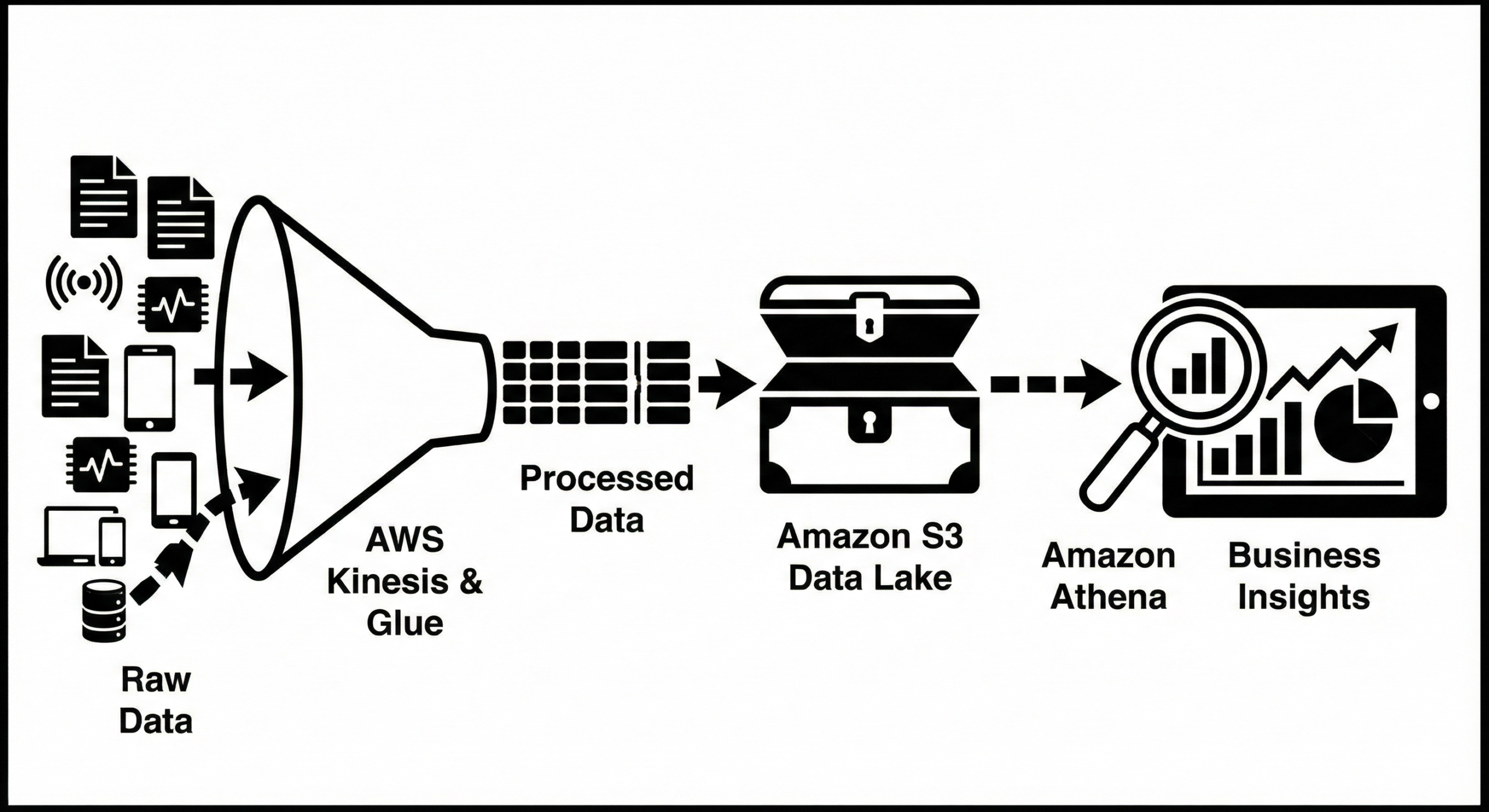
Event-driven ETL pipeline
- Raw files uploaded to S3 (ingest bucket).
- S3 event triggers Lambda to validate & enrich data.
- Lambda writes records to Kinesis or DynamoDB Streams for downstream processing.
- Batch transformations run on EC2/ECS for heavy compute jobs and write results back to S3.
Cost-sensitive batch processing
Use EC2 Spot Instances in an Auto Scaling Group for worker pools processing queued jobs (SQS or Kinesis). This reduces costs while keeping predictable throughput. Use lifecycle hooks to drain Spot instances before termination.
Serverless API with low operational overhead
API Gateway -> Lambda -> DynamoDB/S3. Use API Gateway caching, Provisioned Concurrency for predictable backend latency, and Lambda layers to share common libraries.

Security & Compliance best practices
Security spans identity, data protection, network controls, and supply chain. Below are actionable recommendations for each service.
```EC2 security
- Use IAM roles for instance credentials; never store secrets on instances.
- Enable EBS encryption and enable AMIs that are hardened and scanned.
- Segment workloads with VPCs, private subnets and use NAT gateways for outbound access when necessary.
S3 security
- Enable S3 Block Public Access at account and bucket levels.
- Use bucket policies and least-privilege IAM policies; avoid wildcard principals.
- Enable server-side encryption (SSE-KMS) for sensitive data, and use Object Lock for compliance retention.
Lambda security
- Assign minimal IAM permissions to functions and use resource-based policies only when needed.
- Scan dependencies for vulnerabilities and keep runtimes up-to-date.
- Use VPC access carefully — Lambda functions that need private resource access in VPC should use ENI optimizations or use RDS Proxy to reduce connections.
Audit & logging
Enable CloudTrail, S3 access logs, VPC Flow Logs, GuardDuty, and AWS Config to track changes and detect suspicious activities. Aggregate logs into a central logging account or S3 bucket, and use Amazon Athena for query-based forensic analysis.
```Cost optimization & capacity planning
Each service has unique billing characteristics:
- EC2: billed per instance-hour (or second for Linux) plus attached EBS & data transfer. Use Reserved Instances / Savings Plans for predictable usage, and Spot for flexible workloads.
- S3: storage size, number of requests (GET/PUT), and data retrieval costs for archival storage classes.
- Lambda: pay per request and execution time (GB-seconds). Optimize memory & runtime to reduce cost per invocation.
Practical cost tips
- Run Cost Explorer weekly; set budgets & alerts.
- Tag resources consistently for chargeback and reporting.
- Use S3 Intelligent-Tiering if access patterns are unpredictable.
- Right-size EC2 instances with Compute Optimizer recommendations.
- Consolidate small Lambda functions where appropriate to reduce packaging overhead but balance with single-responsibility principle.
Observability, monitoring, and troubleshooting
Operational excellence requires telemetry. Use these AWS capabilities and patterns:
- CloudWatch metrics & alarms for EC2 CPU, EBS IOPS, and ASG events.
- CloudWatch Logs & structured JSON logs for Lambda with correlation IDs.
- X-Ray for distributed tracing across Lambda, API Gateway, and services.
- Use dashboards and automated runbooks for common incidents.
Debugging tips
For intermittent EC2 issues, capture system logs and use SSM Session Manager for remote debugging without opening SSH ports. For Lambda cold-starts, analyze initialization duration in X-Ray and use provisioned concurrency if necessary.
```Migration strategies
Planning a migration is about tradeoffs: rehost, replatform, refactor, or replace.
```Rehost ("lift and shift")
Quickest path: move VMs to EC2 with minimal change. Use AWS Application Migration Service for automated lift & shift.
Replatform
Move apps to managed services (e.g., RDS, Elasticache) while keeping code changes minimal. Consider moving web-tier to containers on ECS/EKS, or to serverless if suitable.
Refactor
Rewrite parts of the application to be serverless (Lambda + DynamoDB + S3) for improved scalability and lower operational overhead. This requires more development effort but often lowers long-term costs and improves agility.
Data migration to S3 (large datasets)
Use AWS Snowball for petabyte-scale data transfer if network bandwidth is limiting. For online migration, use multi-part uploads, parallel clients, or Transfer Acceleration for cross-region uploads.
```FAQs
```Q: When should I always use Lambda instead of EC2?
A: Use Lambda for stateless event-driven workloads that complete within the execution limit, and where scaling to zero and per-execution billing are advantages. Use EC2 when you need full OS control, specialized hardware, or long-lived connections.
Q: Is S3 suitable for a relational database backup?
A: Yes. Use S3 to store DB dumps or snapshots. For RDS automated snapshots, you can export to S3; consider lifecycle rules and Glacier for long-term retention.
Q: How do I secure S3 objects from public exposure?
A: Enable S3 Block Public Access, review bucket policies and ACLs, use IAM conditions and principal restrictions, and periodically run AWS Trusted Advisor checks or open-source tools like detect-secrets and cloud security scanners.
Q: How can I reduce EC2 costs for dev/test environments?
A: Use smaller instances, schedule stopping non-production instances when unused (use AWS Instance Scheduler), or run ephemeral environments using spot instances or container-based solutions.
```Conclusion & further reading
Amazon EC2, Amazon S3, and AWS Lambda form the core trio of compute and storage in AWS. Each has distinct strengths and trade-offs — EC2 for control and specialized compute, S3 for durable and cheap object storage, and Lambda for event-driven serverless compute. Instead of seeing them as competitors, think of them as complementary tools to design resilient, cost-effective, and scalable systems.
```Start by mapping your workload needs to the decision points in this guide. Prototype using small proofs-of-concept (POCs), measure results, and iterate. Use AWS best-practice tooling (Cost Explorer, Trusted Advisor, Compute Optimizer, CloudWatch) to keep your cloud healthy and optimized.



inscreva-se na binance
Can you be more specific about the content of your article? After reading it, I still have some doubts. Hope you can help me. https://accounts.binance.info/sk/register?ref=WKAGBF7Y