

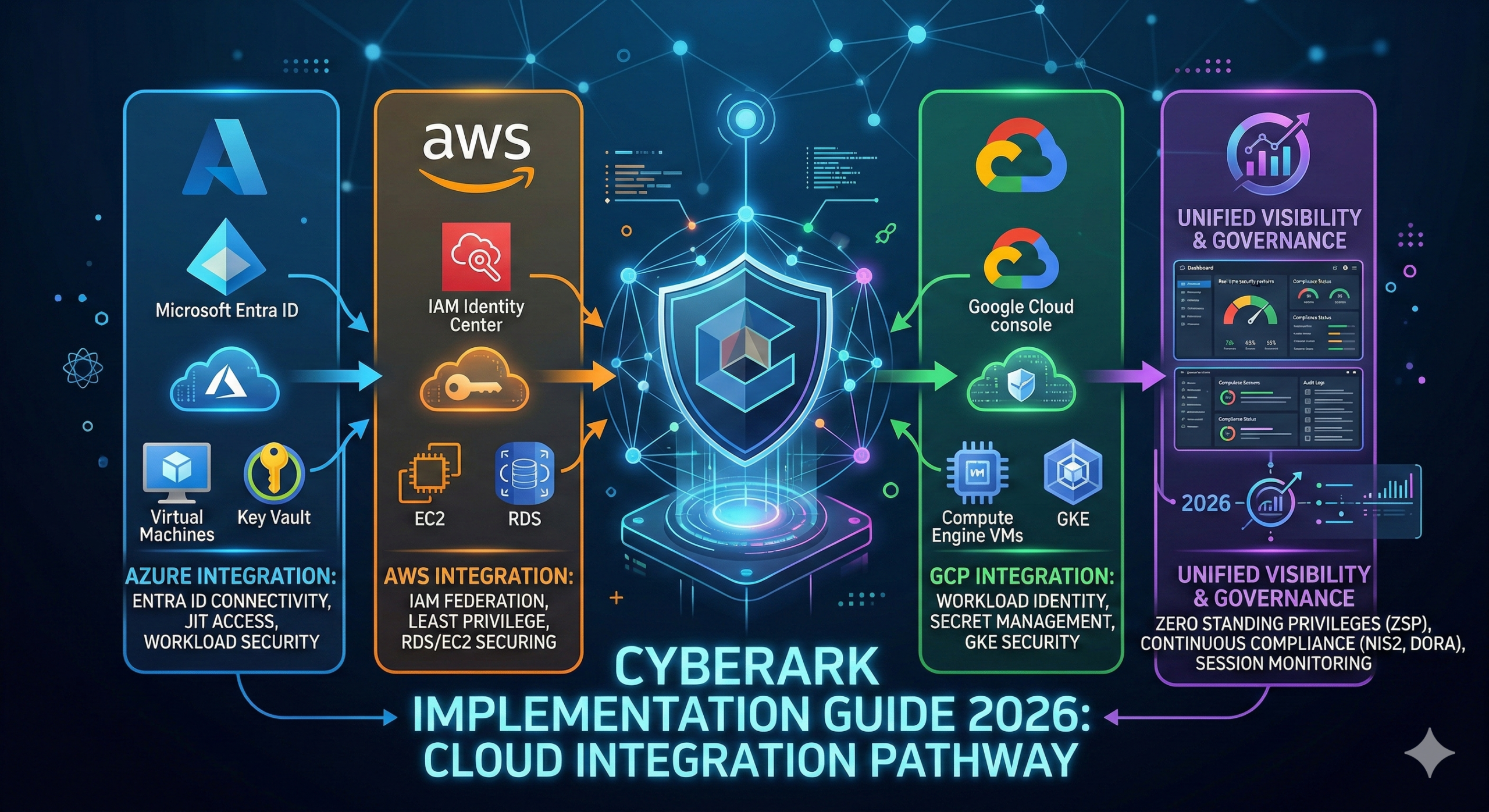
CyberArk Implementation Guide 2026: Powerful 10-Step Integration with Azure, AWS & GCP
Focus Keyword: CyberArk Implementation Guide
Short URL: https://cloudknowledge.in/cyberark-implementation-guide
SEO Meta Description: CyberArk Implementation Guide covering integration with Azure, AWS, GCP, licensing cost, advantages, disadvantages & troubleshooting using PowerShell and Graph API.
CyberArk Implementation Guide: Complete Enterprise Security Blueprint
CyberArk Implementation Guide is the ultimate resource for organizations looking to secure privileged access across hybrid and multi-cloud environments. In today's rapidly evolving cybersecurity landscape, protecting privileged credentials is not optional — it is mission-critical.

Table of Contents
- What is CyberArk?
- Why CyberArk is Needed in Corporate Environments
- How CyberArk Helps in Enterprise Security
- Where CyberArk is Used
- Step-by-Step Integration with Azure
- Step-by-Step Integration with AWS
- Step-by-Step Integration with GCP
- Advantages and Disadvantages
- Licensing Cost and Identity Providers
- PowerShell & Graph API Troubleshooting
- FAQs
What is CyberArk?
CyberArk is a leading Privileged Access Management (PAM) solution that secures, controls, monitors, and audits privileged access across enterprise IT environments. It helps organizations protect sensitive credentials such as:
- Domain Admin accounts
- Cloud root accounts
- Service accounts
- Application credentials
- SSH keys
- API keys
CyberArk consists of core components:
- Privileged Vault
- Privilege Session Manager (PSM)
- Password Vault Web Access (PVWA)
- Central Policy Manager (CPM)
- Conjur for DevOps
For deep cloud IAM knowledge, you may also explore Microsoft Entra Conditional Access Guide .
Why CyberArk is Needed in Corporate Environment
In modern enterprises, privileged accounts are prime targets for attackers. A single compromised admin credential can lead to:
- Data breaches
- Ransomware attacks
- Unauthorized lateral movement
- Compliance violations
According to IBM Security Cost of Data Breach Report , compromised credentials remain one of the top attack vectors.
Key Reasons CyberArk is Needed:
- Zero Trust Security Model implementation
- Privileged credential rotation
- Session monitoring & recording
- Regulatory compliance (ISO, SOC2, HIPAA)
- Multi-cloud governance
How CyberArk Helps in Enterprise Environment
CyberArk Implementation Guide ensures:
- Automatic password rotation
- Session isolation
- Multi-factor authentication
- Just-in-time privileged access
- Centralized credential vaulting
It integrates seamlessly with cloud IAM platforms like:
Where We Use CyberArk
- On-Prem Active Directory
- Azure Virtual Machines
- AWS EC2 Instances
- GCP Compute Engine
- Database Servers
- Kubernetes Clusters
- DevOps Pipelines
Step-by-Step: Integrate CyberArk with Azure
Step 1: Prerequisites
- Azure Subscription
- Admin Access in Entra ID
- CyberArk Vault Installed
Step 2: Create App Registration
Go to Azure Portal → App Registration → New Registration
Step 3: Assign API Permissions
- Directory.Read.All
- User.Read.All
- Group.Read.All
Step 4: Grant Admin Consent
Step 5: Configure SAML or OIDC
Use Enterprise Application → SAML Configuration.
PowerShell Validation Script
Connect-MgGraph -Scopes "Directory.Read.All"
Get-MgUser -Top 5
Troubleshooting Graph API
Invoke-RestMethod -Headers @{Authorization="Bearer $token"} `
-Uri "https://graph.microsoft.com/v1.0/users"
Step-by-Step: Integrate CyberArk with AWS
Step 1: Create IAM Role
- Go to AWS IAM
- Create Role for CyberArk
- Attach AdministratorAccess (Test Only)
Step 2: Configure Access Keys
Step 3: Add Platform in CyberArk
AWS CLI Validation
aws iam list-users
Step-by-Step: Integrate CyberArk with GCP
Step 1: Create Service Account
Step 2: Assign IAM Roles
- Compute Admin
- Security Admin
Step 3: Upload JSON Key to CyberArk
gcloud Validation
gcloud compute instances list
Advantages of CyberArk
- Enterprise-grade security
- Session recording
- Compliance ready
- Strong cloud integration
- Privileged threat analytics
Disadvantages of CyberArk
- High licensing cost
- Complex deployment
- Requires skilled administrators
Licensing Cost & IDP Used
CyberArk licensing depends on:
- Number of privileged accounts
- Number of users
- Cloud or On-Prem deployment
Approximate enterprise cost starts from $3,000+ per year depending on modules.
Identity Providers Supported
- Microsoft Entra ID
- Okta
- Ping Identity
- ADFS
PowerShell Troubleshooting Commands
Get-ADUser -Filter * -Properties *
Test-NetConnection vault.company.com -Port 1858
Frequently Asked Questions (FAQs)
1. Is CyberArk only for large enterprises?
No, mid-size organizations can also implement it.
2. Does CyberArk support multi-cloud?
Yes, it supports Azure, AWS, GCP.
3. Is MFA mandatory?
Strongly recommended.
4. Can CyberArk rotate cloud passwords automatically?
Yes, using policy manager.
Key Takeaways
- CyberArk secures privileged credentials
- Supports hybrid & multi-cloud
- Improves Zero Trust security
- Essential for compliance
For more IAM and cloud security deep dives, visit Cloud Knowledge.
CyberArk Implementation Guide: Architecture Deep Dive
In this CyberArk Implementation Guide, understanding architecture is critical before deployment. CyberArk follows a layered security model designed to protect privileged credentials, sessions, and secrets across hybrid cloud environments.

Core Components of CyberArk Architecture
- Digital Vault – Secures privileged credentials using AES-256 encryption.
- PVWA (Password Vault Web Access) – Web-based access portal.
- CPM (Central Policy Manager) – Automates password rotation.
- PSM (Privileged Session Manager) – Monitors and records sessions.
- PSMP (Privileged Session Manager Proxy) – Enables SSH proxy access.
- Conjur – Secrets management for Kubernetes & DevOps.
Official architecture reference: CyberArk Official Documentation
CyberArk Implementation Guide: Network Design Best Practices
Recommended Tier Model
- Tier 0 – Domain Controllers & Identity Systems
- Tier 1 – Application Servers
- Tier 2 – User Workstations
Firewall Ports Required
- 1858 – Vault Communication
- 443 – HTTPS Access
- 3389 – RDP (PSM)
- 22 – SSH (PSMP)
PowerShell Port Validation
Test-NetConnection vault.company.com -Port 1858
Test-NetConnection psm.company.com -Port 3389
CyberArk Implementation Guide: Azure Deep Integration
When integrating with Azure, CyberArk works closely with Microsoft Entra ID for authentication and RBAC mapping.
Advanced Azure Integration Steps
- Create Managed Identity in Azure
- Assign RBAC Role (Virtual Machine Administrator Login)
- Configure SAML Federation
- Map Azure AD Groups to CyberArk Safes
Graph API Troubleshooting
Connect-MgGraph -Scopes "User.Read.All","Group.Read.All"
Get-MgGroup -Top 10
Get-MgServicePrincipal -DisplayName "CyberArk"
Azure RBAC Verification
Get-AzRoleAssignment -SignInName user@domain.com
More Azure IAM deep dive: Top Entra ID Issues
CyberArk Implementation Guide: AWS Advanced Integration
CyberArk secures AWS root accounts, IAM roles, and EC2 instances.
Secure AWS Root Account via CyberArk
- Store Root Account in Vault
- Enable Password Rotation
- Enable Access via PSM
Use STS Temporary Credentials
aws sts get-caller-identity
AWS IAM Policy Example
{
  "Version": "2012-10-17",
  "Statement": [
    {
      "Effect": "Allow",
      "Action": "ec2:*",
      "Resource": "*"
    }
  ]
}
Official AWS IAM Guide: AWS IAM Documentation
CyberArk Implementation Guide: GCP Advanced Integration
CyberArk supports Google Cloud by integrating with Google Cloud IAM .
Service Account Security Best Practice
- Disable Key Creation
- Enable Workload Identity Federation
- Rotate Keys Automatically
gcloud Role Verification
gcloud projects get-iam-policy PROJECT_ID
CyberArk Implementation Guide: Conjur for Kubernetes
CyberArk Conjur secures containerized workloads and DevOps pipelines.
Steps to Configure Conjur
- Install Conjur OSS or Enterprise
- Deploy Kubernetes Authenticator
- Store Secrets in Vault
- Inject Secrets into Pods
Kubernetes Secret Injection Example
env:
  - name: DB_PASSWORD
    valueFrom:
      secretKeyRef:
        name: conjur-secret
        key: password
CyberArk Security Hardening Checklist
- Enable MFA on PVWA
- Disable Local Admin Access
- Enable Session Recording
- Rotate All Admin Passwords Every 24 Hours
- Enable SIEM Integration
Compliance Mapping
CyberArk supports compliance frameworks:
- ISO 27001
- SOC 2
- PCI-DSS
- HIPAA
Compliance reference: ISO 27001 Official
Advanced Troubleshooting Guide
Vault Service Check
Get-Service *CyberArk*
Check Vault Logs
C:\Program Files (x86)\CyberArk\Vault\Logs
Reset Password via CPM
Invoke-Command -ScriptBlock { Reset-Password }
FAQs – Advanced Level
1. Can CyberArk integrate with Azure PIM?
Yes, via Entra ID Privileged Identity Management role mapping.
2. Does CyberArk support passwordless?
Yes, via certificate-based authentication.
3. Can we integrate SIEM?
Yes, supports Splunk, QRadar, Sentinel.
4. Is CyberArk suitable for DevSecOps?
Yes, using Conjur secrets management.
Key Takeaways
- CyberArk architecture is multi-layered and secure.
- Azure, AWS, GCP integration requires IAM & RBAC mapping.
- Conjur protects Kubernetes workloads.
- Security hardening is critical post-deployment.
Continue learning cloud IAM at Cloud Knowledge.
CyberArk Implementation Guide: Safe Design Strategy & Role-Based Access Model
In this CyberArk Implementation Guide, Safe design is one of the most critical architectural decisions. Improper Safe configuration can lead to excessive privilege exposure or operational inefficiencies. A well-structured Safe strategy ensures security, scalability, and compliance.

What is a Safe in CyberArk?
A Safe is a secure logical container inside the CyberArk Digital Vault where privileged accounts, SSH keys, and secrets are stored.
Safe Contains:
- Privileged Accounts
- Access Control Lists (ACLs)
- Password Policies
- Audit Logs
Official Safe documentation: CyberArk Safes Documentation
Safe Design Best Practices
- Create Safes based on environment (Prod, Dev, UAT)
- Separate Windows & Linux Safes
- Use naming conventions (SAFE_PROD_LINUX_DB01)
- Limit Safe members strictly
- Apply least privilege principle
CyberArk Implementation Guide: Role-Based Access Control (RBAC)
CyberArk integrates with enterprise identity providers like Microsoft Entra ID, Okta, and Ping Identity.
Recommended RBAC Model
- Vault Admin
- Safe Manager
- Auditor
- End User
- Platform Owner
PowerShell: Validate Group Membership
Get-ADGroupMember -Identity "CyberArk_Admins"
Graph API: Verify Role Assignment
Connect-MgGraph -Scopes "RoleManagement.Read.Directory"
Get-MgRoleManagementDirectoryRoleAssignment
CyberArk Implementation Guide: High Availability (HA) Design
High Availability is critical for enterprise-grade deployments.
Vault HA Configuration
- Primary Vault
- DR Vault
- PrivateArk Replication
Load Balancer Setup
- Azure Load Balancer
- AWS ELB
- GCP Load Balancing
Failover Validation Command
Replicate.exe -status
CyberArk Implementation Guide: Disaster Recovery (DR) Strategy
DR Best Practices
- Daily Vault Backup
- Offsite Backup Storage
- Quarterly DR Drill
- Encrypted Backup Storage
Backup Location
C:\Program Files (x86)\PrivateArk\Vault\Backup
Enterprise Deployment Case Study
Scenario:
A financial organization managing:
- 3,000+ privileged accounts
- Azure, AWS & GCP multi-cloud
- 200+ production servers
Implementation Strategy
- Phase 1 – Discovery & Assessment
- Phase 2 – Pilot Deployment
- Phase 3 – Production Rollout
- Phase 4 – Optimization
Result Achieved
- 100% password rotation
- Reduced lateral movement risk
- Improved audit compliance
- Zero Trust alignment
CyberArk Implementation Guide: Advanced Session Monitoring
CyberArk Privileged Session Manager (PSM) provides:
- Session Recording
- Keystroke Logging
- Real-time Monitoring
- Session Termination Control
Enable Session Recording
Set-PSMParameter -RecordSession $true
CyberArk Licensing Model Breakdown
License Types
- Privileged Access Manager (Core)
- Endpoint Privilege Manager
- Conjur Secrets Manager
- Cloud Entitlements Manager
Pricing Factors
- Number of privileged users
- Number of accounts onboarded
- Cloud vs On-Prem
- Support tier (Standard / Premium)
For official pricing contact: CyberArk Pricing
CyberArk Cost Optimization Strategy
- Remove orphaned accounts
- Consolidate Safes
- Use Just-In-Time Access
- Automate account discovery
Migration from Other PAM Solutions
Supported Migrations
- BeyondTrust to CyberArk
- Delinea to CyberArk
- Manual Vault Migration
Migration Checklist
- Inventory All Accounts
- Map Role Structure
- Define Safe Strategy
- Test in Staging Environment
Enterprise Implementation Roadmap
Month 1:
- Assessment & Planning
- Architecture Design
Month 2:
- Vault Deployment
- Network Configuration
Month 3:
- Cloud Integration
- Safe Onboarding
Month 4:
- Compliance Audit
- Optimization
Advanced FAQs
1. How many Vaults are recommended?
Minimum two: Primary and DR Vault.
2. Can CyberArk work in Zero Trust model?
Yes, fully aligned with Zero Trust principles.
3. How often should passwords rotate?
Best practice: 24 hours for admin accounts.
4. Can CyberArk secure API keys?
Yes, via Conjur secrets management.
Key Takeaways
- Safe design is critical for security governance.
- RBAC must follow least privilege.
- High Availability & DR are mandatory for enterprise use.
- Licensing cost depends on usage scale.
- Migration requires structured planning.
Continue reading advanced cloud IAM guides at Cloud Knowledge.
CyberArk Implementation Guide: SIEM Integration (Splunk, Sentinel, QRadar)
In this CyberArk Implementation Guide, monitoring and auditing are critical. Integrating CyberArk with SIEM solutions enhances visibility, threat detection, and compliance reporting.

Supported SIEM Platforms
Steps to Integrate with Microsoft Sentinel
- Enable Syslog forwarding from CyberArk Vault.
- Deploy Log Analytics Agent.
- Create Sentinel Data Connector.
- Build KQL alerts for privileged activity.
Sample KQL Query
SecurityEvent
| where EventID == 4624
| where AccountType == "Privileged"
CyberArk Implementation Guide: Azure PIM Advanced Mapping
CyberArk integrates seamlessly with Azure Privileged Identity Management (PIM) .
Integration Flow
- User requests role activation in PIM
- Role becomes eligible
- CyberArk grants Safe access dynamically
- Password checked out via PSM
Graph API Role Validation
Connect-MgGraph -Scopes "RoleManagement.Read.Directory"
Get-MgRoleManagementDirectoryRoleEligibilitySchedule
CyberArk Implementation Guide: AWS Organizations Governance
For enterprises managing multiple AWS accounts, CyberArk integrates with AWS Organizations .
Best Practices
- Use centralized management account
- Create cross-account IAM roles
- Enable password rotation policies
- Use STS temporary credentials
AWS CLI Cross-Account Role Test
aws sts assume-role --role-arn arn:aws:iam::123456789012:role/CyberArkRole --role-session-name TestSession
CyberArk Implementation Guide: GCP Workload Identity Federation
CyberArk can secure GCP workloads using Workload Identity Federation .
Advanced Setup
- Create Identity Pool
- Configure OIDC Provider
- Map Service Accounts
- Assign IAM Roles
gcloud Federation Verification
gcloud iam workload-identity-pools describe POOL_ID --location="global"
CyberArk Implementation Guide: DevOps Pipeline Secrets Automation
CyberArk Conjur integrates with CI/CD pipelines such as:
- Azure DevOps
- GitHub Actions
- Jenkins
Azure DevOps Integration
- task: AzureCLI@2
  inputs:
    scriptType: 'ps'
    scriptLocation: 'inlineScript'
    inlineScript: |
      Write-Host "Fetching secret from CyberArk"
GitHub Actions Example
jobs:
  build:
    steps:
      - name: Fetch Secret
        run: echo "Using Conjur Secret"
CyberArk Implementation Guide: Certificate-Based Authentication
Benefits
- Passwordless Access
- Stronger Identity Verification
- Reduced Credential Theft Risk
Enable Certificate Authentication
Set-AuthenticationMethod -Type Certificate
Real-World Security Breach Prevention Scenario
Attack Scenario
- Attacker steals admin credentials
- Attempts lateral movement
- Tries to access production database
CyberArk Protection
- Password rotated automatically
- Session isolated via PSM
- Alert sent to SIEM
- Account locked instantly
CyberArk Advanced Hardening Checklist
- Disable direct RDP access
- Enable Just-In-Time Access
- Restrict Safe Managers
- Enable MFA Enforcement
- Enable Vault Auditing
- Integrate with SIEM
CyberArk vs Competitors Comparison
| Feature | CyberArk | BeyondTrust | Delinea |
|---|---|---|---|
| Password Rotation | Yes | Yes | Yes |
| Session Recording | Yes | Limited | Yes |
| Cloud Native Integration | Strong | Moderate | Moderate |
| DevOps Secrets | Conjur | No | Limited |
Multi-Cloud Governance Strategy
- Centralize privileged accounts
- Enforce consistent password policies
- Enable cross-cloud auditing
- Use Just-In-Time access
- Implement Zero Trust model
Advanced FAQs – Part 4
1. Can CyberArk integrate with Microsoft Sentinel?
Yes, using Syslog and Log Analytics connectors.
2. Does CyberArk support AWS multi-account strategy?
Yes, via AWS Organizations and cross-account IAM roles.
3. Can we automate DevOps secrets?
Yes, via CyberArk Conjur integration.
4. Is certificate-based authentication secure?
Yes, it reduces password exposure risk significantly.
Key Takeaways
- SIEM integration strengthens monitoring.
- Azure PIM enhances JIT access.
- AWS Organizations centralizes governance.
- GCP federation supports secure workload identity.
- DevOps integration modernizes PAM strategy.
Explore more enterprise IAM and cloud security topics at Cloud Knowledge.
CyberArk Implementation Guide: Privileged Threat Analytics (PTA) Deep Dive
In this CyberArk Implementation Guide, advanced threat detection plays a vital role in proactive security. CyberArk Privileged Threat Analytics (PTA) monitors privileged account behavior and detects anomalies in real time.

What PTA Detects
- Credential theft attempts
- Pass-the-hash attacks
- Lateral movement behavior
- Unusual login patterns
- Privilege escalation attempts
How PTA Works
- Collects Vault logs
- Analyzes user behavior
- Correlates with SIEM alerts
- Triggers automated response
For security analytics integration reference: CyberArk PTA Documentation
CyberArk Implementation Guide: Endpoint Privilege Manager (EPM)
CyberArk Endpoint Privilege Manager enforces least privilege on endpoints and removes local admin rights.
EPM Capabilities
- Application control
- Least privilege enforcement
- Threat detection on endpoints
- Ransomware protection
Deployment Steps
- Install EPM Agent
- Define Policies
- Apply Privilege Rules
- Monitor via EPM Console
PowerShell Agent Validation
Get-Service | Where-Object {$_.Name -like "*EPM*"}
CyberArk Implementation Guide: Cloud Entitlements Manager (CEM)
Cloud Entitlements Manager (CEM) provides visibility into excessive cloud permissions across AWS IAM, Microsoft Entra ID, and Google Cloud IAM.
Why CEM is Important
- Detects over-permissioned roles
- Identifies toxic combinations
- Reduces attack surface
- Improves compliance posture
Cloud Entitlement Audit Example
aws iam generate-service-last-accessed-details --arn arn:aws:iam::123456789012:role/AdminRole
CyberArk Implementation Guide: Kubernetes Secrets Enterprise Deployment
CyberArk Conjur protects Kubernetes secrets in production environments.
Enterprise Setup
- Deploy Conjur Enterprise
- Configure Kubernetes Authenticator
- Map Namespaces to Policies
- Enable RBAC
Kubernetes Authentication Test
kubectl describe serviceaccount conjur-authenticator
Red Team vs Blue Team Simulation
Red Team Attack
- Attempt brute-force login
- Exploit stored credentials
- Perform lateral movement
Blue Team Response with CyberArk
- Password rotation triggers
- Session recording captures activity
- SIEM alert generated
- Account access revoked
CyberArk Implementation Guide: Advanced Compliance Reporting
CyberArk generates compliance reports for:
- ISO 27001
- SOC 2
- PCI-DSS
- HIPAA
Audit Report Export
Export-AuditReport -Format CSV -Path "C:\Reports\CyberArk_Audit.csv"
CyberArk API Automation Scripts
REST API Authentication
$Body = @{
   username="admin"
   password="Password123!"
} | ConvertTo-Json

Invoke-RestMethod -Uri https://vault.company.com/PasswordVault/API/auth/CyberArk/Logon `
-Method Post -Body $Body -ContentType "application/json"
Retrieve Accounts via API
Invoke-RestMethod -Headers @{Authorization=$token} `
-Uri https://vault.company.com/PasswordVault/API/Accounts
Performance Optimization Strategy
- Regular Vault DB maintenance
- Optimize Safe design
- Enable load balancing
- Monitor PSM CPU usage
- Review password rotation schedule
Vault Maintenance & Upgrade Strategy
Upgrade Best Practices
- Backup Vault before upgrade
- Upgrade DR first
- Test in staging environment
- Verify replication
Vault Version Check
Get-ItemProperty "HKLM:\Software\CyberArk\Vault"
Final Enterprise Deployment Blueprint
Phase 1 – Planning
- Architecture design
- Safe strategy planning
- Cloud IAM mapping
Phase 2 – Implementation
- Vault deployment
- Cloud integration
- SIEM integration
Phase 3 – Optimization
- Enable PTA
- Enable EPM
- Run compliance audit
Phase 4 – Continuous Monitoring
- Review logs weekly
- Quarterly access review
- Annual DR testing
Advanced FAQs – Part 5
1. What is Privileged Threat Analytics?
It detects anomalous privileged behavior using machine learning.
2. Does CyberArk secure endpoints?
Yes, via Endpoint Privilege Manager.
3. Can CyberArk reduce excessive cloud permissions?
Yes, using Cloud Entitlements Manager.
4. Is API automation supported?
Yes, CyberArk provides REST APIs for automation.
Key Takeaways
- PTA provides proactive threat detection.
- EPM enforces endpoint least privilege.
- CEM reduces cloud over-permission risks.
- API automation simplifies management.
- Regular maintenance ensures performance stability.
For more enterprise IAM deep dives and real-world lab examples, visit Cloud Knowledge.
CyberArk Implementation Guide: Zero Trust Architecture Model
In this CyberArk Implementation Guide, adopting a Zero Trust security model is essential for modern enterprises. Zero Trust means “never trust, always verify” — especially when dealing with privileged access.
Core Zero Trust Principles Applied to CyberArk
- Verify every privileged request
- Enforce least privilege access
- Enable Just-In-Time (JIT) access
- Monitor and record all sessions
- Continuously validate identity context
CyberArk integrates with identity providers such as Microsoft Entra ID to enforce conditional access and MFA.
CyberArk Implementation Guide: AI-Driven Security Capabilities
CyberArk leverages behavioral analytics and AI-driven anomaly detection via Privileged Threat Analytics (PTA).
AI Capabilities
- User behavior baseline profiling
- Anomaly detection
- Threat correlation with SIEM
- Automated risk scoring
Sample Risk Detection Flow
1. Admin logs in from new location
2. PTA flags unusual behavior
3. Alert sent to SIEM
4. Session auto-terminated
Integration reference: CyberArk PTA Overview
CyberArk Implementation Guide: Multi-Cloud Reference Architecture
Architecture Layers
- Identity Layer (Entra ID / Okta)
- PAM Layer (CyberArk Vault & PSM)
- Cloud Layer (Azure, AWS, GCP)
- Monitoring Layer (SIEM)
Reference Flow
User → Identity Provider → CyberArk Vault → PSM → Cloud Resource → SIEM Logs
- Azure VMs protected via RBAC
- AWS EC2 secured via IAM roles
- GCP instances controlled via Service Accounts
CyberArk Implementation Guide: Enterprise Security Governance Framework
Governance Pillars
- Access Governance
- Risk Management
- Compliance Monitoring
- Continuous Improvement
Quarterly Governance Review Checklist
- Review Safe memberships
- Validate MFA enforcement
- Review password rotation logs
- Analyze PTA alerts
- Test DR failover
CyberArk Implementation Guide: Executive-Level Implementation Strategy
Step 1 – Business Risk Assessment
- Identify critical assets
- Calculate impact of credential compromise
- Map regulatory requirements
Step 2 – Budget Planning
- License cost estimation
- Infrastructure cost planning
- Training & certification cost
Step 3 – Deployment Phases
- Pilot (Non-Production)
- Phase 1 (Core Servers)
- Phase 2 (Cloud Resources)
- Phase 3 (DevOps Integration)
CyberArk Implementation Guide: ROI Calculation Model
Sample Risk Cost Scenario
- Average data breach cost: $4.45 Million
- Regulatory penalty: $500K+
- Operational downtime: $1M+
CyberArk Investment Example
- License: $50K annually
- Infrastructure: $20K
- Operational cost: $15K
ROI Formula
ROI = (Potential Breach Cost Avoided - CyberArk Investment) / Investment
CyberArk significantly reduces risk exposure and improves audit readiness.
CyberArk Implementation Guide: Security KPIs & Metrics
- % Privileged Accounts Onboarded
- Password Rotation Success Rate
- Number of Unauthorized Attempts Blocked
- Mean Time to Detect (MTTD)
- Mean Time to Respond (MTTR)
Future Roadmap (2026 & Beyond)
- Deeper AI integration
- Cloud-native SaaS expansion
- Passwordless enterprise adoption
- Enhanced DevSecOps automation
Complete Enterprise Deployment Summary
This CyberArk Implementation Guide has covered:
- Architecture & Safe design
- Azure, AWS, GCP integration
- SIEM & DevOps automation
- Compliance & governance
- Zero Trust model implementation
- Cost & ROI strategy
Final FAQs – Executive Level
1. Is CyberArk suitable for hybrid environments?
Yes, it supports on-prem, cloud, and multi-cloud architectures.
2. Can CyberArk align with Zero Trust?
Yes, it is fully aligned with Zero Trust security principles.
3. Is AI-driven monitoring available?
Yes, via Privileged Threat Analytics.
4. What is the biggest benefit?
Complete control and monitoring of privileged access.
Key Takeaways
- CyberArk protects privileged credentials across all environments.
- Multi-cloud integration enhances enterprise scalability.
- Zero Trust and AI-driven analytics strengthen security posture.
- ROI justifies investment by reducing breach risk.
- Governance ensures long-term compliance and stability.
For more enterprise IAM implementation guides, visit Cloud Knowledge.
CyberArk Implementation Guide: End-to-End Enterprise Lab Deployment
In this CyberArk Implementation Guide, we now move into a practical enterprise lab deployment model. This section is designed for architects and administrators who want a structured real-world implementation scenario.

Lab Environment Design
- 2 Domain Controllers (Windows Server)
- 1 CyberArk Primary Vault
- 1 Disaster Recovery Vault
- 1 Privileged Session Manager (PSM)
- 1 Central Policy Manager (CPM)
- Azure Subscription (Test)
- AWS Test Account
- GCP Test Project
Network Layout
User → Entra ID → Load Balancer → PVWA → Vault → PSM → Target Server
CyberArk Implementation Guide: Detailed Account Onboarding Process
Step 1 – Create Safe
New-Safe -SafeName "SAFE_PROD_WINDOWS"
Step 2 – Add Account
Add-Account -Safe "SAFE_PROD_WINDOWS" -PlatformID "WinDomain" -Address "Server01"
Step 3 – Set Password Policy
Set-PasswordPolicy -MinLength 14 -Complexity High
Step 4 – Assign Access
Add-SafeMember -SafeName "SAFE_PROD_WINDOWS" -MemberName "CyberArk_Admins"
CyberArk Implementation Guide: Full API Automation Workflow
Authenticate via REST API
$Body = @{
  username = "admin"
  password = "Password123!"
} | ConvertTo-Json

$token = Invoke-RestMethod `
-Uri https://vault.company.com/PasswordVault/API/auth/CyberArk/Logon `
-Method POST `
-Body $Body `
-ContentType "application/json"
Retrieve All Safes
Invoke-RestMethod `
-Headers @{Authorization=$token} `
-Uri https://vault.company.com/PasswordVault/API/Safes
Rotate Password via API
Invoke-RestMethod `
-Headers @{Authorization=$token} `
-Uri https://vault.company.com/PasswordVault/API/Accounts/{id}/Change `
-Method POST
CyberArk Implementation Guide: Azure Advanced Troubleshooting
CyberArk integrates with Microsoft Entra ID for authentication and role mapping.
Verify Service Principal
Get-MgServicePrincipal -DisplayName "CyberArk"
Check RBAC Assignment
Get-AzRoleAssignment | Where-Object {$_.DisplayName -like "*CyberArk*"}
Conditional Access Validation
Get-MgIdentityConditionalAccessPolicy
CyberArk Implementation Guide: AWS Multi-Account Automation
CyberArk integrates with AWS Organizations for centralized governance.
List IAM Roles
aws iam list-roles
Check Last Accessed Services
aws iam generate-service-last-accessed-details --arn arn:aws:iam::123456789012:role/AdminRole
Cross-Account Role Validation
aws sts get-caller-identity
CyberArk Implementation Guide: GCP Advanced Role Verification
CyberArk supports Google Cloud IAM for privileged account security.
List Project IAM Roles
gcloud projects get-iam-policy PROJECT_ID
Check Service Account Keys
gcloud iam service-accounts keys list --iam-account service@project.iam.gserviceaccount.com
CyberArk Implementation Guide: Enterprise Operational Excellence
Daily Operational Tasks
- Monitor Vault service status
- Review failed login attempts
- Validate password rotation logs
Weekly Tasks
- Review Safe memberships
- Analyze SIEM alerts
- Validate backup integrity
Monthly Tasks
- Conduct access review
- Test DR replication
- Review over-permissioned accounts
CyberArk Implementation Guide: Performance Monitoring
Monitor Vault CPU Usage
Get-Process | Where-Object {$_.ProcessName -like "*Vault*"}
Check Disk Usage
Get-PSDrive -PSProvider FileSystem
Check Replication Status
Replicate.exe -status
CyberArk Implementation Guide: Enterprise Security Hardening Extended
- Disable local administrator login
- Enable MFA everywhere
- Restrict PSM access to jump servers only
- Enable session timeout policy
- Enable automatic password reset on checkout
Advanced Enterprise FAQs – Part 7
1. Can CyberArk be fully automated?
Yes, using REST APIs and PowerShell modules.
2. How to validate replication health?
Use Replicate.exe -status command.
3. How often should access reviews occur?
Quarterly minimum, monthly recommended for high-risk systems.
4. Can CyberArk integrate with DevOps pipelines?
Yes, via Conjur secrets manager.
Key Takeaways
- Enterprise deployment requires structured lab testing.
- API automation simplifies onboarding and rotation.
- Multi-cloud troubleshooting requires CLI validation.
- Operational excellence ensures long-term stability.
- Performance monitoring prevents outages.
Continue exploring IAM and cloud security at Cloud Knowledge .
CyberArk Implementation Guide: 2026 Enterprise Architecture Blueprint
In this final section of the CyberArk Implementation Guide, we present a complete enterprise-grade architecture blueprint designed for hybrid and multi-cloud environments in 2026 and beyond.

Enterprise Architecture Layers
- Identity Layer: Microsoft Entra ID / Okta / Ping Identity
- Access Governance Layer: CyberArk Vault & Safes
- Session Security Layer: PSM & PSMP
- Threat Detection Layer: Privileged Threat Analytics
- Cloud Layer: Azure, AWS, GCP
- Monitoring Layer: SIEM (Sentinel, Splunk, QRadar)
CyberArk Implementation Guide: Advanced Red Team vs Blue Team Simulation
Red Team Attack Simulation
- Phishing attempt to capture admin credentials
- Attempt to reuse credentials on production server
- Privilege escalation attempt
- Attempt lateral movement across cloud resources
Blue Team Defense Using CyberArk
- Password auto-rotation triggered
- Session recorded via PSM
- PTA anomaly detection activated
- SIEM alert generated
- Access revoked automatically
CyberArk Implementation Guide: Deep Compliance Mapping
ISO 27001 Controls
- Access Control Policy Enforcement
- Privileged Account Monitoring
- Password Management
SOC 2 Requirements
- Logical Access Controls
- Security Monitoring
- Change Management Auditing
PCI-DSS Controls
- Unique ID for each privileged user
- Strong authentication enforcement
- Access logging and review
Official ISO reference: ISO 27001 Documentation
CyberArk Implementation Guide: Executive Security Dashboard Model
Executive KPIs
- Total Privileged Accounts Onboarded
- Password Rotation Success %
- Number of Blocked Privilege Escalations
- Mean Time to Detect (MTTD)
- Mean Time to Respond (MTTR)
- Compliance Audit Readiness Score
Dashboard Data Sources
- Vault Audit Logs
- PTA Alerts
- SIEM Correlation Events
- Cloud IAM Reports
CyberArk Implementation Guide: Complete Enterprise Implementation Checklist
Pre-Deployment Checklist
- Risk assessment completed
- Architecture design approved
- License procurement finalized
- Infrastructure provisioned
Deployment Checklist
- Vault installed
- DR replication configured
- PSM deployed
- Cloud integration validated
- SIEM connected
Post-Deployment Checklist
- Password rotation tested
- Session recording validated
- MFA enforcement confirmed
- DR failover tested
- Compliance report generated
CyberArk Implementation Guide: Full Security Governance Model
Governance Structure
- Chief Information Security Officer (CISO)
- PAM Administrator
- Cloud Security Engineer
- Compliance Officer
- Security Operations Team
Annual Security Review
- Review Safe architecture
- Review RBAC mappings
- Evaluate over-permissioned accounts
- Update password policy standards
CyberArk Implementation Guide: Enterprise Risk Mitigation Strategy
Risk Categories
- Credential Theft
- Insider Threat
- Cloud Misconfiguration
- Compliance Failure
Mitigation Controls
- Automatic password rotation
- Just-In-Time access
- Session monitoring
- Continuous privilege review
Final Executive Summary
This CyberArk Implementation Guide has delivered a complete enterprise roadmap covering:
- Architecture & Safe design strategy
- Azure, AWS & GCP integration
- SIEM and DevOps automation
- Threat analytics & endpoint privilege management
- Compliance and governance framework
- Zero Trust model implementation
- ROI and executive-level planning
CyberArk is not just a PAM tool — it is a foundational security platform for protecting privileged access across hybrid and multi-cloud ecosystems.
Final FAQs – Complete Guide
1. Is CyberArk suitable for enterprise-scale deployment?
Yes, it supports large-scale hybrid and multi-cloud environments.
2. Does CyberArk support Zero Trust?
Yes, it aligns fully with Zero Trust principles.
3. Can CyberArk reduce compliance risk?
Yes, it provides audit-ready reports and strong privileged controls.
4. What is the primary business benefit?
Reduced breach risk, improved compliance, and centralized privileged access control.
Final Key Takeaways
- CyberArk centralizes and secures privileged access.
- Multi-cloud integration strengthens enterprise scalability.
- Advanced threat analytics enhances security posture.
- Compliance mapping simplifies audit readiness.
- Zero Trust architecture ensures future-ready security.
For more in-depth IAM and cloud security implementation guides, visit Cloud Knowledge .
