Google Cloud Networking: The Ultimate Architecture & Performance Guide (2026)
Google Cloud Networking: The Ultimate Architecture & Performance Guide (2026)
In the era of hyper-scale computing, Google Cloud Networking stands as the critical differentiator between an application that merely functions and one that dominates its market. While compute and storage are commodities, the network is the nervous system of your infrastructure. It dictates latency, defines your security perimeter, and ultimately controls your cloud costs.
This comprehensive 2026 guide goes beyond the basics. We will dissect the architectural secrets of Google's global fiber backbone, provide actionable PowerShell scripts for automation, and explore how to secure your environment using Zero Trust security principles. Whether you are an architect designing a hybrid cloud or an engineer troubleshooting packet loss, this guide is your blueprint.
1. Cloud CDN: The Global Edge Architecture
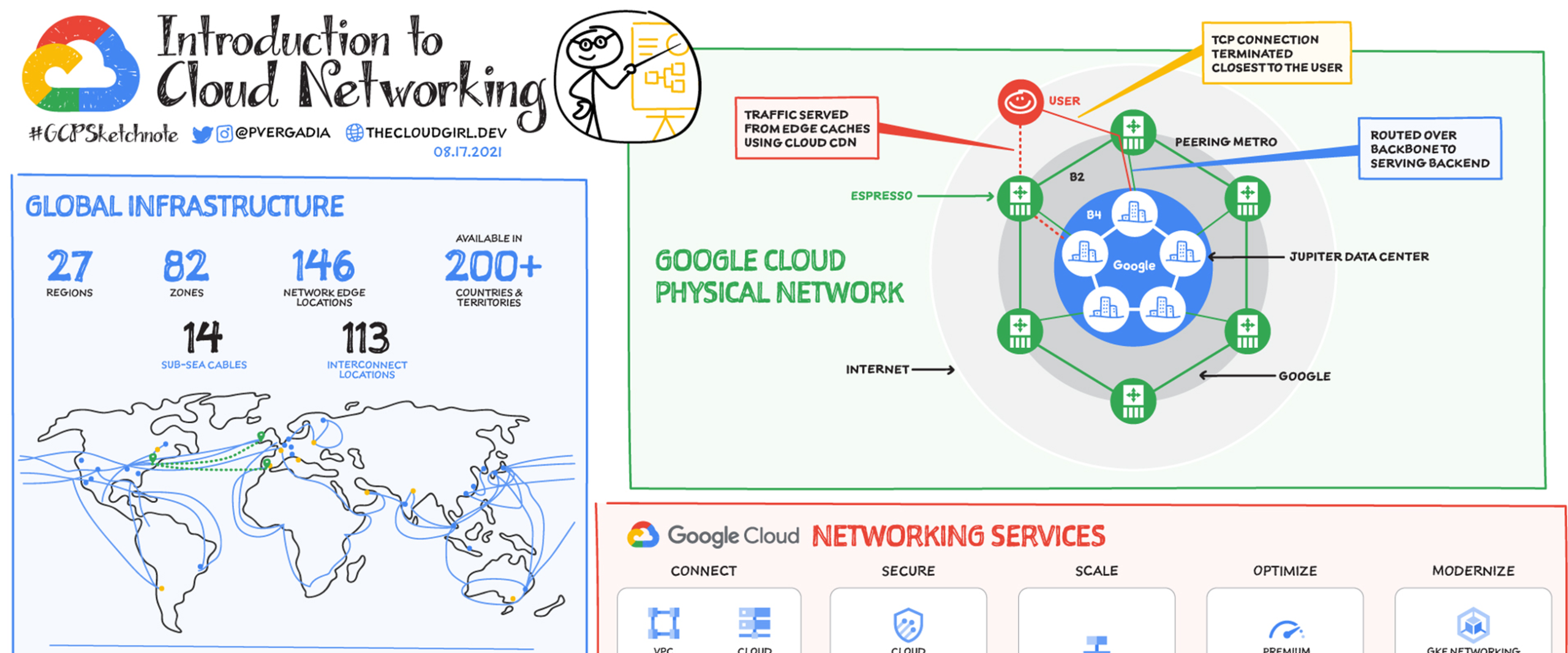
Google Cloud Networking leverages one of the world's largest private fiber networks. At the heart of this performance capability is Cloud CDN (Content Delivery Network). Unlike traditional CDNs that operate as third-party overlays, Cloud CDN is baked directly into the Google Front End (GFE).
Deep Dive: How Edge Caching Works
When you enable Cloud CDN on a Global External Application Load Balancer, you are effectively pushing your static assets (images, CSS, JavaScript, and even video segments) to over 100+ Points of Presence (PoPs) worldwide. Here is the technical flow:
- User Request: A user in Singapore requests
logo.png from your US-hosted application.
- Anycast Routing: Google Cloud Networking uses Anycast IP to route that request to the nearest Google edge location (e.g., the Singapore PoP).
- Cache Lookup: The edge GFE checks its cache. If the file exists (Cache Hit), it is served instantly (~5ms latency).
- Cache Miss & Fill: If the file is missing, the request travels over Google's private backbone—not the public internet—to your origin server. This backbone transit is faster and more reliable than public routing.
Advanced Feature: Origin Shielding
For high-traffic applications, "thundering herd" problems can occur when a cache expires. Origin Shielding adds an extra caching layer between the edge locations and your backend. If 50 different edge locations all miss the cache simultaneously, they request the data from the Origin Shield, which sends only one request to your backend server. This protects your infrastructure from load spikes.
Security: Signed URLs and Cookies
Serving premium content? You cannot leave your CDN open. Cloud CDN supports Signed URLs and Signed Cookies. These are cryptographic tokens appended to the URL that grant temporary access to a specific resource for a limited time, validated at the edge.
Key Points
- Integration: Works seamlessly with Cloud Storage buckets and Compute Engine instance groups.
- Protocol Support: Full HTTP/2 and HTTP/3 (QUIC) support for faster mobile performance.
- Cache Modes: Configurable "Cache All", "Use Origin Headers", or "Force Cache" modes.
- Link: Official Cloud CDN Documentation
Frequently Asked Questions
Q: Can Cloud CDN cache dynamic content?
A: Technically, it caches responses based on headers. While typically for static content, you can cache API responses if they have appropriate `Cache-Control` headers, but be careful with personalization.
Q: How do I invalidate a file that has changed?
A: You can issue an invalidation request via the console, gcloud, or API. Invalidations generally complete in under a minute globally.
2. Cloud Interconnect: Enterprise Hybrid Connectivity
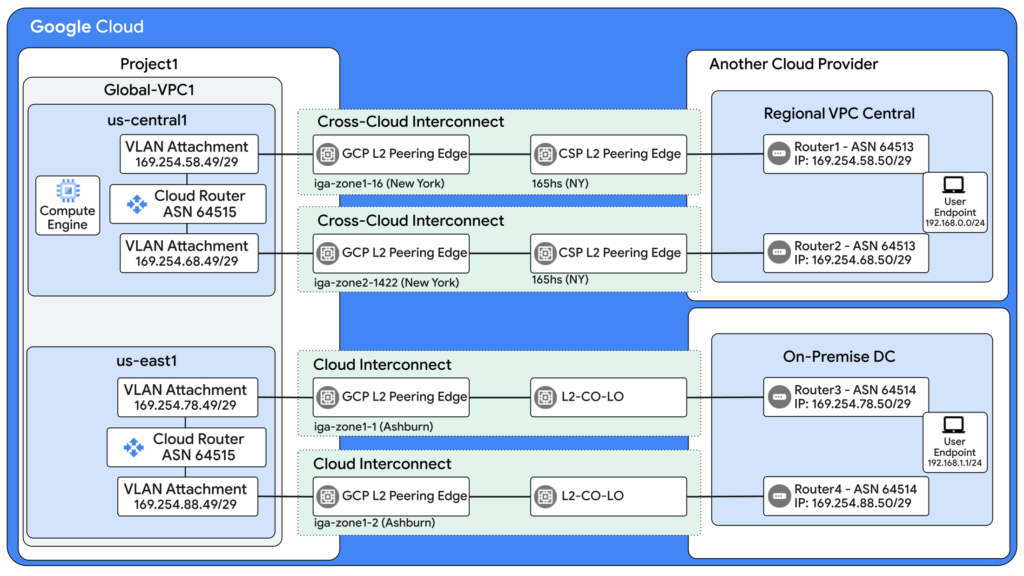
For enterprises moving to the cloud, connectivity is the first major hurdle. Google Cloud Networking offers Cloud Interconnect to bridge your on-premises data center with your Google Virtual Private Cloud (VPC).
Dedicated Interconnect Architecture
Dedicated Interconnect is a physical cross-connect between your router and Google's router in a colocation facility. It effectively extends your private network into the cloud with massive bandwidth (multiple 100 Gbps links).
The LACP Factor: To aggregate bandwidth and provide redundancy, Google uses the Link Aggregation Control Protocol (LACP). You must configure your on-premise routers (Cisco, Juniper, etc.) to participate in LACP groups to handle link failures gracefully.
Partner Interconnect: The Flexible Alternative
Not everyone has equipment in a Google PoP. Partner Interconnect allows you to connect through service providers like Equinix, AT&T, or Verizon. The provider handles the physical connection to Google, and you connect to the provider. This allows for fractional bandwidth (e.g., 50 Mbps to 10 Gbps).
Encryption & Security
A common misconception is that Interconnect is encrypted. It is not. It is a private line, but the traffic is cleartext at the packet level. To secure sensitive financial or healthcare data, you must layer encryption on top:
- MACsec (IEEE 802.1AE): Encrypts traffic at Layer 2 between your router and Google's router. Requires compatible hardware.
- HA VPN over Interconnect: Encrypts traffic at Layer 3 (IPsec) and runs over the Interconnect links. This is the standard solution for most enterprises needing encryption.
Key Points
- SLA: 99.9% or 99.99% availability depending on the topology (number of interconnects and regions).
- Addressing: Requires valid RFC1918 private IP space or public IPs for BGP peering.
- BGP: Uses Border Gateway Protocol (BGP) to dynamically exchange routes between on-prem and cloud.
- Reference: Official Interconnect Guide
Frequently Asked Questions
Q: What is the difference between Interconnect and Cloud VPN?
A: Cloud VPN runs over the public internet (unpredictable latency, max 3 Gbps per tunnel). Interconnect is a private fiber link (guaranteed latency, up to 100 Gbps).
Q: Can I access Google APIs (like BigQuery) over Interconnect?
A: Yes, by using "Private Google Access for on-premises hosts". You route traffic to a specific restricted VIP range.
3. Network Service Tiers: Optimizing Cost & Routing
One of the most unique aspects of Google Cloud Networking is the ability to choose your routing path. This feature, known as Network Service Tiers, allows architects to balance budget constraints against performance requirements.
Premium Tier: The "Cold Potato" Method
In the Premium Tier, Google ingests traffic as early as possible. If a user in London accesses a server in Iowa:
- Traffic enters Google's network at the London PoP.
- It travels swiftly across Google's private trans-Atlantic submarine cables.
- It exits the network in Iowa, right at the data center.
This avoids the chaotic public internet, resulting in lower jitter and packet loss. This tier is mandatory for Global Load Balancing.
Standard Tier: The "Hot Potato" Method
Standard Tier mimics how other cloud providers (like AWS or Azure) typically route standard traffic. Traffic stays on the public ISP networks (the "hot potato" passed between carriers) for as long as possible, only entering Google's network in the region where the VM resides (Iowa in our example).
Cost Implication: Standard Tier outbound data transfer is roughly 20-30% cheaper than Premium Tier. For bulk data processing, archival storage retrieval, or internal non-production workloads, switching to Standard Tier can save thousands of dollars.
Comparative Table
| Feature |
Premium Tier |
Standard Tier |
| Routing |
Google Global Backbone |
Public Internet (ISP Transit) |
| Global Load Balancing |
Supported |
Not Supported (Regional only) |
| Performance |
High, Low Latency |
Variable, Standard Latency |
| Cost |
$$$ |
$$ |
Key Points
- Flexibility: You can mix and match tiers. Use Premium for your frontend web servers and Standard for your backend batch processing logs.
- SLA: Premium Tier carries a robust networking SLA; Standard Tier does not.
- Learn More: Visit Cloud Knowledge for cost optimization strategies.
4. Cloud DNS: The 100% Availability Standard
DNS is the phonebook of the internet. If DNS fails, your application effectively disappears. Google Cloud Networking offers Cloud DNS, a highly scalable, reliable, and managed authoritative DNS service.
The 100% SLA Guarantee
Most cloud services offer "three nines" (99.9%) or "four nines" (99.99%). Google Cloud DNS offers a 100% Availability SLA. This is achieved through a massively distributed architecture where authoritative name servers are replicated globally.
Split-Horizon DNS
A critical enterprise feature is Split-Horizon DNS. This allows you to use the same domain name (e.g., app.cloudknowledge.in) but return different IP addresses based on who is asking:
- Public Internet User: Resolves to the Public IP of the External Load Balancer.
- Internal VPC User (VPN/Interconnect): Resolves to the Private IP of the Internal Load Balancer.
This simplifies application configuration, as developers only need to know one domain name regardless of where the code is running.
DNS Security (DNSSEC)
DNS spoofing and cache poisoning are real threats. Cloud DNS supports one-click DNSSEC. This signs your DNS records cryptographically. Resolvers (like Google Public DNS 8.8.8.8) can verify the signature to ensure the IP address they received is actually the one you published.
5. Cloud Service Mesh (Traffic Director): Modern Traffic Management
As applications move from monoliths to microservices, the network complexity explodes. Enter Cloud Service Mesh (formerly Traffic Director). It acts as the control plane for your service mesh, managing the configuration of Envoy proxies.
The Sidecar Pattern
In a service mesh, every application container (Pod) has a "buddy" container called a Sidecar Proxy (usually Envoy). All network traffic in and out of the application goes through this proxy. Cloud Service Mesh communicates with these proxies to enforce rules.
Advanced Capabilities
- Traffic Splitting (Canary): Deploy a new version of your checkout service. Tell Cloud Service Mesh to send only 1% of users to the new version. If errors spike, revert instantly. If stable, increase to 10%, then 100%.
- Circuit Breaking: If the "Inventory Service" becomes overloaded and starts failing, the mesh "trips the circuit" and stops sending requests to it, failing fast rather than hanging the entire e-commerce site.
- Security (mTLS): Automatically encrypt traffic between microservices using mutual TLS, ensuring that service A can only talk to service B if authorized.
Key Points
- Managed Control Plane: You don't manage the mesh servers; Google does (99.99% SLA).
- Observability: Generates detailed metrics, logs, and traces for every hop in the network.
- Link: Cloud Service Mesh Guide
Advanced Troubleshooting & Automation
Managing Google Cloud Networking at scale requires automation. Below are scripts to handle common operational tasks and detailed troubleshooting.
Troubleshooting DNS Propagation with PowerShell
When migrating domains, knowing exactly when a record propagates is vital. This script polls Cloud DNS until the record matches the expected IP.
# Configuration Variables
$ZoneName = "production-zone"
$RecordName = "api.cloudknowledge.in."
$ExpectedIP = "34.102.55.10"
$ProjectID = "my-gcp-project"

Write-Host "Starting DNS Propagation Monitor for $RecordName..." -ForegroundColor Cyan

# Loop indefinitely until propagation is confirmed
do {
    # Fetch the specific record set using gcloud wrapper
    $CurrentRecord = gcloud dns record-sets list `
        --zone=$ZoneName `
        --name=$RecordName `
        --project=$ProjectID `
        --format="value(rrdatas[0])"

    # Check if the returned IP matches our expectation
    if ($CurrentRecord -eq $ExpectedIP) {
        Write-Host "Success: DNS has propagated. Value is $CurrentRecord" -ForegroundColor Green
        break
    } else {
        $Time = Get-Date -Format "HH:mm:ss"
        Write-Host "[$Time] Waiting... Current Value: $CurrentRecord" -ForegroundColor Yellow
        Start-Sleep -Seconds 10
    }
} while ($true)
Automating Subnet Creation via REST API
While the UI is great, infrastructure as code is better. Below is how you would programmatically create a subnet using the Google Cloud REST API. This is the underlying mechanism for tools like Terraform.
POST https://compute.googleapis.com/compute/v1/projects/YOUR_PROJECT/regions/us-central1/subnetworks

{
  "name": "prod-subnet-01",
  "network": "https://compute.googleapis.com/compute/v1/projects/YOUR_PROJECT/global/networks/vpc-main",
  "ipCidrRange": "10.0.1.0/24",
  "privateIpGoogleAccess": true,
  "enableFlowLogs": true,
  "logConfig": {
    "enable": true,
    "flowSampling": 0.5
  },
  "description": "Production subnet created via API for Cloud Knowledge automation"
}
Diagnosing Interconnect Errors
If your Hybrid connectivity is flanking, you need optical diagnostics. This script parses the JSON output from Google's API to find light level issues on the fiber.
$InterconnectName = "partner-link-us-east"
$Project = "my-project-id"

Write-Host "Analyzing Optical Levels for $InterconnectName..."

# Get diagnostics in JSON format and convert to PowerShell Object
$Diagnostics = gcloud compute interconnects get-diagnostics $InterconnectName `
    --project=$Project `
    --format="json" | ConvertFrom-Json

foreach ($Link in $Diagnostics.result.links) {
    $CircuitId = $Link.circuitId
    $Power = $Link.receivingOpticalPower.value
    $Status = $Link.receivingOpticalPower.state

    # Check for Low Light levels (usually below -14 dBm indicates a fiber bend or cut)
    if ($Status -eq "OK") {
        Write-Host "Circuit $CircuitId: Signal Excellent ($Power dBm)" -ForegroundColor Green
    } else {
        Write-Host "Circuit $CircuitId: CRITICAL SIGNAL ISSUE ($Power dBm)" -ForegroundColor Red
        Write-Host "Action: Contact your colocation provider immediately."
    }
}
Conclusion
Google Cloud Networking provides a toolkit of immense power. From the global acceleration of Cloud CDN to the precision routing of Network Service Tiers, the platform allows you to build infrastructure that is not only robust but also cost-efficient.
However, power requires control. Implementing Cloud Identity governance, setting up proper monitoring alerts, and utilizing Infrastructure as Code (IaC) are prerequisites for success. As we move into 2026, the convergence of networking and security (SASE) will only tighten, making the mastery of these components essential for every cloud architect.
Start small: optimize your DNS, enable CDN for your static assets, and audit your egress costs. The network is the foundation—build it strong.