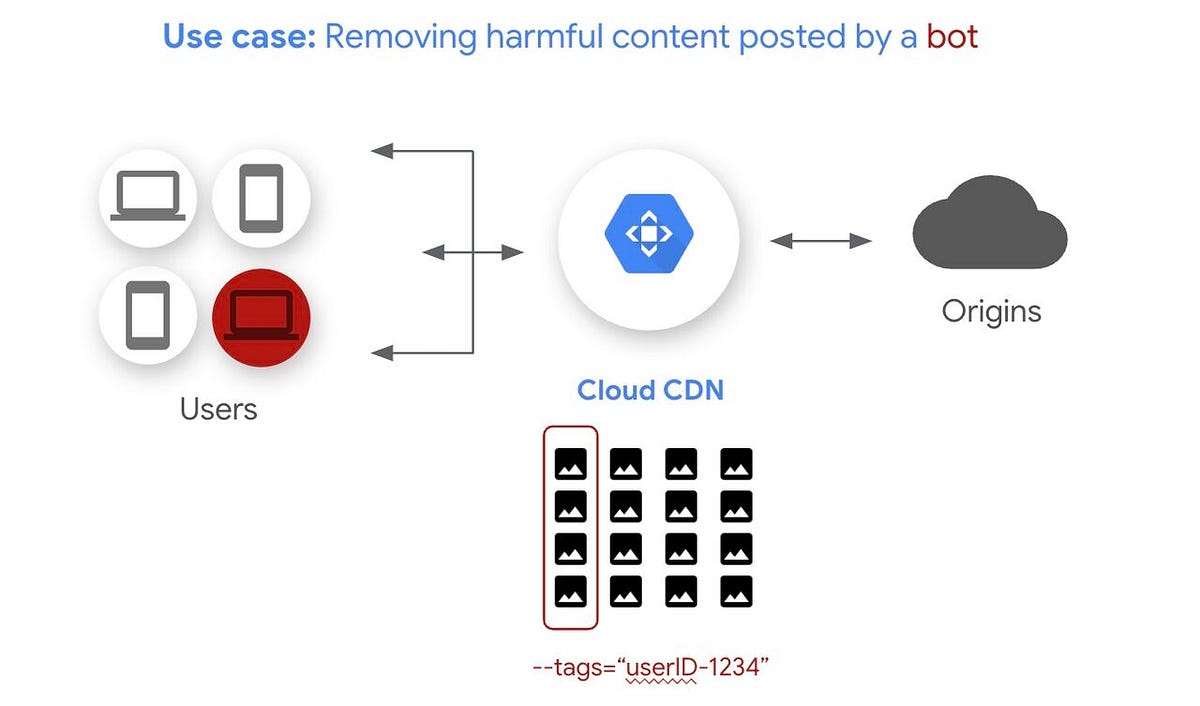
Cloud CDN Architecture Explained (2026): Edge Caching, Performance, Security & Real-World Use Cases
Cloud CDN Architecture Explained (2026): Edge Caching, Performance, Security & Real-World Use Cases
Cloud CDN accelerates content delivery by caching content at globally distributed edge locations, reducing latency and backend load for modern cloud-native applications.
In this in-depth guide, we explore how Cloud CDN works internally, how edge caching improves performance, how cache hierarchies function, and how enterprises use Cloud CDN to serve billions of requests reliably.
What Is Cloud CDN?
Cloud CDN is a globally distributed content delivery network integrated natively with :contentReference[oaicite:1]{index=1}.
It uses Google’s private backbone and edge points of presence (PoPs) to cache and deliver content closer to users.
Unlike traditional CDNs that rely heavily on third-party networks, Cloud CDN is deeply integrated with Google’s global infrastructure, load balancers, and security services.
Key Objectives of Cloud CDN
- Reduce end-user latency worldwide
- Lower origin server load and cost
- Improve availability and resilience
- Provide secure content delivery by default
---
Edge Caching: Serving Content from the Nearest PoP
Edge caching is the foundation of Cloud CDN performance. Instead of every request reaching your backend, cacheable content is stored at Google’s edge locations worldwide.
How Edge Caching Works
- User sends a request to your application
- Request is routed to the nearest Google edge PoP
- If content exists in cache → served instantly
- If not → fetched from backend and cached
This dramatically reduces round-trip time (RTT), especially for global audiences.
What Can Be Cached?
- Static content (HTML, CSS, JS)
- Images and video assets
- Cacheable dynamic content (GET APIs)
Learn more about edge caching fundamentals on
Content Delivery Network concepts.
---
Cloud CDN Cache Hierarchy Explained
Cloud CDN uses a multi-layer cache hierarchy to balance performance and freshness.
Cache Flow
- Edge Cache – Closest to the user
- Regional Cache – Shared across regions
- Origin – Backend service or storage
This hierarchy ensures that even cache misses are resolved efficiently without overloading the origin.
Benefits of Cache Hierarchy
- Faster cache warm-up
- Reduced backend traffic spikes
- Improved cache hit ratios
---
Cache Keys: How Cloud CDN Identifies Unique Content
A cache key defines how Cloud CDN differentiates cached objects. Incorrect cache keys can lead to poor hit ratios or content leakage.
Cache Key Components
- Host name
- Protocol (HTTP / HTTPS)
- Query strings
- HTTP headers
Fine-tuning cache keys is essential for API acceleration and personalized content delivery.
Best Practices
- Exclude unnecessary query parameters
- Include headers only when required
- Keep cache keys minimal
---
Signed URLs & Signed Cookies for Secure Content Delivery
Cloud CDN supports signed URLs and cookies to protect premium or private content from unauthorized access.
Use Cases
- Paid video streaming platforms
- Private software downloads
- Subscription-based media access
How It Works
- Client receives a time-limited signed URL
- Cloud CDN validates the signature
- Content is served only if valid
This security model integrates seamlessly with Google Cloud load balancers.
---
Negative Caching: Caching Error Responses
Negative caching allows Cloud CDN to cache error responses such as 404 and 500.
Why Negative Caching Matters
- Prevents repeated backend hits for missing content
- Protects origin during traffic spikes
- Improves user experience during failures
Example
If a popular image is missing, Cloud CDN caches the 404 response for a short duration instead of hammering the backend repeatedly.
---
Cloud CDN Architecture Flow
- User request hits nearest Google edge
- Cache hit → response served immediately
- Cache miss → forwarded to backend
- Response cached based on TTL and headers
Supported backends include:
- Compute Engine
- GKE
- Cloud Storage
- External origins
---
Performance & Security Benefits
Performance Gains
- Significant latency reduction for global users
- Higher throughput under peak load
- Improved cache hit ratios
Security Advantages
- HTTPS by default
- Google-managed SSL certificates
- Integration with Cloud Armor (DDoS & WAF)
---
Common Cloud CDN Use Cases
- Static websites and blogs
- Media streaming platforms
- Software distribution portals
- API acceleration for GET requests
---
Cloud CDN FAQs
Does Cloud CDN support dynamic content?
Yes. Cacheable dynamic content such as GET APIs can be accelerated when proper headers are configured.
How does Cloud CDN differ from Akamai or Cloudflare?
Cloud CDN is natively integrated with Google Cloud’s load balancers and private backbone, offering tighter integration and lower operational overhead.
How do I invalidate Cloud CDN cache programmatically?
gcloud compute url-maps invalidate-cdn-cache URL_MAP_NAME \
--path "/*"
This command invalidates cached objects across all edge locations.
---
Key Takeaways
- Cloud CDN improves performance using global edge caching
- Cache hierarchy optimizes origin protection
- Signed URLs and negative caching enhance security
- Ideal for global, high-traffic applications
Cloud Interconnect Explained (2026): Dedicated vs Partner Interconnect, Architecture, Security & Use Cases
Cloud Interconnect Explained (2026): Dedicated vs Partner Interconnect, Architecture, Security & Use Cases
Cloud Interconnect provides private, high-bandwidth connectivity between on-premises data centers and :contentReference[oaicite:1]{index=1}, bypassing the public internet entirely.
In modern hybrid and multi-cloud architectures, secure and predictable connectivity is critical. Cloud Interconnect enables enterprises to extend their internal networks directly into Google Cloud with consistent latency, high throughput, and enterprise-grade SLAs.
For foundational hybrid networking concepts, refer to
Hybrid Cloud Networking Explained.
What Is Cloud Interconnect?
Cloud Interconnect is a dedicated private connectivity service that links your on-premises infrastructure to Google Cloud VPC networks using high-capacity physical or partner-provided connections.
Unlike VPNs, Cloud Interconnect traffic does not traverse the public internet, making it suitable for latency-sensitive and regulated workloads.
Core Objectives of Cloud Interconnect
- Provide predictable, low-latency connectivity
- Support massive data transfer workloads
- Enable secure hybrid cloud architectures
- Meet enterprise compliance requirements
---
Types of Cloud Interconnect
Google Cloud offers two primary Cloud Interconnect models, allowing organizations to choose based on scale, cost, and operational complexity.
1. Dedicated Interconnect
Dedicated Interconnect is a physical, private fiber connection between your data center and Google’s edge network.
Key Characteristics
- Physical fiber connection
- 10 Gbps or 100 Gbps links
- Colocation with Google facilities
- Highest performance and reliability
When to Use Dedicated Interconnect
- Large enterprises with high data volume
- Financial institutions and healthcare providers
- Mission-critical SAP and Oracle workloads
Learn more about enterprise hybrid designs at
Google Cloud VPC Architecture.
---
2. Partner Interconnect
Partner Interconnect provides private connectivity through a supported service provider instead of direct physical cabling.
Key Characteristics
- No need for physical colocation
- Bandwidth from 50 Mbps to 50 Gbps
- Faster provisioning
- Lower upfront cost
When to Use Partner Interconnect
- Mid-sized organizations
- Branch offices and remote locations
- Gradual cloud migration projects
---
Cloud Interconnect Architecture Explained
Cloud Interconnect integrates tightly with Google Cloud networking components to deliver resilient hybrid connectivity.
Key Architectural Components
- Interconnect attachment
- VLAN attachments
- :contentReference[oaicite:2]{index=2}
- BGP routing
Traffic Flow
- Traffic enters Google’s edge via Interconnect
- VLAN attachments segment traffic
- Cloud Router exchanges routes using BGP
- Traffic reaches VPC subnets privately
This design ensures dynamic route exchange, fast failover, and simplified operations.
---
VLAN Attachments & BGP Routing
VLAN attachments logically connect your Interconnect to a specific VPC network.
Why VLAN Attachments Matter
- Traffic segmentation
- Multi-VPC connectivity
- Support for HA designs
BGP with Cloud Router
Cloud Router dynamically exchanges routes between on-prem and Google Cloud using BGP, eliminating static routing complexity.
Benefits
- Automatic route updates
- Fast convergence during failures
- Supports active-active architectures
---
High Availability (HA) Interconnect
For production workloads, Google strongly recommends HA Interconnect.
HA Design Principles
- At least two Interconnect links
- Redundant VLAN attachments
- Separate physical paths
- Multiple edge availability domains
This design ensures connectivity remains available even during maintenance or hardware failures.
---
Security Advantages of Cloud Interconnect
Private Traffic Path
- No exposure to public internet
- Reduced attack surface
- Lower risk of MITM attacks
Compliance-Ready
- Supports regulated industries
- Predictable routing paths
- Enterprise SLAs
Cloud Interconnect is often paired with additional security layers such as firewalls and VPC Service Controls.
---
Common Cloud Interconnect Use Cases
- Hybrid cloud architectures
- Large-scale data migration
- Low-latency disaster recovery
- SAP, Oracle, and mainframe integration
---
Cloud VPN vs Cloud Interconnect (SEO Comparison)
| Feature |
Cloud VPN |
Cloud Interconnect |
| Bandwidth |
Up to 3 Gbps |
Up to 200 Gbps |
| Latency |
Variable |
Consistent |
| Traffic Path |
Public Internet |
Private Google Backbone |
| SLA |
Limited |
Enterprise-grade |
---
Cloud Interconnect FAQs
Is Cloud Interconnect encrypted?
Interconnect itself is private but not encrypted by default. Many enterprises add application-level or MACsec encryption.
Can I use Cloud Interconnect with multiple VPCs?
Yes. VLAN attachments allow connectivity to multiple VPC networks.
Is Partner Interconnect less secure than Dedicated?
No. Both provide private connectivity, but Dedicated offers higher bandwidth and control.
---
Troubleshooting Cloud Interconnect
Verify BGP Status
gcloud compute routers get-status ROUTER_NAME --region REGION
Common Issues
- BGP session not established
- Incorrect ASN configuration
- VLAN attachment mismatch
---
Key Takeaways
- Cloud Interconnect enables secure, private hybrid connectivity
- Dedicated vs Partner options fit different scales
- BGP and Cloud Router simplify routing
- HA designs are critical for production
Network Service Tiers Explained (2026): Premium vs Standard, Performance, Cost & Use Cases
Network Service Tiers Explained (2026): Premium vs Standard, Performance, Cost & Use Cases
Network Service Tiers allow organizations to balance performance, reliability, and cost for outbound traffic in :contentReference[oaicite:1]{index=1}.
By selecting the appropriate network tier, architects can optimize latency-sensitive production workloads while controlling egress costs for non-critical systems.
For a foundational overview of cloud networking, see
Cloud Networking Basics.
What Are Network Service Tiers?
Network Service Tiers determine how traffic exits and traverses Google’s network.
They directly impact latency, availability, routing path, and cost.
Google Cloud provides two network service tiers:
- Premium Tier – High performance, global backbone
- Standard Tier – Cost-optimized, regional routing
Understanding these tiers is essential for designing scalable and cost-efficient architectures.
---
Premium Network Service Tier
The Premium Tier uses Google’s private global backbone from the point traffic enters Google’s network until it reaches the end user.
Key Characteristics
- Uses Google’s private global fiber network
- Lowest latency and jitter
- High availability with global redundancy
- Global Anycast IP addresses
How Premium Tier Works
- User request enters Google’s edge
- Traffic stays on Google’s backbone globally
- Delivered to user via nearest edge PoP
This architecture avoids congestion and unpredictability of the public internet.
Mandatory Use Cases
- Global HTTP(S) Load Balancers
- Cloud CDN
- Latency-sensitive applications
Premium Tier is the default and recommended option for production workloads.
---
Standard Network Service Tier
The Standard Tier is designed for cost-sensitive workloads where ultra-low latency is not critical.
Key Characteristics
- Traffic exits Google’s network earlier
- Uses public internet routing
- Regional rather than global performance
- Lower egress pricing
How Standard Tier Works
- Traffic enters Google network
- Exits at regional edge
- Traverses public internet to users
While latency may vary, the cost savings can be significant for non-critical workloads.
Ideal Scenarios
- Development and test environments
- Internal applications
- Regional workloads
---
Premium vs Standard: Feature Comparison
| Feature |
Premium Tier |
Standard Tier |
| Routing Path |
Google private global backbone |
Public internet routing |
| Latency |
Lowest and consistent |
Variable |
| Availability |
Global, multi-region |
Regional |
| Anycast IP |
Yes |
No |
| Cost |
Higher |
Lower |
---
Network Service Tiers and Load Balancers
Network tier selection directly affects how Google Cloud load balancers behave.
Important Rules
- Global HTTP(S) Load Balancers require Premium Tier
- Regional Load Balancers support both tiers
- Tier is selected per forwarding rule
For more on traffic distribution, see
Google Cloud Load Balancing Explained.
---
Cost Optimization Using Network Service Tiers
One of the biggest advantages of Network Service Tiers is the ability to optimize cost without sacrificing reliability where it matters.
Cost Optimization Strategy
- Use Premium Tier for production workloads
- Use Standard Tier for dev/test environments
- Combine Standard Tier with regional load balancers
- Avoid Premium Tier for internal-only services
Example Architecture
A global SaaS platform may use:
- Premium Tier + Cloud CDN for customer-facing apps
- Standard Tier for admin portals and batch jobs
This approach significantly reduces monthly egress cost.
---
Security Implications of Network Service Tiers
Premium Tier Security Benefits
- Traffic stays on Google’s private network longer
- Reduced exposure to internet-based attacks
- Better DDoS absorption capabilities
Standard Tier Considerations
- Traffic traverses public internet
- May require additional security controls
- Best suited for non-sensitive workloads
Premium Tier integrates seamlessly with Cloud Armor for advanced protection.
---
Network Service Tiers FAQs
Can I mix Premium and Standard tiers?
Yes. Network tier selection is per resource, allowing granular optimization.
Is Premium Tier always better?
Performance-wise, yes. Cost-wise, Standard Tier may be more appropriate for non-critical workloads.
Does Cloud CDN work with Standard Tier?
No. Cloud CDN requires Premium Tier.
---
Troubleshooting Network Service Tiers
Check Network Tier of a Forwarding Rule
gcloud compute forwarding-rules describe FORWARDING_RULE_NAME \
--region REGION
Common Issues
- Unexpected latency due to wrong tier
- Higher costs from unnecessary Premium usage
- Misconfigured load balancers
---
Key Takeaways
- Network Service Tiers control performance vs cost
- Premium Tier uses Google’s private backbone
- Standard Tier reduces egress cost
- Choosing the right tier is critical for optimization
Cloud DNS Explained (2026): Architecture, Anycast, DNSSEC, Private Zones & Hybrid DNS
Cloud DNS Explained (2026): Architecture, Anycast, DNSSEC, Private Zones & Hybrid DNS
Cloud DNS is a highly available, scalable, and fully managed authoritative DNS service provided by :contentReference[oaicite:1]{index=1}.
It enables organizations to publish, manage, and resolve DNS records globally with low latency, high reliability, and enterprise-grade security.
For a foundational overview of DNS concepts, refer to
Domain Name System (DNS) Explained.
What Is Cloud DNS?
Cloud DNS is a globally distributed authoritative DNS service that uses Anycast to serve DNS responses from the nearest available location.
It is designed to handle massive query volumes while maintaining consistent performance and uptime.
Why Cloud DNS Matters
- DNS is the entry point to every application
- Latency directly affects user experience
- Availability impacts application uptime
Cloud DNS eliminates single points of failure commonly seen in traditional DNS deployments.
---
Global Anycast DNS Architecture
Cloud DNS leverages Google’s global Anycast network to distribute DNS queries across multiple edge locations.
How Anycast DNS Works
- User queries a domain name
- Request is routed to nearest Google DNS edge
- Response is served with minimal latency
Benefits of Anycast
- Ultra-low DNS resolution latency
- Automatic failover
- Resilience against DDoS attacks
---
Cloud DNS Zone Types
Cloud DNS supports multiple zone types to address different networking needs.
1. Public DNS Zones
Public zones are used to publish DNS records that must be resolvable from the public internet.
Typical Use Cases
- Web applications
- Public APIs
- Global SaaS platforms
2. Private DNS Zones
Private zones are accessible only within specific VPC networks.
Key Benefits
- Internal name resolution
- No exposure to public internet
- Seamless integration with VPC resources
Learn more about private networking at
Google Cloud VPC Explained.
---
Advanced Cloud DNS Capabilities
DNSSEC (Domain Name System Security Extensions)
Cloud DNS supports DNSSEC to protect against DNS spoofing and cache poisoning attacks.
How DNSSEC Works
- Digitally signs DNS records
- Validates authenticity of responses
- Prevents tampering in transit
DNSSEC is essential for security-sensitive workloads and compliance-driven environments.
---
Forwarding & Peering Zones
Cloud DNS enables hybrid DNS architectures using forwarding and peering zones.
Forwarding Zones
- Forward queries to on-prem DNS servers
- Ideal for legacy systems
Peering Zones
- DNS resolution across VPCs
- Supports shared services architecture
---
Integration with Google Cloud Services
Cloud DNS integrates seamlessly with:
- Google Cloud Load Balancers
- GKE services
- Compute Engine
- Hybrid connectivity (VPN & Interconnect)
This tight integration simplifies service discovery and traffic routing.
---
Reliability, Scale & SLA
Enterprise-Grade Reliability
- 100% uptime SLA
- Automatic scaling
- Millions of queries per second
Operational Simplicity
- No infrastructure to manage
- API-driven automation
- IAM-based access control
---
Typical Cloud DNS Use Cases
- Domain hosting for global web applications
- Hybrid cloud DNS resolution
- Multi-region failover
- Microservices service discovery
---
Cloud DNS vs Traditional DNS (SEO Comparison)
| Feature |
Traditional DNS |
Cloud DNS |
| Scalability |
Limited |
Massive, automatic |
| Latency |
Variable |
Low (Anycast) |
| Security |
Basic |
DNSSEC supported |
| Availability |
Depends on setup |
100% SLA |
---
Cloud DNS FAQs
Is Cloud DNS authoritative?
Yes. Cloud DNS is a fully managed authoritative DNS service.
Does Cloud DNS support internal-only domains?
Yes. Private DNS zones are designed for internal resolution.
Can Cloud DNS be used with on-prem DNS?
Yes. Forwarding zones enable hybrid DNS architectures.
---
Troubleshooting Cloud DNS
List DNS Records
gcloud dns record-sets list \
--zone=ZONE_NAME
Common Issues
- Incorrect TTL causing stale records
- Misconfigured private zone visibility
- Missing DNSSEC delegation
---
Key Takeaways
- Cloud DNS provides global, low-latency DNS resolution
- Anycast architecture ensures resilience
- Supports public, private, and hybrid DNS
- DNSSEC enhances security and trust
Traffic Director Explained (2026): Service Mesh, Envoy, mTLS, Canary Deployments & Zero Trust
Traffic Director Explained (2026): Service Mesh, Envoy, mTLS, Canary Deployments & Zero Trust
Traffic Director is a fully managed service mesh control plane provided by :contentReference[oaicite:1]{index=1}, built on the open-source :contentReference[oaicite:2]{index=2} proxy.
It enables centralized traffic management, secure service-to-service communication, and advanced routing for microservices architectures running across cloud, hybrid, and multi-cloud environments.
For an overview of microservices networking fundamentals, see
Microservices Architecture Explained.
What Is Traffic Director?
Traffic Director acts as a control plane that programs Envoy proxies deployed alongside services (sidecar or proxyless) to enforce traffic policies consistently.
Instead of hardcoding service endpoints and routing logic into applications, Traffic Director dynamically manages:
- Service discovery
- Traffic routing rules
- Security policies
- Observability configuration
Why Traffic Director Matters
- Eliminates brittle, hardcoded networking logic
- Improves resilience and availability
- Enables zero-trust service-to-service security
---
Service Mesh Architecture with Traffic Director
Traffic Director uses a control-plane / data-plane architecture.
Control Plane
- Traffic Director API
- Centralized policy management
- Dynamic configuration distribution
Data Plane
- Envoy proxies
- Handle actual service traffic
- Enforce routing and security rules
Request Flow
- Client service sends request
- Envoy proxy intercepts traffic
- Traffic Director policies applied
- Request routed to target service
---
Key Capabilities of Traffic Director
Advanced Traffic Management
- Weighted traffic splitting
- Header-based routing
- Path-based routing
Common Use Cases
- Canary deployments
- Blue-green deployments
- A/B testing
---
Service-to-Service Security (mTLS)
Traffic Director supports mutual TLS (mTLS) for encrypted and authenticated service-to-service communication.
Benefits of mTLS
- Automatic certificate rotation
- Strong identity verification
- Zero-trust networking model
This ensures that only authorized services can communicate with each other.
---
Resilience Features
- Circuit breaking
- Retries with backoff
- Request timeouts
These features prevent cascading failures in distributed systems.
---
Observability & Monitoring
Traffic Director integrates with Google Cloud monitoring to provide deep visibility into service behavior.
- Latency metrics
- Error rates
- Traffic volume
This enables faster troubleshooting and performance tuning.
---
Supported Environments
Traffic Director supports a wide range of environments:
- Google Kubernetes Engine (GKE)
- Compute Engine (VM-based workloads)
- Hybrid and multi-cloud via :contentReference[oaicite:3]{index=3}
This flexibility allows organizations to standardize traffic management across platforms.
---
Traffic Director vs Istio vs Linkerd (SEO Comparison)
| Feature |
Traffic Director |
Istio |
Linkerd |
| Management |
Fully managed |
Self-managed |
Self-managed |
| Control Plane |
Google-managed |
User-managed |
User-managed |
| mTLS |
Native |
Native |
Native |
| Hybrid Support |
Yes |
Limited |
Limited |
---
Why Traffic Director Is Critical for Zero Trust
Zero Trust assumes no implicit trust between services. Traffic Director enforces this model by:
- Authenticating every service request
- Encrypting traffic end-to-end
- Applying least-privilege routing rules
This aligns with modern zero-trust networking principles.
---
Typical Use Cases
- Microservices at scale
- Hybrid cloud service mesh
- Progressive delivery pipelines
- Secure internal APIs
---
Traffic Director FAQs
Do I need Kubernetes to use Traffic Director?
No. Traffic Director works with both Kubernetes and VM-based workloads.
Is Traffic Director vendor lock-in?
No. It is built on the open Envoy standard.
Does Traffic Director replace load balancers?
No. It complements load balancers by managing east-west traffic.
---
Troubleshooting Traffic Director
Verify Backend Service Configuration
gcloud compute backend-services describe BACKEND_SERVICE_NAME
Common Issues
- Envoy proxy not receiving config
- mTLS handshake failures
- Incorrect traffic split percentages
---
Key Takeaways
- Traffic Director is a managed service mesh control plane
- Envoy powers advanced routing and security
- mTLS enables zero-trust service communication
- Ideal for large-scale microservices architectures
Google Cloud Networking Reference Architectures (2026): CDN, Interconnect, DNS, Service Mesh & Automation
Google Cloud Networking Reference Architectures (2026): CDN, Interconnect, DNS, Service Mesh & Automation
This final section brings together everything covered so far—Cloud CDN, Cloud Interconnect, Network Service Tiers, Cloud DNS, and Traffic Director—into practical, production-ready designs on :contentReference[oaicite:1]{index=1}.
You’ll find real-world architectures, cross-service comparisons, automation commands, troubleshooting guidance, and SEO-ready closing blocks.
End-to-End Reference Architecture: Global Web Application
Scenario
A globally distributed SaaS platform serving millions of users with low latency, high availability, and strong security.
Architecture Components
- Global HTTP(S) Load Balancer (Premium Tier)
- Cloud CDN for edge caching
- Cloud DNS with Anycast
- Traffic Director for east-west traffic
- GKE or Compute Engine backends
Traffic Flow
- User resolves domain via Cloud DNS Anycast
- Request reaches nearest Google edge
- Cloud CDN serves cached content (if hit)
- Cache miss forwarded to backend
- Traffic Director manages service-to-service routing
This design delivers lowest global latency and maximum resilience.
---
Hybrid Enterprise Architecture: On-Prem + Google Cloud
Scenario
An enterprise migrating workloads gradually while retaining on-prem systems.
Architecture Components
- Dedicated or Partner Interconnect
- Cloud Router with BGP
- Private Cloud DNS zones
- Traffic Director for hybrid service mesh
Benefits
- Private, predictable connectivity
- Unified DNS namespace
- Consistent service policies across environments
Learn more about hybrid designs at
Hybrid Cloud Networking.
---
Multi-Region Failover Architecture
Scenario
Mission-critical application requiring regional isolation and fast failover.
Key Design Elements
- Multi-region backends
- Cloud DNS health checks
- Premium Tier global routing
- Traffic Director retries & circuit breaking
Outcome
- Automatic regional failover
- Minimal user disruption
- Improved SLA compliance
---
Cross-Service Comparison (SEO-Friendly)
| Service |
Primary Role |
Key Benefit |
| Cloud CDN |
Content acceleration |
Low latency, reduced backend load |
| Cloud Interconnect |
Hybrid connectivity |
Private, high-bandwidth links |
| Network Service Tiers |
Routing & cost control |
Performance vs cost optimization |
| Cloud DNS |
Name resolution |
Global Anycast, 100% SLA |
| Traffic Director |
Service mesh control |
mTLS, canary, resilience |
---
Automation & Operations (gcloud Examples)
Invalidate Cloud CDN Cache
gcloud compute url-maps invalidate-cdn-cache URL_MAP_NAME \
--path "/*"
Check Interconnect BGP Status
gcloud compute routers get-status ROUTER_NAME --region REGION
List DNS Records
gcloud dns record-sets list --zone=ZONE_NAME
Verify Backend Services for Traffic Director
gcloud compute backend-services describe BACKEND_SERVICE_NAME
These commands are commonly used during incident response and change validation.
---
Troubleshooting Checklist (Production)
- Unexpected latency → Verify Network Service Tier
- Cache misses → Review cache keys & TTLs
- Hybrid routing issues → Check BGP sessions
- Service failures → Inspect Traffic Director retries/circuit breakers
- DNS issues → Validate zone visibility and TTL
---
Security Best Practices Across Services
- Use HTTPS everywhere with managed certificates
- Enable DNSSEC for public zones
- Adopt mTLS for service-to-service traffic
- Prefer Premium Tier for internet-facing apps
- Restrict access using IAM and least privilege
---
FAQs (Series Wrap-Up)
Do I need all services together?
No. Each service can be adopted independently, but combined architectures deliver maximum value.
Is this suitable for regulated workloads?
Yes. Private connectivity, DNSSEC, and mTLS support compliance-driven environments.
Can this architecture scale globally?
Absolutely. All services are designed for global scale.
---
Final Key Takeaways
- Google Cloud networking services are modular yet deeply integrated
- Edge caching + private backbone = superior performance
- Hybrid and multi-cloud designs are first-class citizens
- Automation and observability are built in
Related Topics (Internal Linking)