AWS IAM Identity and Access Management – Complete Access Control & Security Guide
AWS IAM Identity and Access Management is the foundation of security in
Amazon Web Services.
It controls who can access AWS resources and what actions they are allowed to perform.
This guide explains AWS IAM from beginner to enterprise level, including
users, groups, roles, policies, least privilege, monitoring, and real-world troubleshooting.
Table of Contents
- AWS IAM Overview
- Core IAM Components
- IAM Access Control Model
- IAM Policies Deep Dive
- IAM Roles & Use Cases
- Least Privilege Principle
- Monitoring & Auditing
1. AWS IAM – Overview
AWS IAM is a global service used to securely manage access to AWS services and resources.
- Centralized identity and permission management
- Authentication (who you are)
- Authorization (what you can do)
- Integrated with all AWS services
- No additional cost
Key Points
- IAM is global (not region-specific)
- Root account is created by default
- IAM policies define access rules
FAQs
Is AWS IAM free?
Yes, AWS IAM is provided at no extra charge.
Is IAM regional?
No, IAM is a global AWS service.
2. Core IAM Components
a) IAM Users
An IAM user represents an individual identity with credentials for accessing AWS.
- Console access using username/password
- Programmatic access using access keys
- Should be avoided for long-term use
Best practice is to use IAM roles instead of users.
IAM User Troubleshooting – AWS CLI
aws iam list-users
aws iam get-user --user-name test-user
FAQs
Should developers use IAM users?
No. Use roles with temporary credentials.
b) IAM Groups
IAM groups are collections of users with shared permissions.
- Simplifies permission management
- Policies attached at group level
- No credentials of their own
Best Practice
- Group users by job role (Admins, Developers, ReadOnly)
c) IAM Roles
IAM roles provide temporary security credentials and are the most secure way to grant access.
- No long-term access keys
- Used by AWS services
- Supports cross-account access
- Used with SSO and federation
Example: EC2 Accessing S3
{
  "Effect": "Allow",
  "Action": "s3:GetObject",
  "Resource": "arn:aws:s3:::example-bucket/*"
}
d) IAM Policies
Policies are JSON documents that define permissions.
- Allow or deny actions
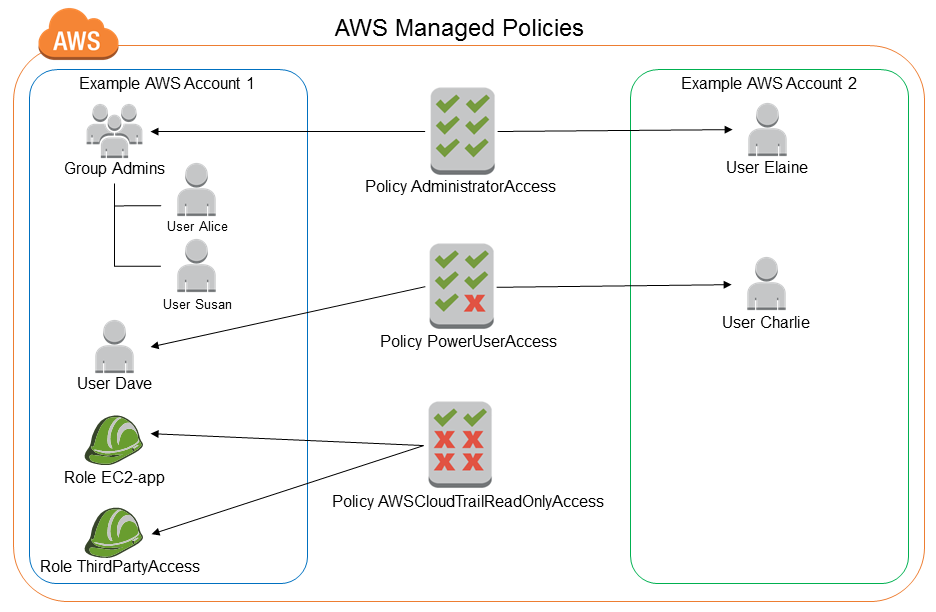
- Attached to users, groups, or roles
- Support conditions and wildcards
Learn more from
AWS IAM Policy Documentation.
3. IAM Access Control Model
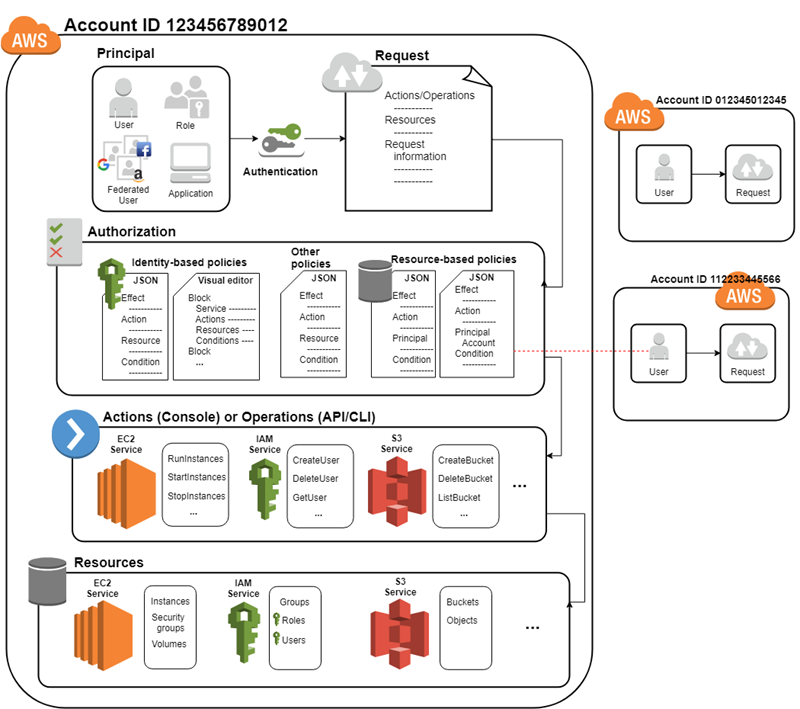
AWS evaluates permissions using multiple layers:
- Identity-based policies
- Resource-based policies
- Permission boundaries
- Service Control Policies (SCPs)
Explicit DENY always wins.
FAQs
What happens if no policy allows an action?
Implicit deny is applied.
4. Least Privilege Principle
Least privilege means granting only the permissions required to perform a task.
- Avoid
* in actions and resources
- Start with minimal permissions
- Expand only when required
Use
IAM Access Analyzer to refine permissions.
Internal Learning
PART 2: IAM Policies – Deep Dive
Identity-Based Policies
Identity-based policies are attached to IAM users, groups, or roles and define what actions an identity can perform.
- Attached to users, groups, or roles
- Most commonly used policy type
- Evaluated during every API request
Resource-Based Policies
Resource-based policies are attached directly to AWS resources like S3 buckets, KMS keys, or SQS queues.
- Define who can access the resource
- Support cross-account access
- Common with S3 bucket policies
Inline vs Managed Policies
- Inline: Embedded directly into one identity (not reusable)
- AWS Managed: Created and maintained by AWS
- Customer Managed: Reusable and recommended for production
Key Points
- Prefer customer-managed policies
- Avoid inline policies in enterprise setups
FAQs
Which policy type is best?
Customer-managed policies offer flexibility and reuse.
PART 3: IAM Policy JSON Structure
IAM policies follow a strict JSON structure.
{
  "Version": "2012-10-17",
  "Statement": [{
    "Effect": "Allow",
    "Action": "ec2:DescribeInstances",
    "Resource": "*"
  }]
}
- Version: Policy language version
- Statement: One or more permission rules
- Effect: Allow or Deny
- Action: AWS API actions
- Resource: ARN of resource
- Condition: Optional fine-grained control
Advanced Conditions Example
"Condition": {
  "Bool": {"aws:MultiFactorAuthPresent": "true"}
}
FAQs
Can conditions enforce MFA?
Yes, conditions can require MFA for sensitive actions.
PART 4: IAM Roles – Key Use Cases
- EC2 accessing S3 without access keys
- Lambda accessing DynamoDB
- Cross-account access
- SSO and identity federation
- Temporary privilege elevation
Trust Policy vs Permission Policy
- Trust Policy: Who can assume the role
- Permission Policy: What the role can do
AWS CLI – Assume Role
aws sts assume-role \
--role-arn arn:aws:iam::123456789012:role/AdminRole \
--role-session-name testSession
FAQs
Why use roles instead of users?
Roles eliminate long-term credentials.
PART 5: Least Privilege Principle
The least privilege principle is central to AWS IAM Identity and Access Management.
- Grant only required permissions
- Remove unused permissions
- Avoid wildcard permissions
IAM Access Analyzer
- Identifies unused access
- Detects overly permissive policies
- Helps refine least privilege
Official doc:
AWS IAM Access Analyzer
FAQs
Does Access Analyzer remove permissions?
No, it provides recommendations.
PART 6: Permission Boundaries
Permission boundaries define the maximum permissions an IAM role or user can receive.
- Used in delegated admin models
- Acts as a guardrail
- Does not grant permissions
Use Case
Allow developers to create roles but restrict them from accessing billing or IAM admin privileges.
FAQs
Do permission boundaries grant access?
No, they only restrict maximum permissions.
PART 7: Service Control Policies (SCPs)
SCPs are used with AWS Organizations to control what accounts can do.
- Applied at Organization, OU, or Account level
- Restrict root and IAM users
- Enforce compliance
SCP Example
{
  "Effect": "Deny",
  "Action": "ec2:TerminateInstances",
  "Resource": "*"
}
FAQs
Do SCPs grant permissions?
No, they only restrict permissions.
PART 8: Monitoring & Auditing IAM
- AWS CloudTrail – logs all API calls
- IAM Access Advisor – last accessed services
- AWS Config – compliance tracking
AWS CLI – CloudTrail Lookup
aws cloudtrail lookup-events --lookup-attributes AttributeKey=Username,AttributeValue=admin
FAQs
Can IAM changes be audited?
Yes, via CloudTrail.
PART 9: IAM Best Practices for Enterprise & DevOps
- Use IAM roles everywhere
- Enforce MFA for privileged access
- Integrate with CI/CD pipelines
- Enable federation (SAML/OIDC)
- Review permissions quarterly
Common IAM Security Mistakes
- Using root account daily
- Over-permissive policies
- Long-lived access keys
- No MFA enforcement
Internal References
Conclusion
AWS IAM Identity and Access Management is the backbone of cloud security.
When implemented with least privilege, monitoring, and governance, IAM enables secure, scalable, and compliant cloud operations.
PART 10: Advanced IAM Policy Engineering
Advanced policy engineering is where AWS IAM Identity and Access Management moves from basic security
to enterprise-grade governance.
Policy Evaluation Order (Critical for Security)
- Explicit Deny (always wins)
- Service Control Policies (SCPs)
- Permission Boundaries
- Identity-based policies
- Resource-based policies
Understanding Explicit vs Implicit Deny
If no policy explicitly allows an action, AWS applies an implicit deny.
Real-World Example
{
  "Effect": "Deny",
  "Action": "iam:*",
  "Resource": "*"
}
This deny overrides any allow—even AdministratorAccess.
Advanced Condition Keys
| Condition Key | Purpose |
|---|
| aws:SourceIp | Restrict access by IP |
| aws:MultiFactorAuthPresent | Require MFA |
| aws:RequestedRegion | Restrict regions |
| aws:PrincipalArn | Restrict by role |
IP Restriction Example
"Condition": {
  "IpAddress": {
    "aws:SourceIp": "203.0.113.0/24"
  }
}
FAQs
Can IAM restrict regions?
Yes, using aws:RequestedRegion.
PART 11: Policy Design for Enterprises
Layered Policy Strategy
- SCPs → Organization guardrails
- Permission Boundaries → Developer limits
- IAM Roles → Workload identity
- Resource Policies → Fine-grained control
Admin Separation Model
- Security Admin – IAM, SCPs
- Platform Admin – Networking, Accounts
- Application Admin – App-level services
Best Practice
Never allow developers direct IAM admin privileges.
PART 12: IAM Federation – Enterprise Identity Integration
Federation allows enterprises to integrate existing identity providers with AWS.
Supported Federation Methods
- SAML 2.0 (Azure AD, Okta)
- OIDC (Google, GitHub, Cognito)
- AWS IAM Identity Center (SSO)
SAML Federation Flow
- User authenticates with corporate IdP
- IdP issues SAML assertion
- AWS STS issues temporary credentials
- User assumes IAM role
Official AWS Reference:
AWS Federation Documentation
FAQs
Does federation replace IAM users?
Yes, in enterprise environments.
PART 13: IAM Identity Center (AWS SSO) – Enterprise Access at Scale
AWS IAM Identity Center (formerly AWS SSO) centralizes workforce access across multiple AWS accounts and applications.
It is a cornerstone of AWS IAM Identity and Access Management in enterprise environments.
Why IAM Identity Center?
- Single sign-on across AWS accounts
- Integration with external IdPs
- Centralized permission sets
- Short-lived credentials by default
Core Components
- Identity Source: Built-in directory or external IdP
- Permission Sets: Reusable permission definitions
- Account Assignments: Users/groups mapped to accounts
Permission Sets vs IAM Roles
- Permission Sets are templates
- IAM Roles are created automatically in target accounts
- Separation of identity and authorization
Common Permission Set Patterns
- ReadOnlyAccess
- DeveloperAccess (no IAM admin)
- SecurityAudit
- BillingReadOnly
Operational Tips
- Use groups, not individual users
- Name permission sets clearly
- Version permission sets for changes
FAQs
Does IAM Identity Center replace IAM users?
Yes, for human access in enterprises.
Are credentials long-lived?
No, all credentials are temporary.
Official reference:
AWS IAM Identity Center Documentation
PART 14: Federation with External Identity Providers (SAML & OIDC)
Federation allows organizations to authenticate users outside AWS while authorizing access using IAM roles.
SAML 2.0 Federation (Enterprise Standard)
- Used with corporate IdPs
- Best for workforce access
- Supports MFA and conditional access
SAML Trust Policy Example
{
  "Version": "2012-10-17",
  "Statement": [{
    "Effect": "Allow",
    "Principal": {
      "Federated": "arn:aws:iam::123456789012:saml-provider/CorpIDP"
    },
    "Action": "sts:AssumeRoleWithSAML",
    "Condition": {
      "StringEquals": {
        "SAML:aud": "https://signin.aws.amazon.com/saml"
      }
    }
  }]
}
OIDC Federation (Modern & Cloud-Native)
- Used by CI/CD systems
- No static secrets
- Fine-grained trust conditions
OIDC Trust Example (GitHub Actions)
{
  "Effect": "Allow",
  "Principal": {
    "Federated": "arn:aws:iam::123456789012:oidc-provider/token.actions.githubusercontent.com"
  },
  "Action": "sts:AssumeRoleWithWebIdentity",
  "Condition": {
    "StringEquals": {
      "token.actions.githubusercontent.com:sub": "repo:org/repo:ref:refs/heads/main"
    }
  }
}
Security Best Practices
- Restrict by subject and audience
- Limit token lifetime
- Use one role per pipeline
FAQs
SAML or OIDC — which is better?
SAML for workforce, OIDC for workloads.
Official reference:
AWS Federation Providers
PART 15: MFA Enforcement & Conditional Access Patterns
Multi-Factor Authentication is mandatory for securing privileged access in
AWS IAM Identity and Access Management.
MFA Options
- Virtual MFA (Authenticator apps)
- Hardware MFA (FIDO / OTP devices)
- FIDO2 via external IdPs
Mandatory MFA for Privileged Roles
{
  "Effect": "Deny",
  "Action": "*",
  "Resource": "*",
  "Condition": {
    "BoolIfExists": {
      "aws:MultiFactorAuthPresent": "false"
    }
  }
}
Conditional Access via Federation
- IP-based restrictions
- Device compliance (via IdP)
- Risk-based authentication
MFA Troubleshooting – AWS CLI
aws iam list-mfa-devices --user-name admin-user
aws sts get-session-token --serial-number arn:aws:iam::123456789012:mfa/admin --token-code 123456
Common MFA Mistakes
- MFA not enforced on admin roles
- Root account without MFA
- Shared MFA devices
FAQs
Should MFA be enforced via IAM or IdP?
Prefer IdP enforcement for users, IAM for roles.
Internal Learning
PART 16: IAM for CI/CD Pipelines (GitHub Actions, GitLab, Jenkins)
Modern DevOps relies on temporary, identity-based access.
Within AWS IAM Identity and Access Management, CI/CD systems should authenticate using OIDC federation, not static access keys.
Why OIDC for CI/CD?
- No long-lived secrets
- Short-lived STS credentials
- Fine-grained trust conditions
- Auditable pipeline identity
Common CI/CD Identity Patterns
- One IAM role per repository
- One IAM role per environment (dev/test/prod)
- Restrict by branch or tag
OIDC Trust Policy – GitHub Actions (Hardened)
{
  "Version": "2012-10-17",
  "Statement": [{
    "Effect": "Allow",
    "Principal": {
      "Federated": "arn:aws:iam::123456789012:oidc-provider/token.actions.githubusercontent.com"
    },
    "Action": "sts:AssumeRoleWithWebIdentity",
    "Condition": {
      "StringEquals": {
        "token.actions.githubusercontent.com:aud": "sts.amazonaws.com"
      },
      "StringLike": {
        "token.actions.githubusercontent.com:sub": "repo:org/repo:ref:refs/heads/main"
      }
    }
  }]
}
Pipeline Permission Policy (Least Privilege)
{
  "Effect": "Allow",
  "Action": [
    "ecs:RegisterTaskDefinition",
    "ecs:UpdateService"
  ],
  "Resource": "*"
}
Security Hardening Checklist
- Restrict by repository and branch
- Use separate roles for deploy vs build
- Limit session duration
- Enable CloudTrail logging
Troubleshooting – Common Errors
- InvalidIdentityToken: OIDC provider misconfigured
- AccessDenied: Permission policy missing
- Not authorized to assume role: Trust policy mismatch
FAQs
Should CI/CD ever use access keys?
No. Use OIDC-based role assumption.
PART 17: IAM for Kubernetes & EKS (IRSA – IAM Roles for Service Accounts)
IRSA is the recommended way to grant AWS permissions to pods running on Amazon EKS.
It replaces node-level permissions with pod-level identity.
Why IRSA?
- Pod-level least privilege
- No credentials stored in containers
- Native integration with AWS STS
- Improved blast-radius control
IRSA Architecture Overview
- EKS cluster with OIDC provider
- Kubernetes service account annotated with IAM role
- Pods assume role via web identity token
IAM Trust Policy for IRSA
{
  "Version": "2012-10-17",
  "Statement": [{
    "Effect": "Allow",
    "Principal": {
      "Federated": "arn:aws:iam::123456789012:oidc-provider/oidc.eks.region.amazonaws.com/id/EXAMPLE"
    },
    "Action": "sts:AssumeRoleWithWebIdentity",
    "Condition": {
      "StringEquals": {
        "oidc.eks.region.amazonaws.com/id/EXAMPLE:sub": "system:serviceaccount:prod:app-sa"
      }
    }
  }]
}
Kubernetes Service Account Annotation
apiVersion: v1
kind: ServiceAccount
metadata:
  name: app-sa
  namespace: prod
  annotations:
    eks.amazonaws.com/role-arn: arn:aws:iam::123456789012:role/app-role
Common IRSA Use Cases
- Pods accessing S3
- Applications writing to DynamoDB
- Controllers managing AWS resources
Troubleshooting IRSA
- Ensure EKS OIDC provider exists
- Validate service account annotation
- Check trust policy subject
- Inspect pod environment variables
FAQs
Is IRSA better than node IAM roles?
Yes, it provides granular, pod-level permissions.
Official reference:
AWS IRSA Documentation
PART 18: Workload Identity Patterns & STS Token Management
Workload identity focuses on authenticating applications, not humans.
AWS IAM Identity and Access Management uses AWS STS as the backbone for workload credentials.
Workload Identity Sources
- EC2 instance roles
- EKS IRSA
- OIDC federation (CI/CD)
- AWS services assuming service roles
STS Credential Lifecycle
- Identity token presented
- STS validates trust policy
- Temporary credentials issued
- Credentials auto-expire
Session Duration Best Practices
- CI/CD roles: 15–60 minutes
- Human sessions: 1–8 hours
- Service roles: minimum required
Monitoring STS Usage
aws cloudtrail lookup-events \
--lookup-attributes AttributeKey=EventName,AttributeValue=AssumeRole
Common Security Risks
- Overly broad trust policies
- Wildcard OIDC subjects
- Excessive session duration
- Shared service accounts
Hardening Checklist
- Restrict trust policy subjects
- Limit session duration
- Separate roles by workload
- Audit STS events regularly
FAQs
Are STS credentials logged?
Yes, via AWS CloudTrail.
Internal Learning



Thanks for sharing this. SailorPiece covers Roblox anime-game codes and guide notes in a way that is easy to scan.